
Kapalas - Minecraft Skins & Skin History
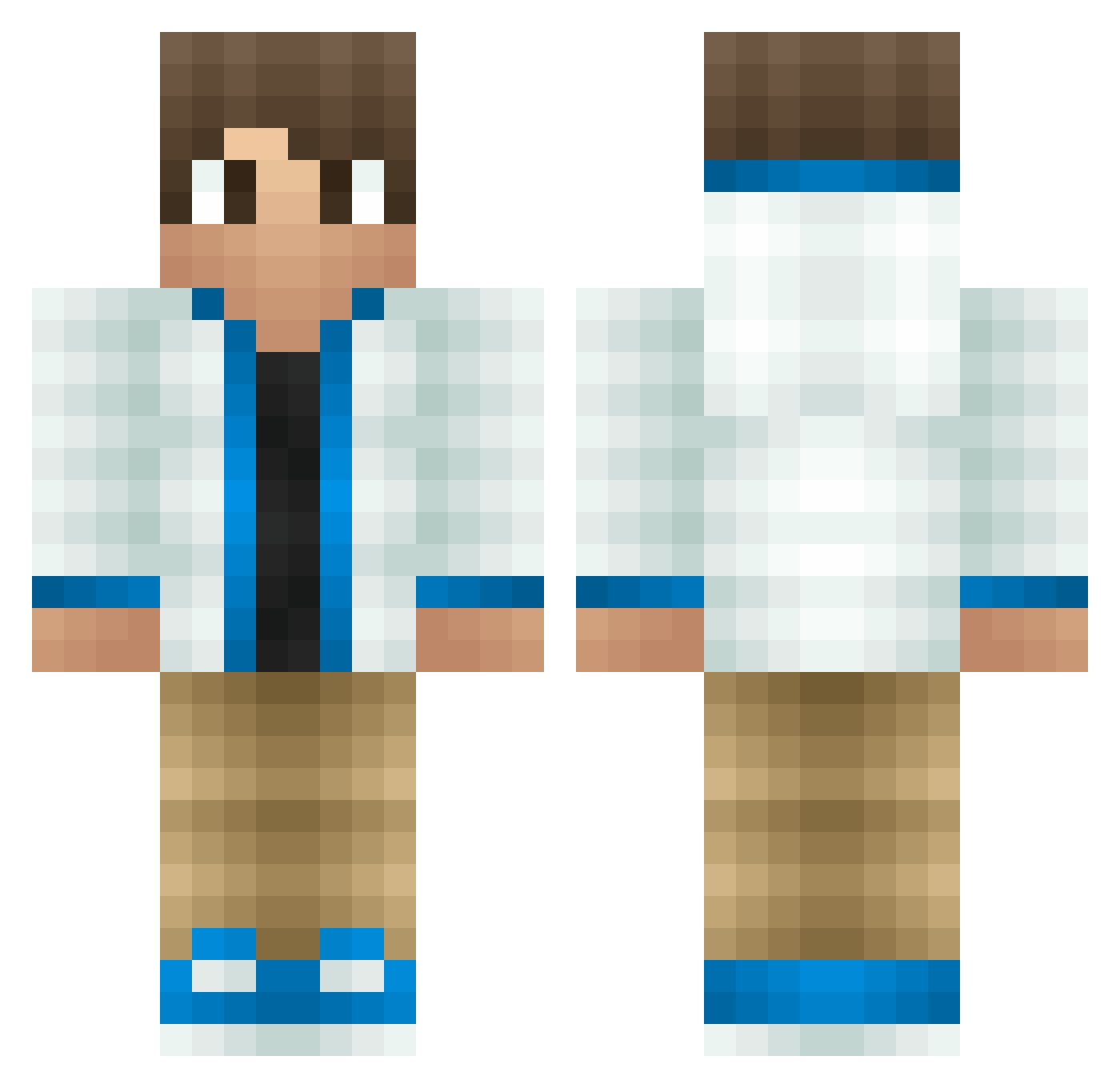
Current Minecraft skin of the player Kapalas, loaded from the official Mojang API. Rotate the 3D model with your mouse or finger, then download the skin as a PNG file and use it in Minecraft: Bedrock Edition or Java Edition for free. When Kapalas changes their skin, this page updates automatically and the old skin stays in the history below.
Other players with this skin (111)
Kapalas was the 38th player we have seen with this skin, first spotted on 17.09.2026. The same skin was seen on these players. Open a nickname to see their current skin and skin history.
 Kevin_Aki Tedelicious SebabsKebabs IsabelDuong Populier PIKOGAMEROP Stitchn NarutoTube77 POlytU TheSandwichPlay MyAdventureBear Theccolgamerhill OleLuke Benchu24 VikingsFTW69
 Occultrtor0114 7Nayzh Dani72_turbo MCxiaodu Mr_Suny Varo19 Cajuncam3 DIJIUHAI destiny2729 Kanadianwarrior melweiss XTRMJ mightykings minecraft_zzxxyy Terrorkeks_xD Sodium_7 Colalight55 T3KNO BusDunk 5x2 Danger1029 pinda13 Matiix JMcMuffin _Cyber_Phoenix_ TeodorCR InfernusWoodie vlada201 clashprodude jusbot123 brocolosoup Nic5512Yt TheCaico M4rvin20 robot_Guero Arrow575 wapitier HaveFun_22 Sky_less SyrShoTs Qiong_Qi RA_Sinhala marxbjl2 Mazku007 Marcus_DK
How to install the Kapalas skin
- Press the Download button above to save the skin as a PNG file.
- Minecraft: Bedrock Edition (PE): open the Dressing Room from the main menu (or tap your character → Edit Character), go to Classic Skins → Owned, press the + (new skin) button, choose the downloaded PNG and pick the Classic (Steve) model. Works on PC and mobile; consoles cannot import custom skins.
- Minecraft: Java Edition: open the Minecraft Launcher, go to the Skins tab, click New Skin, load the PNG, pick the Classic (Steve) model and press Save & Use. You can also upload it at minecraft.net → Profile → Change Skin.
The skin does not show up after import - what should I do?
Restart Minecraft and open the Dressing Room again - imported skins sometimes appear only after a restart. Also make sure you selected the imported skin and picked the Classic (Steve) model.
Which model should I choose, Classic or Slim?
This skin is designed for the Classic (Steve) model. If you pick the wrong model, the arms of the skin will look stretched or squeezed.
Is the skin of Kapalas free to download?
Yes. Press Download, save the PNG file and use it in Minecraft: Bedrock Edition or Java Edition - no payment or registration needed. The skin also works on multiplayer servers and Realms.
More skins
Looking for more? Go back to all Minecraft skins and check the top skins of the week, month and all time, or find any player's skin by nickname.