
KFZU - Minecraft Skins & Skin History
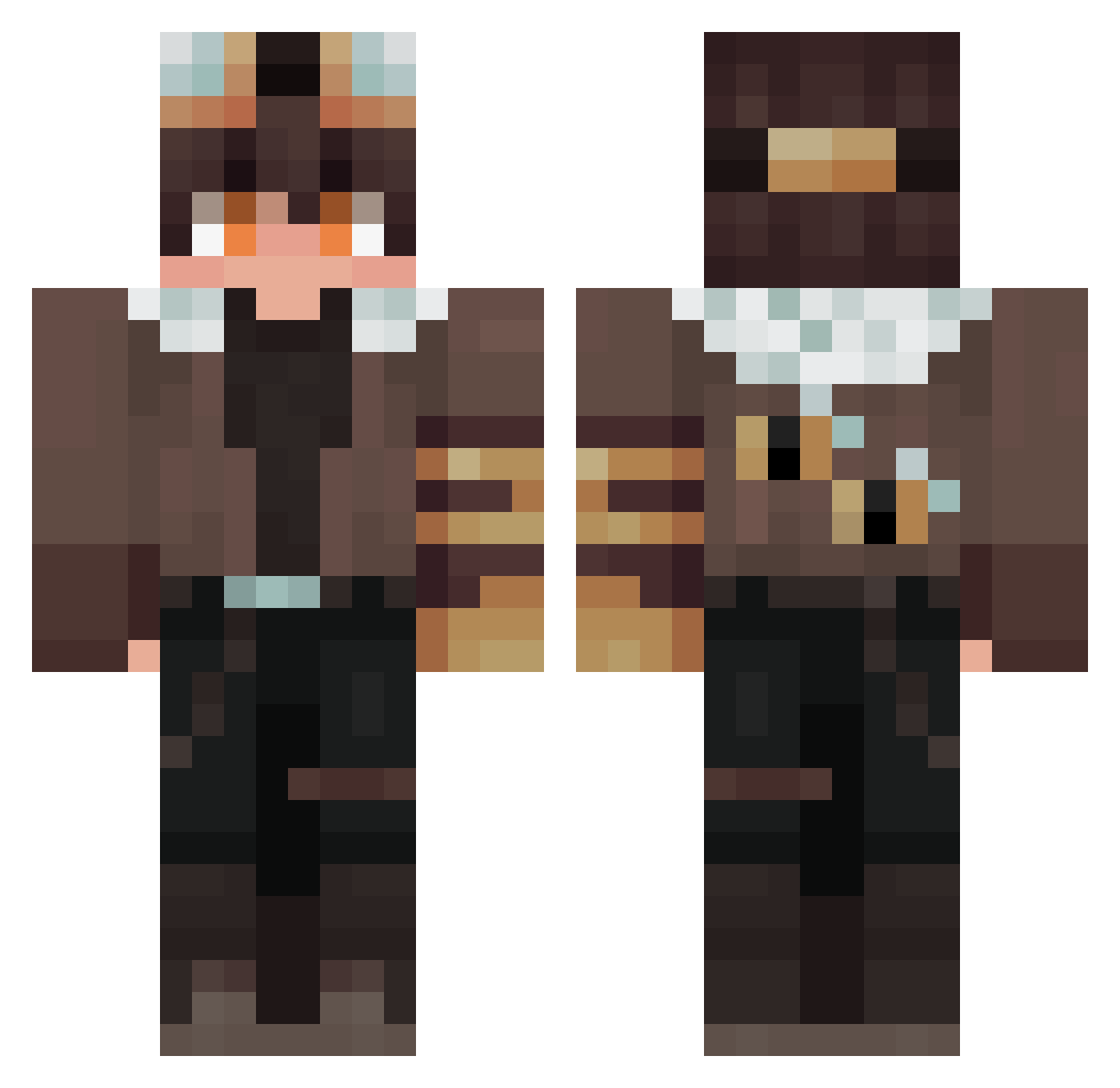
Current Minecraft skin of the player KFZU, loaded from the official Mojang API. Rotate the 3D model with your mouse or finger, then download the skin as a PNG file and use it in Minecraft: Bedrock Edition or Java Edition for free. When KFZU changes their skin, this page updates automatically and the old skin stays in the history below.
Other players with this skin (360)
KFZU was the 335th player we have seen with this skin, first spotted on 13.11.2026. The same skin was seen on these players. Open a nickname to see their current skin and skin history.
 Gutsy0413 purololol _SNova__ Yobob_o ShuiDouBHW SouLuz HotHat3 JonWasntHere HirotoRyu devilboy89 keyworld3 thayan24 nickhates1 LittelMush Dd4885 Kubuleks ZackyBR Gat01123 Tylor_HD junket66 TinocoCuh Persepro LIKI_Song hyunjaeoh66 LESL1E_L1U Lansweg gato186 zoidxff Takuan4910 WooChangBum Nesheph William321Larsen bai99 Todo57300 imlhr iLL0402 sevenknalha _MonkeyDLuffy RafaeldoPlay Quinn_Fin T_Katta koeitsu Aeron1869 Laz_022 Benchaneer Lekzs4445 Dilan0311 KivoX WitheredLav g144151 Mrhumy Walfun_ usate BloodWolf23 Denkuro juniorori Pixelio_2137 Wertyzz fps_Deny jotapegomes
More Aviator Minecraft skins
How to install the KFZU skin
- Press the Download button above to save the skin as a PNG file.
- Minecraft: Bedrock Edition (PE): open the Dressing Room from the main menu (or tap your character → Edit Character), go to Classic Skins → Owned, press the + (new skin) button, choose the downloaded PNG and pick the Classic (Steve) model. Works on PC and mobile; consoles cannot import custom skins.
- Minecraft: Java Edition: open the Minecraft Launcher, go to the Skins tab, click New Skin, load the PNG, pick the Classic (Steve) model and press Save & Use. You can also upload it at minecraft.net → Profile → Change Skin.
The skin does not show up after import - what should I do?
Restart Minecraft and open the Dressing Room again - imported skins sometimes appear only after a restart. Also make sure you selected the imported skin and picked the Classic (Steve) model.
Which model should I choose, Classic or Slim?
This skin is designed for the Classic (Steve) model. If you pick the wrong model, the arms of the skin will look stretched or squeezed.
Is the skin of KFZU free to download?
Yes. Press Download, save the PNG file and use it in Minecraft: Bedrock Edition or Java Edition - no payment or registration needed. The skin also works on multiplayer servers and Realms.
More skins
Looking for more? Go back to all Minecraft skins and check the top skins of the week, month and all time, or find any player's skin by nickname.