
K1ngCrayon - Minecraft Skins & Skin History
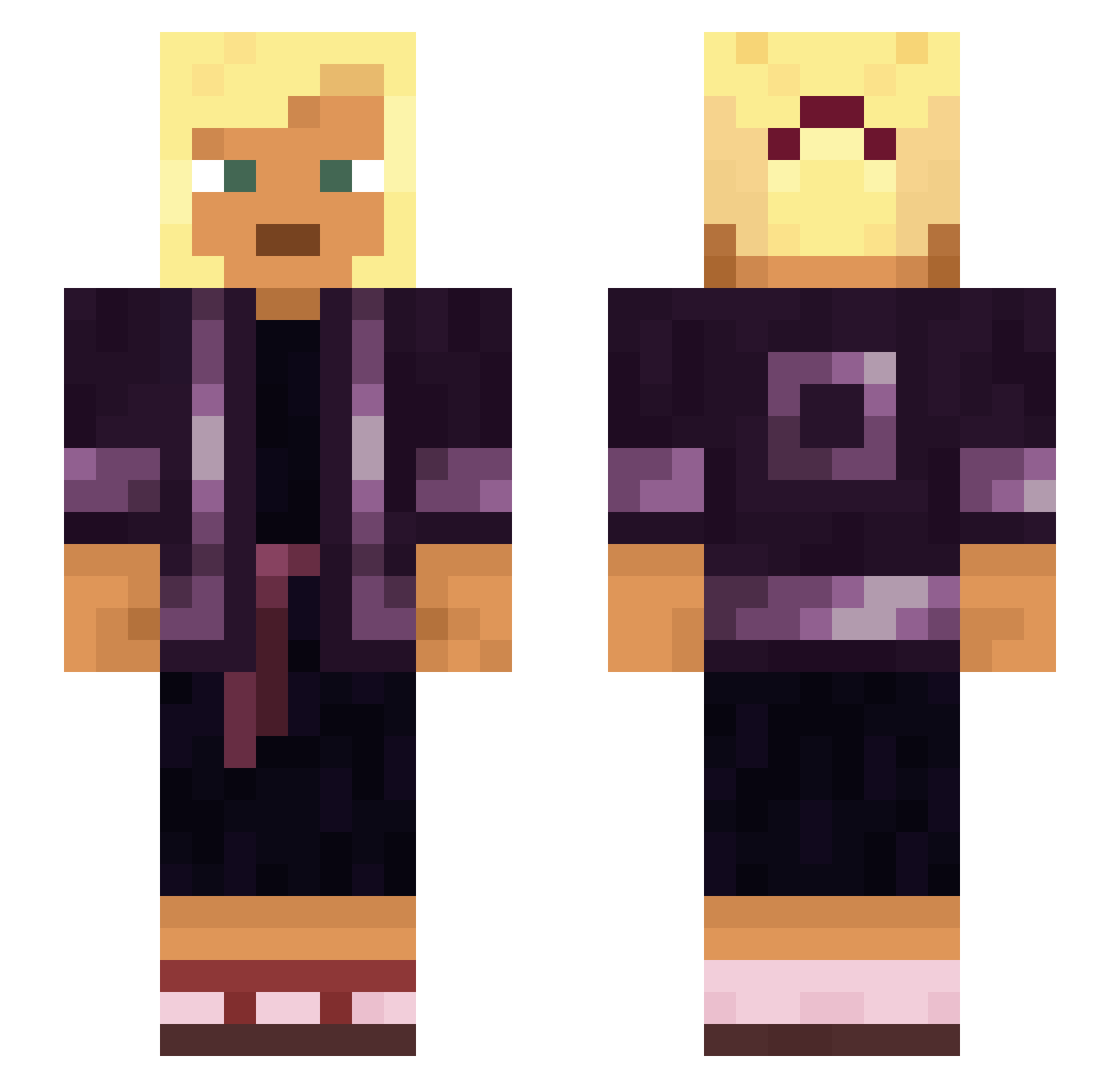
Current Minecraft skin of the player K1ngCrayon, loaded from the official Mojang API. Rotate the 3D model with your mouse or finger, then download the skin as a PNG file and use it in Minecraft: Bedrock Edition or Java Edition for free. When K1ngCrayon changes their skin, this page updates automatically and the old skin stays in the history below.
Other players with this skin (1112)
K1ngCrayon was the 1053rd player we have seen with this skin, first spotted on 16.11.2026. The same skin was seen on these players. Open a nickname to see their current skin and skin history.
 CTL_Mandehh Cuckooflower Pilaws FendtAxion930 Alagau Bluetops Battuto lebowksi VincentGboy jesuit buzzbomb Luki5420 pipsqueak4 PayNaeNae Brussels unkilling TriXy ik_eet_jullie ThatBoyTuckTuck moudie maxwinseb Indissolubility Balija Algenib Decennia Mhd_Mi Herminator22 Flogster Parsecs POLLACKS Parthenopaeus Raspberry DabWolf Vanquishchris cookiemonster761 bgweeze NewPitNet MaxShout xMegaWars Hemimorphite ShepherDing chalicotherium JazzMusicSoft murilorulo adolf_borba JHbier vajra Miezimi dodoisms Whitster embloom RaceMe JonasBror gunfires Hypothalamus Prickmedainty ALTDUDAK531 BackStabbath0 Zaaiinn switchlock
More Asian Minecraft skins
How to install the K1ngCrayon skin
- Press the Download button above to save the skin as a PNG file.
- Minecraft: Bedrock Edition (PE): open the Dressing Room from the main menu (or tap your character → Edit Character), go to Classic Skins → Owned, press the + (new skin) button, choose the downloaded PNG and pick the Slim (Alex) model. Works on PC and mobile; consoles cannot import custom skins.
- Minecraft: Java Edition: open the Minecraft Launcher, go to the Skins tab, click New Skin, load the PNG, pick the Slim (Alex) model and press Save & Use. You can also upload it at minecraft.net → Profile → Change Skin.
The skin does not show up after import - what should I do?
Restart Minecraft and open the Dressing Room again - imported skins sometimes appear only after a restart. Also make sure you selected the imported skin and picked the Slim (Alex) model.
Which model should I choose, Classic or Slim?
This skin is designed for the Slim (Alex) model. If you pick the wrong model, the arms of the skin will look stretched or squeezed.
Is the skin of K1ngCrayon free to download?
Yes. Press Download, save the PNG file and use it in Minecraft: Bedrock Edition or Java Edition - no payment or registration needed. The skin also works on multiplayer servers and Realms.
More skins
Looking for more? Go back to all Minecraft skins and check the top skins of the week, month and all time, or find any player's skin by nickname.