
Justincase124 - Minecraft Skins & Skin History
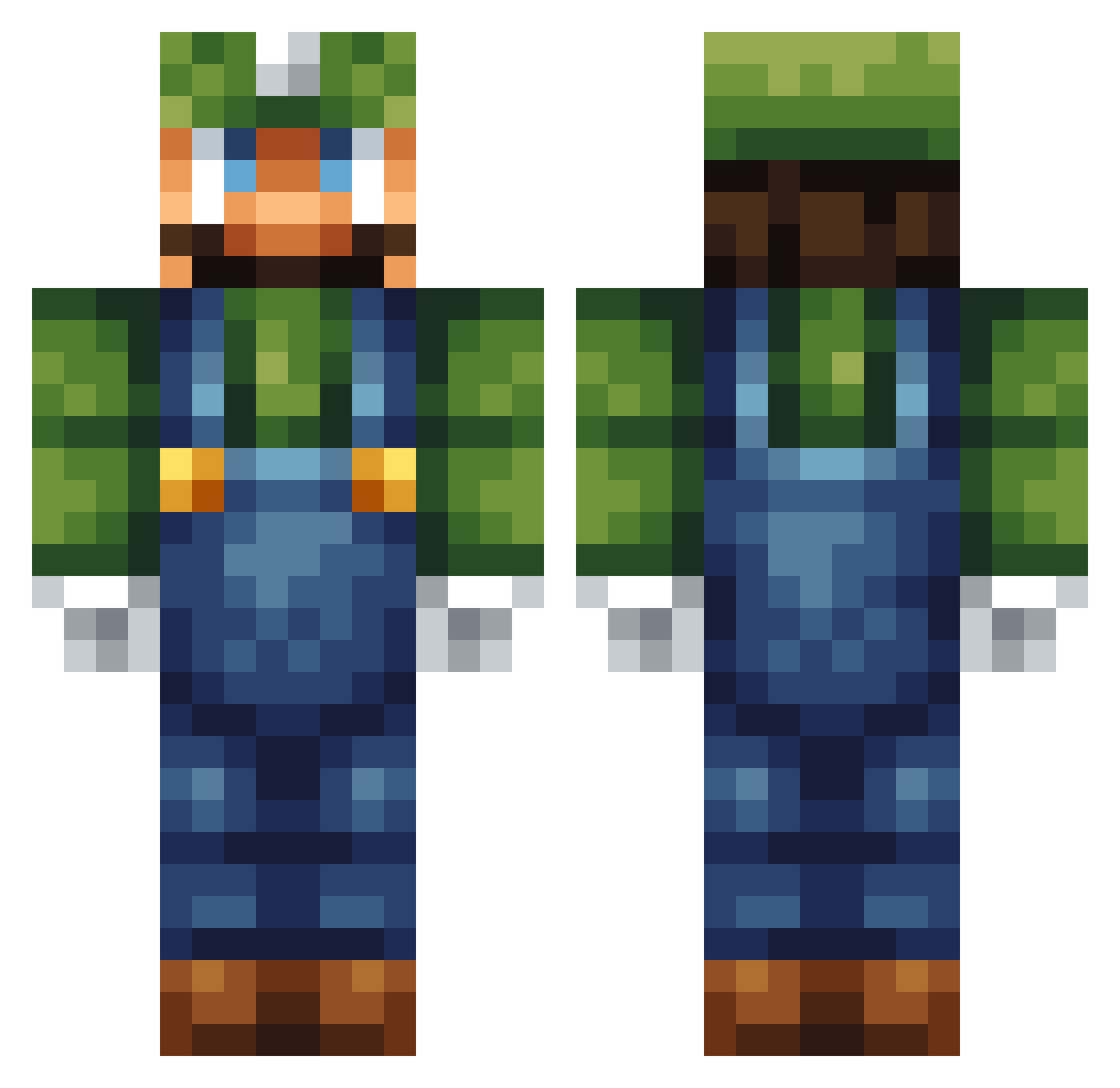
Current Minecraft skin of the player Justincase124, loaded from the official Mojang API. Rotate the 3D model with your mouse or finger, then download the skin as a PNG file and use it in Minecraft: Bedrock Edition or Java Edition for free. When Justincase124 changes their skin, this page updates automatically and the old skin stays in the history below.
Other players with this skin (257)
Justincase124 was the 120th player we have seen with this skin, first spotted on 12.09.2026. The same skin was seen on these players. Open a nickname to see their current skin and skin history.
 Luigiilovestein ItsDarragh Iron_C32 Pepperdog15 golddrags Luigi_the_miner Jaxy3 Irakura37 BubaCaun sushiparade Petter_Gjerde TimKlatten SprocketDash bangatron Carter0915 Harryh24 HugoBrodin _TheLuckyBlock_ AdithyaR zarman21 Dino0Z swegsquid kolboy warniingciiro FortisFortuna Itahat ubermol RaNicx HarriMC HereComesFodman Bobofette jayelliott1 XxFartingNinjaxX iwilllisten scareyjump55 Valefant Killer873 Ethan_Liston player257 MrGeertje Peeny MineCraftMatt08 SmokeyWoodhouse AydenMcc MamaG_007 gamer61 ChoiPat hotr5 SonnyP1 FiendWaffle iamlori TheStorebror GiantsSoul Mrjoseph123 sandy1ab avrillon Jente27 Cowgirl2011 JJspark marcoloco719
More Luigi Minecraft skins
How to install the Justincase124 skin
- Press the Download button above to save the skin as a PNG file.
- Minecraft: Bedrock Edition (PE): open the Dressing Room from the main menu (or tap your character → Edit Character), go to Classic Skins → Owned, press the + (new skin) button, choose the downloaded PNG and pick the Classic (Steve) model. Works on PC and mobile; consoles cannot import custom skins.
- Minecraft: Java Edition: open the Minecraft Launcher, go to the Skins tab, click New Skin, load the PNG, pick the Classic (Steve) model and press Save & Use. You can also upload it at minecraft.net → Profile → Change Skin.
The skin does not show up after import - what should I do?
Restart Minecraft and open the Dressing Room again - imported skins sometimes appear only after a restart. Also make sure you selected the imported skin and picked the Classic (Steve) model.
Which model should I choose, Classic or Slim?
This skin is designed for the Classic (Steve) model. If you pick the wrong model, the arms of the skin will look stretched or squeezed.
Is the skin of Justincase124 free to download?
Yes. Press Download, save the PNG file and use it in Minecraft: Bedrock Edition or Java Edition - no payment or registration needed. The skin also works on multiplayer servers and Realms.
More skins
Looking for more? Go back to all Minecraft skins and check the top skins of the week, month and all time, or find any player's skin by nickname.