
Junitogames - Minecraft Skins & Skin History
Current Minecraft skin of the player Junitogames, loaded from the official Mojang API. Rotate the 3D model with your mouse or finger, then download the skin as a PNG file and use it in Minecraft: Bedrock Edition or Java Edition for free. When Junitogames changes their skin, this page updates automatically and the old skin stays in the history below.
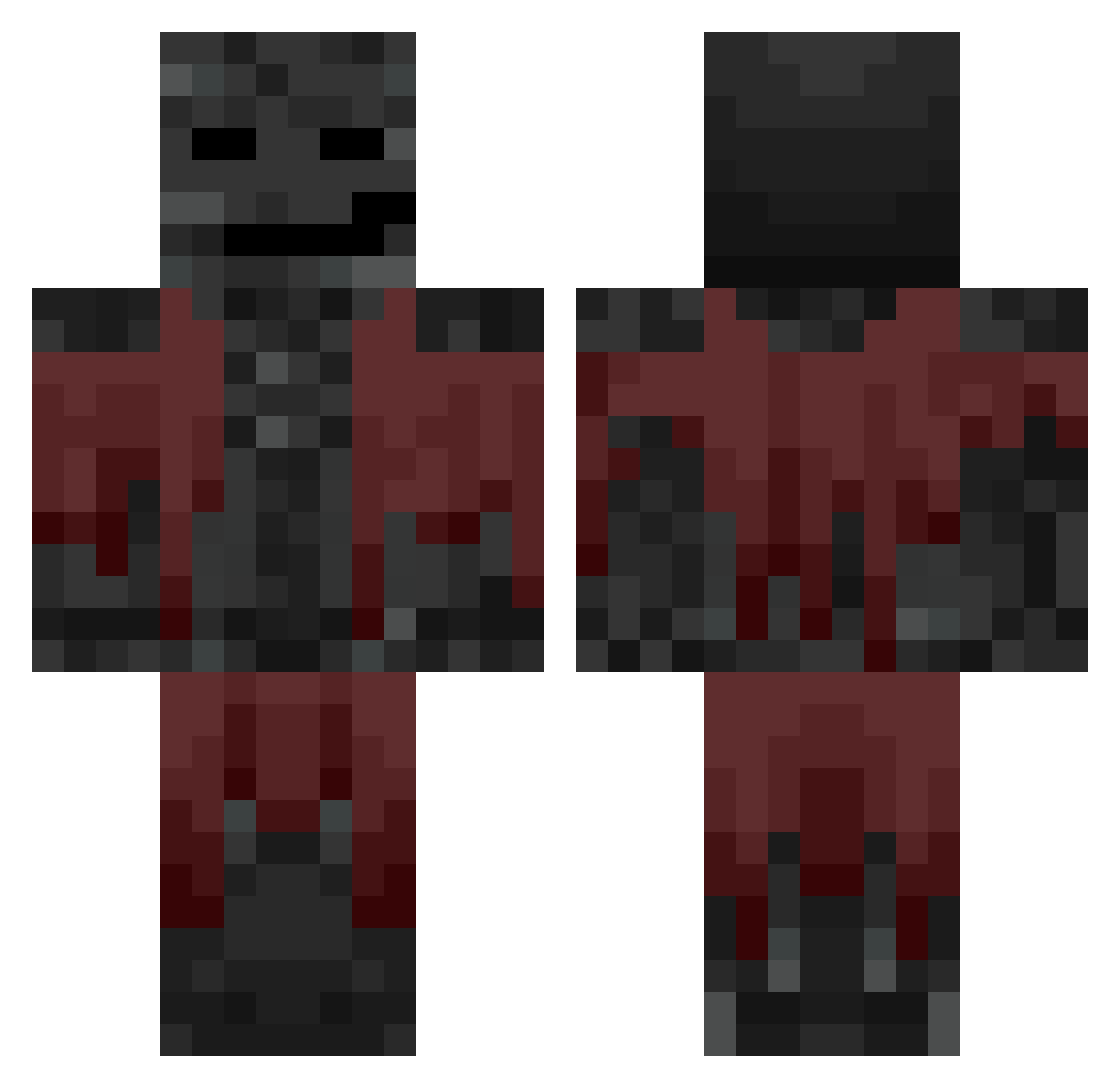
Other players with this skin (639)
Junitogames was the 153rd player we have seen with this skin, first spotted on 18.08.2026. The same skin was seen on these players. Open a nickname to see their current skin and skin history.
 AriOpteryx acountnamehere Sepjust Hitsuragiii TvRicaneswag nxng_ ReactedJeans678 Eg9974 Namenlos_TV zapper8619 00n0 DatoDZN Xleeexz Busbarius XxGoonMasterxX Fengue MrRoberto27 Siuumone Domingueuz_187 Dyvins kapko26 EXO_ZUXXI daflackyy14 Stef_Chef Eolipz49 gaybo667 Sadbuckle dominic5000 McLongRod OrionBellatrix bogyeom13 BustoBlanco
 Sky_xl
 Epic_Hacker NuggetsMayne max141367 FFTTOZ Xulag
 _betta
 NoName11222 GerardoSiu Quark_Bey
 Xequino aKrytox_ MonochromaticEXE
 _Hasim iLycheex781 SamkoGury
 braintum0rgaming ScoobyXD Faroosi11 Ssaint67 semyeong1 Norbi_HUN Vortex_X2 merlinotje Malesiak IRLXpWaste ardagoodman_
 Dixi_estudio
More Wither Minecraft skins
How to install the Junitogames skin
- Press the Download button above to save the skin as a PNG file.
- Minecraft: Bedrock Edition (PE): open the Dressing Room from the main menu (or tap your character → Edit Character), go to Classic Skins → Owned, press the + (new skin) button, choose the downloaded PNG and pick the Classic (Steve) model. Works on PC and mobile; consoles cannot import custom skins.
- Minecraft: Java Edition: open the Minecraft Launcher, go to the Skins tab, click New Skin, load the PNG, pick the Classic (Steve) model and press Save & Use. You can also upload it at minecraft.net → Profile → Change Skin.
The skin does not show up after import - what should I do?
Restart Minecraft and open the Dressing Room again - imported skins sometimes appear only after a restart. Also make sure you selected the imported skin and picked the Classic (Steve) model.
Which model should I choose, Classic or Slim?
This skin is designed for the Classic (Steve) model. If you pick the wrong model, the arms of the skin will look stretched or squeezed.
Is the skin of Junitogames free to download?
Yes. Press Download, save the PNG file and use it in Minecraft: Bedrock Edition or Java Edition - no payment or registration needed. The skin also works on multiplayer servers and Realms.
More skins
Looking for more? Go back to all Minecraft skins and check the top skins of the week, month and all time, or find any player's skin by nickname.