
Jotuunn - Minecraft Skins & Skin History
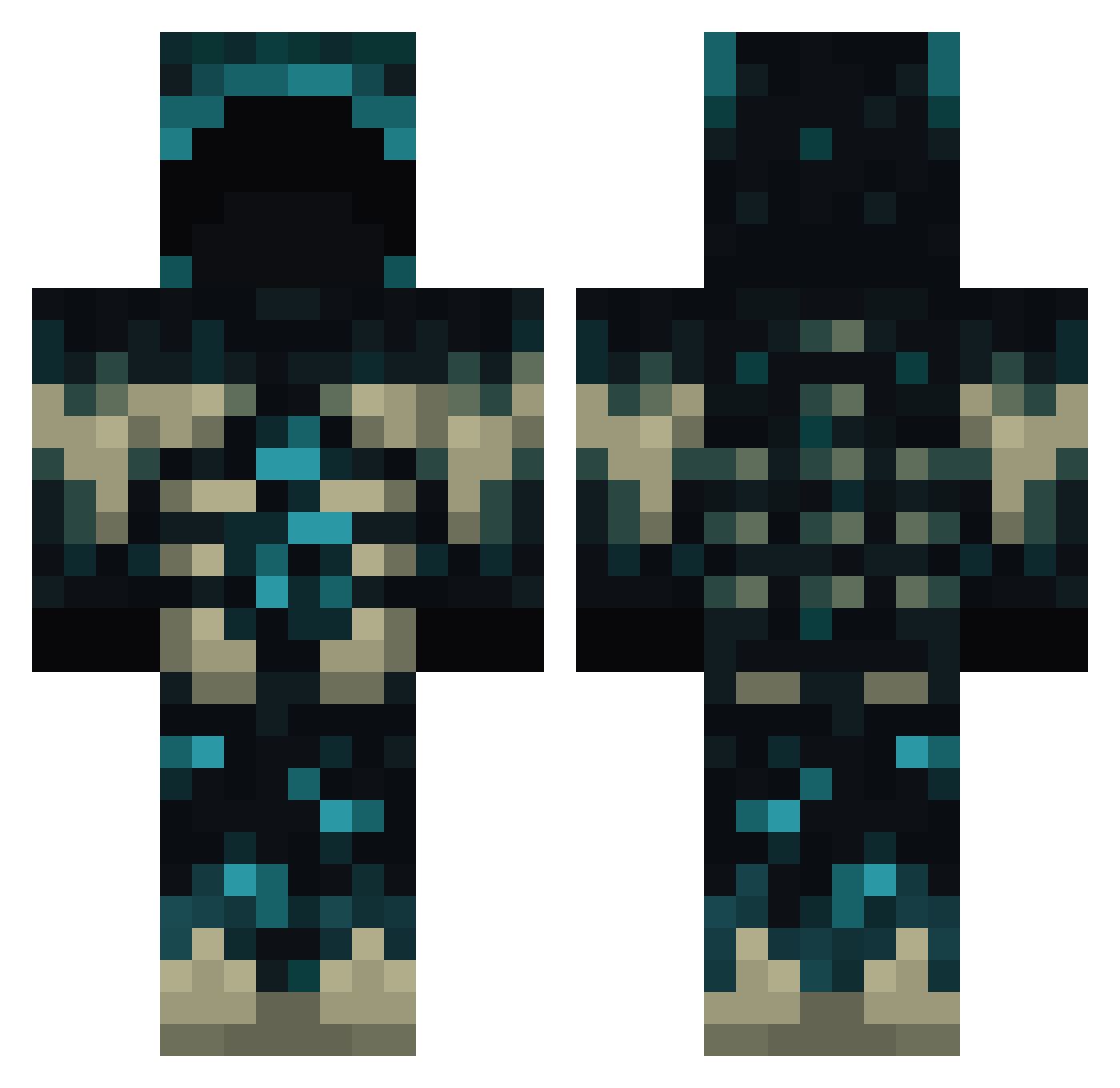
Current Minecraft skin of the player Jotuunn, loaded from the official Mojang API. Rotate the 3D model with your mouse or finger, then download the skin as a PNG file and use it in Minecraft: Bedrock Edition or Java Edition for free. When Jotuunn changes their skin, this page updates automatically and the old skin stays in the history below.
Other players with this skin (938)
Jotuunn was the 849th player we have seen with this skin, first spotted on 09.11.2026. The same skin was seen on these players. Open a nickname to see their current skin and skin history.
 Technobobby mYinsanity2 15Angel PisHurtig mike1024 BA_NSHEE Firstblood1 AirShotz09 Skrzyp0l Silva_Beanie WatsonLai CNSNA aandreademarchi thdespou Slice___ Kellthenig RogueOcean1216 LegendArrow58 Frog_light TheMutantWarden InfiniteCycle_ Audio_Video fourknees LeTableau CreeperNo ARealHybrid Kavajen Csbubu LIN_XJ lukemazzz Hookfang823 BeninArmyLeader Caiber Smy_786 weaverlewis7 M45T3R_M1NDYT PaulExt03 MoonKnight222 Kopeh07 AutumnCargo6231 EnderCube231 JAVE503 Missanth PIIIDO The_Profits abysiss Killerfanta petrolpula AlperenAVC IceSpritz Ghorhexa vinynov coldkaio TheRealSmoop HakersKyyYT Miner_stone DastardlyTip flowerfy Vukooooo DMPfamily
More Deep Dark Minecraft skins
How to install the Jotuunn skin
- Press the Download button above to save the skin as a PNG file.
- Minecraft: Bedrock Edition (PE): open the Dressing Room from the main menu (or tap your character → Edit Character), go to Classic Skins → Owned, press the + (new skin) button, choose the downloaded PNG and pick the Classic (Steve) model. Works on PC and mobile; consoles cannot import custom skins.
- Minecraft: Java Edition: open the Minecraft Launcher, go to the Skins tab, click New Skin, load the PNG, pick the Classic (Steve) model and press Save & Use. You can also upload it at minecraft.net → Profile → Change Skin.
The skin does not show up after import - what should I do?
Restart Minecraft and open the Dressing Room again - imported skins sometimes appear only after a restart. Also make sure you selected the imported skin and picked the Classic (Steve) model.
Which model should I choose, Classic or Slim?
This skin is designed for the Classic (Steve) model. If you pick the wrong model, the arms of the skin will look stretched or squeezed.
Is the skin of Jotuunn free to download?
Yes. Press Download, save the PNG file and use it in Minecraft: Bedrock Edition or Java Edition - no payment or registration needed. The skin also works on multiplayer servers and Realms.
More skins
Looking for more? Go back to all Minecraft skins and check the top skins of the week, month and all time, or find any player's skin by nickname.