
Jinirin - Minecraft Skins & Skin History
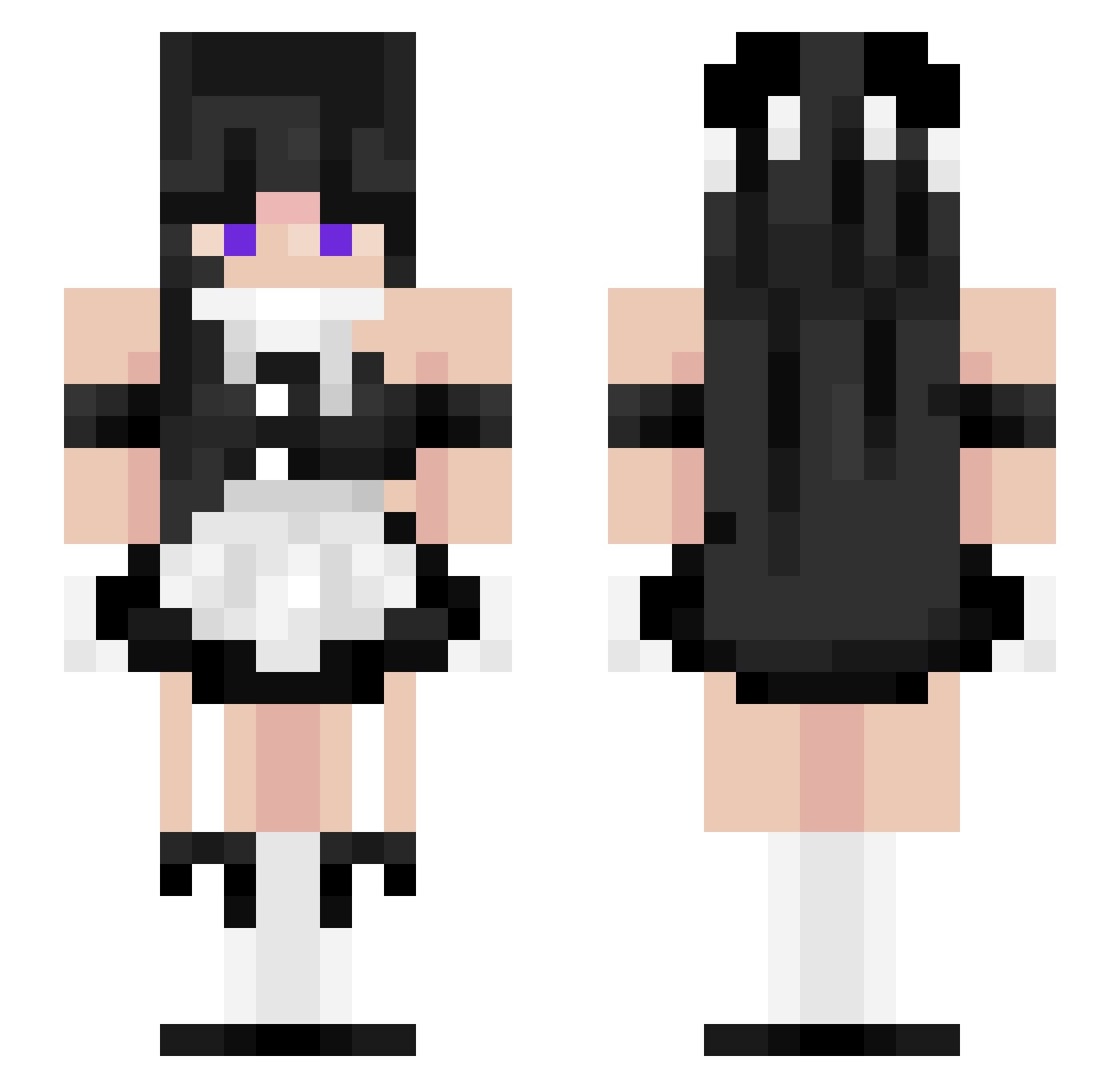
Current Minecraft skin of the player Jinirin, loaded from the official Mojang API. Rotate the 3D model with your mouse or finger, then download the skin as a PNG file and use it in Minecraft: Bedrock Edition or Java Edition for free. When Jinirin changes their skin, this page updates automatically and the old skin stays in the history below.
Other players with this skin (60)
Jinirin was the 32nd player we have seen with this skin, first spotted on 15.09.2026. The same skin was seen on these players. Open a nickname to see their current skin and skin history.
 Iris2409 ammobellgeek Stra_6rot1ubveal xujaz Jackdanger12 Nathan0934 Toustri BossFlame98 DrBalls33 MegaWarrior2299 PumpkinX_x SEALLLLLLLLLLlol _xXColeXx_ RyderDude_Z chudalamus tyschenko GirlDadVal cansirrr TOG_HellB TungTung6742 ShamianKing MikeyMoloko DaddyCombo123
 Anormase199243 haywirebugle qtcams pineapplecat1 Kensea
 Semsan7018 Bisago_ TheRikuHD ice14520 KiszonkaLewa
 AlexFox2 VileVel IEatKimchi GamerTilo S0C10P4TH
 XG_07_Mars NeoGrizlyFox grannyboo203 GergelyPpa
 HegeBoy11 Porneliusoficial BigSnacck
 sanuvuc lio1710 radar8000 Activty40 styleboynoua AndreXiety MessyJesse9637 Greenacid6612
 DieserJanW pfaffi_GHG Mr_vio hopisz
 ProBLR Theprincessb balliskamryn157
More Maid Minecraft skins
How to install the Jinirin skin
- Press the Download button above to save the skin as a PNG file.
- Minecraft: Bedrock Edition (PE): open the Dressing Room from the main menu (or tap your character → Edit Character), go to Classic Skins → Owned, press the + (new skin) button, choose the downloaded PNG and pick the Slim (Alex) model. Works on PC and mobile; consoles cannot import custom skins.
- Minecraft: Java Edition: open the Minecraft Launcher, go to the Skins tab, click New Skin, load the PNG, pick the Slim (Alex) model and press Save & Use. You can also upload it at minecraft.net → Profile → Change Skin.
The skin does not show up after import - what should I do?
Restart Minecraft and open the Dressing Room again - imported skins sometimes appear only after a restart. Also make sure you selected the imported skin and picked the Slim (Alex) model.
Which model should I choose, Classic or Slim?
This skin is designed for the Slim (Alex) model. If you pick the wrong model, the arms of the skin will look stretched or squeezed.
Is the skin of Jinirin free to download?
Yes. Press Download, save the PNG file and use it in Minecraft: Bedrock Edition or Java Edition - no payment or registration needed. The skin also works on multiplayer servers and Realms.
More skins
Looking for more? Go back to all Minecraft skins and check the top skins of the week, month and all time, or find any player's skin by nickname.