
Jarmercenary - Minecraft Skins & Skin History
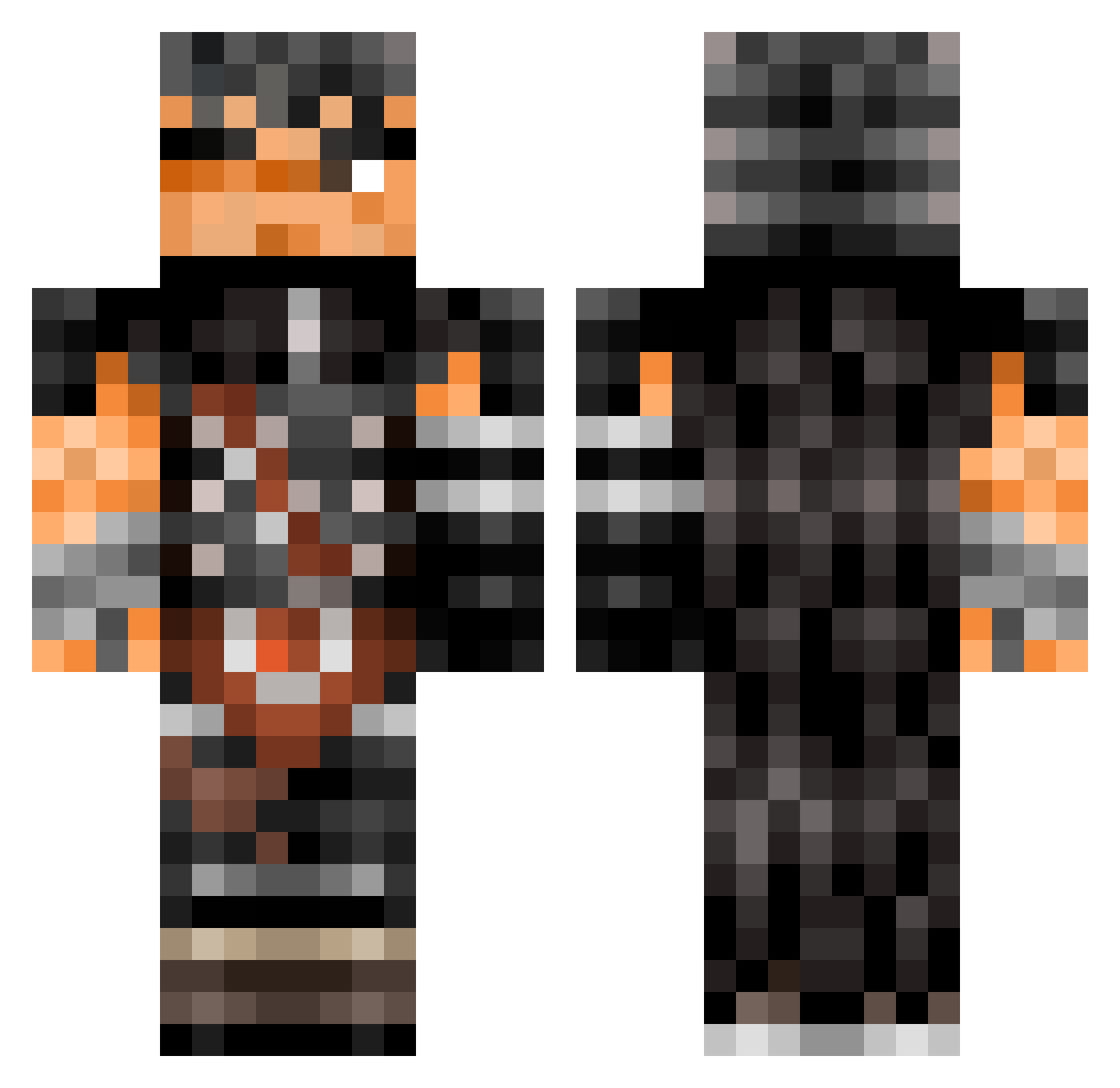
Current Minecraft skin of the player Jarmercenary, loaded from the official Mojang API. Rotate the 3D model with your mouse or finger, then download the skin as a PNG file and use it in Minecraft: Bedrock Edition or Java Edition for free. When Jarmercenary changes their skin, this page updates automatically and the old skin stays in the history below.
Other players with this skin (599)
Jarmercenary was the 543rd player we have seen with this skin, first spotted on 08.11.2026. The same skin was seen on these players. Open a nickname to see their current skin and skin history.
 requiem_ej XxDrake13xX zaccer Ighoricos SteeLSpooky AshenAmber HoWtOsPoOn23 Blindedeyes GenetikFormer sexerman Marmotax2482 MatteoBdh _FreePix_ theOlDirtyDog j4xp Gumskul4 LatinaTiddy starrkiddo Coreysusername shadyfromhueco aayoub Apollo3546 sad0guts Hawk_Eyes470 BertOfficialVEVO ZERTDZ AstroNuv07 orngflavoreddesk aizensoska CaesarsSpoon Guts6969 TRIDENYX trineu NeedPunPun DuebelMaster Erazzy todo0 FemtosRevenge Tortyrex GripsGP Barashukketsu starkiller65 ApolloXVIII_ bigbode123 Sky211232 X3i joelddaa sonnykoko69 FreakxX6730 Dragonninja005 Menkyo_ leftcat QuintaT dalax899 beast_zeus JavaTheCaveman shisui_uchiha00 Shinaberry Paint_Chipz Ovanix
More Guts Minecraft skins
How to install the Jarmercenary skin
- Press the Download button above to save the skin as a PNG file.
- Minecraft: Bedrock Edition (PE): open the Dressing Room from the main menu (or tap your character → Edit Character), go to Classic Skins → Owned, press the + (new skin) button, choose the downloaded PNG and pick the Classic (Steve) model. Works on PC and mobile; consoles cannot import custom skins.
- Minecraft: Java Edition: open the Minecraft Launcher, go to the Skins tab, click New Skin, load the PNG, pick the Classic (Steve) model and press Save & Use. You can also upload it at minecraft.net → Profile → Change Skin.
The skin does not show up after import - what should I do?
Restart Minecraft and open the Dressing Room again - imported skins sometimes appear only after a restart. Also make sure you selected the imported skin and picked the Classic (Steve) model.
Which model should I choose, Classic or Slim?
This skin is designed for the Classic (Steve) model. If you pick the wrong model, the arms of the skin will look stretched or squeezed.
Is the skin of Jarmercenary free to download?
Yes. Press Download, save the PNG file and use it in Minecraft: Bedrock Edition or Java Edition - no payment or registration needed. The skin also works on multiplayer servers and Realms.
More skins
Looking for more? Go back to all Minecraft skins and check the top skins of the week, month and all time, or find any player's skin by nickname.