
JJYONIIII - Minecraft Skins & Skin History
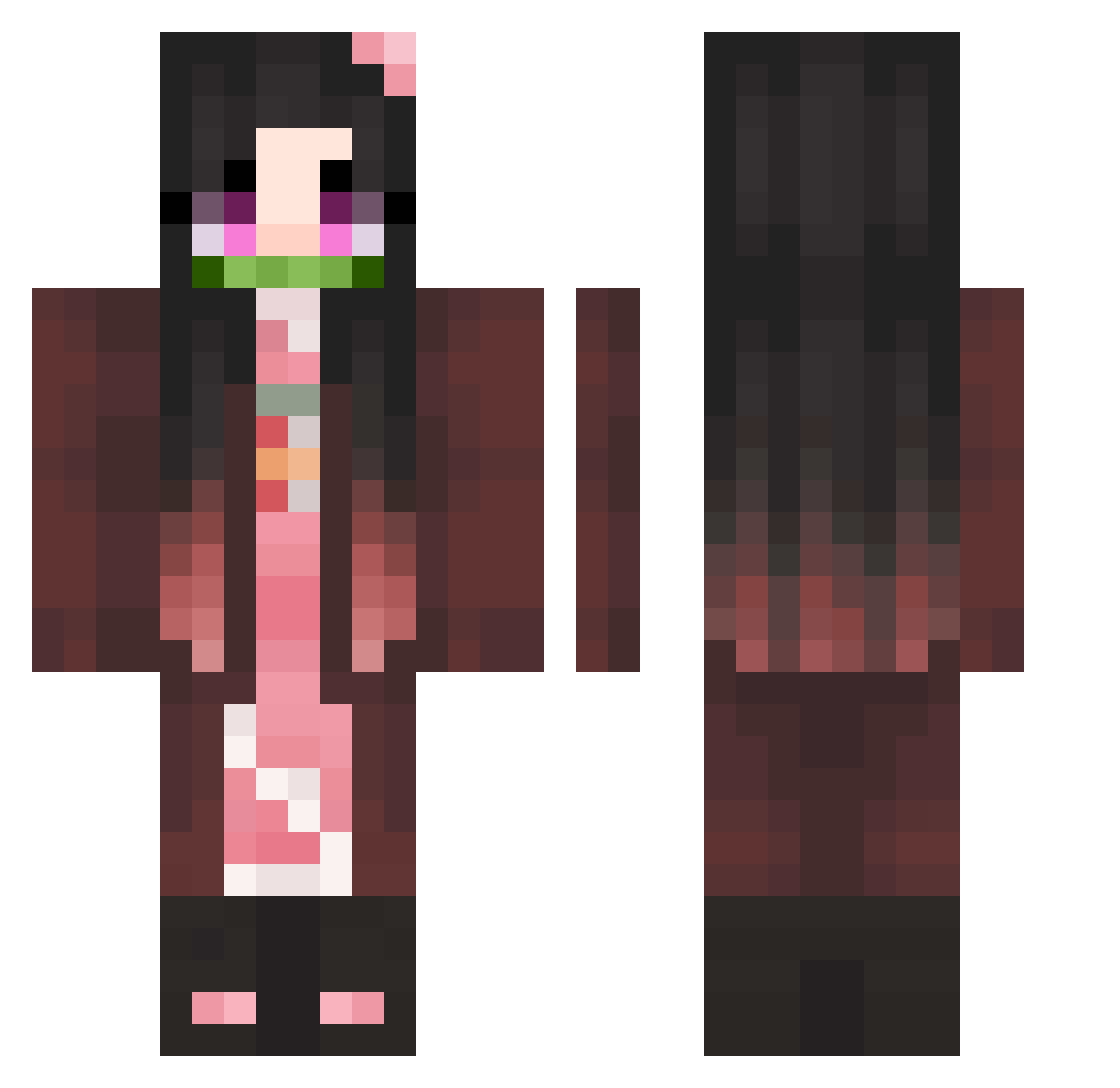
Current Minecraft skin of the player JJYONIIII, loaded from the official Mojang API. Rotate the 3D model with your mouse or finger, then download the skin as a PNG file and use it in Minecraft: Bedrock Edition or Java Edition for free. When JJYONIIII changes their skin, this page updates automatically and the old skin stays in the history below.
Other players with this skin (311)
JJYONIIII was the 214th player we have seen with this skin, first spotted on 29.09.2026. The same skin was seen on these players. Open a nickname to see their current skin and skin history.
 lizarea WosieRose Ny4rlaTh0tep Ding_Yl Haz3leyes234 kmartpolice Daarkki Megansyrjala foodforlife258 Sato404 Sambo110 WinduFin nuo15 Zz014 CHANYOUNG123 4llee Esoterica88 Ulucassx Goobochka soulsad nurungzee Bonitase Bigmaloney007 LIM010307 onetimo BlankMeaN HxMAN Mooni_ati AngelsMari Uglyunicorns reggund1 himobra Huskymudciz A__Unic0rn Glasses_Gun typo_Vatrushka owlpoop6 __Mistic__ ThinIce Juniboo luv_nagi progamer_woki201 june_likes_lolis Juliietaa IsaNotF0und deathism mitsuyo05 Jmo326 Virustorm jiseok0610 yumyumYu Allakins klk1cv3 Mai_S2 pokotopekotokoma Elisaviettta Sasiaa wazibic Urkana27 LSH1029
More Nezuko Kamado Minecraft skins
See all 162 Nezuko Kamado skins
How to install the JJYONIIII skin
- Press the Download button above to save the skin as a PNG file.
- Minecraft: Bedrock Edition (PE): open the Dressing Room from the main menu (or tap your character → Edit Character), go to Classic Skins → Owned, press the + (new skin) button, choose the downloaded PNG and pick the Classic (Steve) model. Works on PC and mobile; consoles cannot import custom skins.
- Minecraft: Java Edition: open the Minecraft Launcher, go to the Skins tab, click New Skin, load the PNG, pick the Classic (Steve) model and press Save & Use. You can also upload it at minecraft.net → Profile → Change Skin.
The skin does not show up after import - what should I do?
Restart Minecraft and open the Dressing Room again - imported skins sometimes appear only after a restart. Also make sure you selected the imported skin and picked the Classic (Steve) model.
Which model should I choose, Classic or Slim?
This skin is designed for the Classic (Steve) model. If you pick the wrong model, the arms of the skin will look stretched or squeezed.
Is the skin of JJYONIIII free to download?
Yes. Press Download, save the PNG file and use it in Minecraft: Bedrock Edition or Java Edition - no payment or registration needed. The skin also works on multiplayer servers and Realms.
More skins
Looking for more? Go back to all Minecraft skins and check the top skins of the week, month and all time, or find any player's skin by nickname.