
ImprovingNoob - Minecraft Skins & Skin History
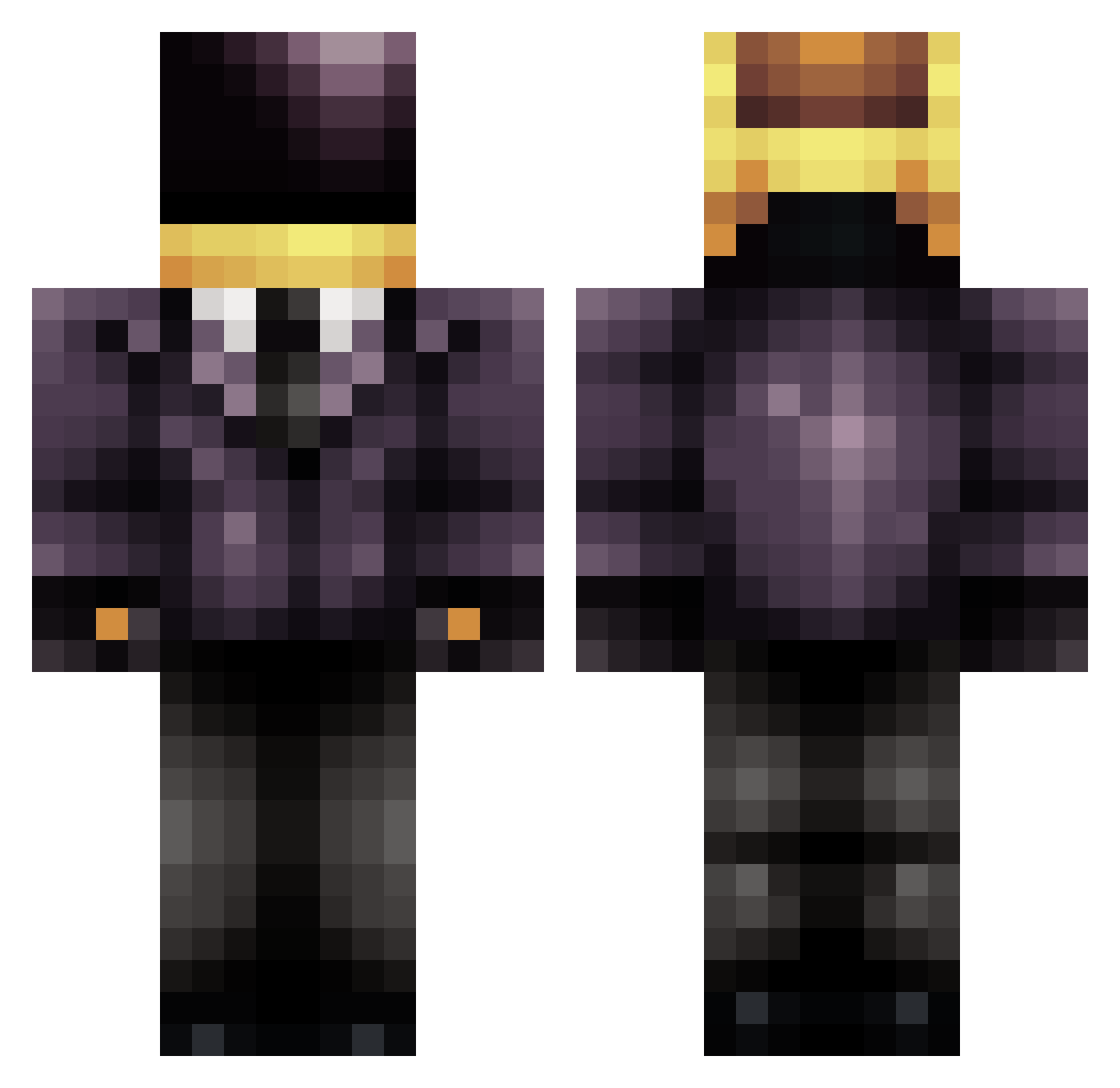
Current Minecraft skin of the player ImprovingNoob, loaded from the official Mojang API. Rotate the 3D model with your mouse or finger, then download the skin as a PNG file and use it in Minecraft: Bedrock Edition or Java Edition for free. When ImprovingNoob changes their skin, this page updates automatically and the old skin stays in the history below.
Other players with this skin (830)
ImprovingNoob was the 736th player we have seen with this skin, first spotted on 06.11.2026. The same skin was seen on these players. Open a nickname to see their current skin and skin history.
 Njesk Gwyn93 AdamH01 etbo97 SilentSurviver DarkHeartMC WillG133 amigomelon ailanna ETI5BACK minetank626 p4nD4rt RedBullTrigger Denmatt DrZaiusPhD wisloff bootlegOtter BobbyBujanos byssergio samuellego lockichoi peetu21 zombieslayer25o MEGANOOB2025 kitrules17 ZioSelic swoleyboi Diistreet Nextto47 OREOKING219 lilscrew98 jakethizzle 0UNICODE0 MosquitaDopadita IamLarry Boiledbird Lucoa bescroggin XxKillerMauxX The_Baloun laloshadowknight KaiAlkins Icedude782 Enigma_Machine Reysama mcwolfe14 SapDek Drakcel76 Saxaphone151 Dusteee NvMustang marc_aguilar13 Yung_Badger MistaGriz Wilian99 MagnetIIIZ 08jaen EightPointOh MattTheSupreme Roach612
More Daft Punk Minecraft skins
How to install the ImprovingNoob skin
- Press the Download button above to save the skin as a PNG file.
- Minecraft: Bedrock Edition (PE): open the Dressing Room from the main menu (or tap your character → Edit Character), go to Classic Skins → Owned, press the + (new skin) button, choose the downloaded PNG and pick the Classic (Steve) model. Works on PC and mobile; consoles cannot import custom skins.
- Minecraft: Java Edition: open the Minecraft Launcher, go to the Skins tab, click New Skin, load the PNG, pick the Classic (Steve) model and press Save & Use. You can also upload it at minecraft.net → Profile → Change Skin.
The skin does not show up after import - what should I do?
Restart Minecraft and open the Dressing Room again - imported skins sometimes appear only after a restart. Also make sure you selected the imported skin and picked the Classic (Steve) model.
Which model should I choose, Classic or Slim?
This skin is designed for the Classic (Steve) model. If you pick the wrong model, the arms of the skin will look stretched or squeezed.
Is the skin of ImprovingNoob free to download?
Yes. Press Download, save the PNG file and use it in Minecraft: Bedrock Edition or Java Edition - no payment or registration needed. The skin also works on multiplayer servers and Realms.
More skins
Looking for more? Go back to all Minecraft skins and check the top skins of the week, month and all time, or find any player's skin by nickname.