
IgorZinho - Minecraft Skins & Skin History
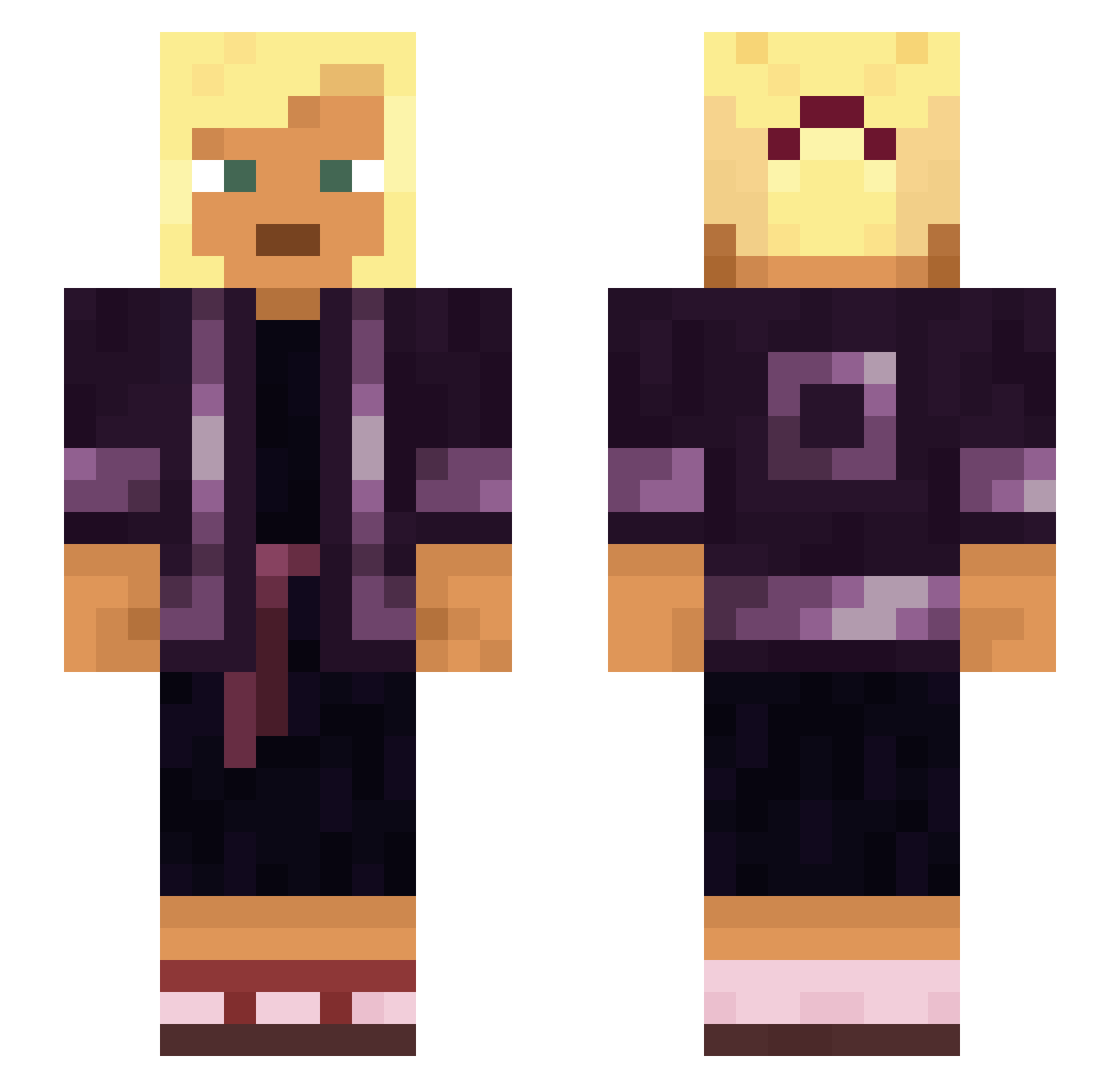
Current Minecraft skin of the player IgorZinho, loaded from the official Mojang API. Rotate the 3D model with your mouse or finger, then download the skin as a PNG file and use it in Minecraft: Bedrock Edition or Java Edition for free. When IgorZinho changes their skin, this page updates automatically and the old skin stays in the history below.
Other players with this skin (1112)
IgorZinho was the 1010th player we have seen with this skin, first spotted on 11.11.2026. The same skin was seen on these players. Open a nickname to see their current skin and skin history.
 Courier hny iMaky Pyrogallol YokiZaKu kookaburra Sonika1206 Parisienne kgoble splooter26 KR_Nikia aeyturakk murasakinodosei blick o6y Wallets Unshielded Claribella mooched dragonlance7 switchlock Twistyz_ Zaaiinn Tainui BackStabbath0 Aziz_Sancar Hypercube ALTDUDAK531 lanai Pathrusim Lashlite Alkalimeter 1nvincib1e BigDaddySpring Prickmedainty RaceMe embloom AspectFalleN papa_smurf_simp Miezimi Arthron vajra adolf_borba Sadddddd murilorulo underbreath chalicotherium AAR_0N morphism Wendell xMegaWars XiaoZya MaxShout Tinta NewPitNet cookiemonster761 Wendye quinina IvanaTamara DabWolf
More Asian Minecraft skins
How to install the IgorZinho skin
- Press the Download button above to save the skin as a PNG file.
- Minecraft: Bedrock Edition (PE): open the Dressing Room from the main menu (or tap your character → Edit Character), go to Classic Skins → Owned, press the + (new skin) button, choose the downloaded PNG and pick the Slim (Alex) model. Works on PC and mobile; consoles cannot import custom skins.
- Minecraft: Java Edition: open the Minecraft Launcher, go to the Skins tab, click New Skin, load the PNG, pick the Slim (Alex) model and press Save & Use. You can also upload it at minecraft.net → Profile → Change Skin.
The skin does not show up after import - what should I do?
Restart Minecraft and open the Dressing Room again - imported skins sometimes appear only after a restart. Also make sure you selected the imported skin and picked the Slim (Alex) model.
Which model should I choose, Classic or Slim?
This skin is designed for the Slim (Alex) model. If you pick the wrong model, the arms of the skin will look stretched or squeezed.
Is the skin of IgorZinho free to download?
Yes. Press Download, save the PNG file and use it in Minecraft: Bedrock Edition or Java Edition - no payment or registration needed. The skin also works on multiplayer servers and Realms.
More skins
Looking for more? Go back to all Minecraft skins and check the top skins of the week, month and all time, or find any player's skin by nickname.