
Hunterfire11 - Minecraft Skins & Skin History
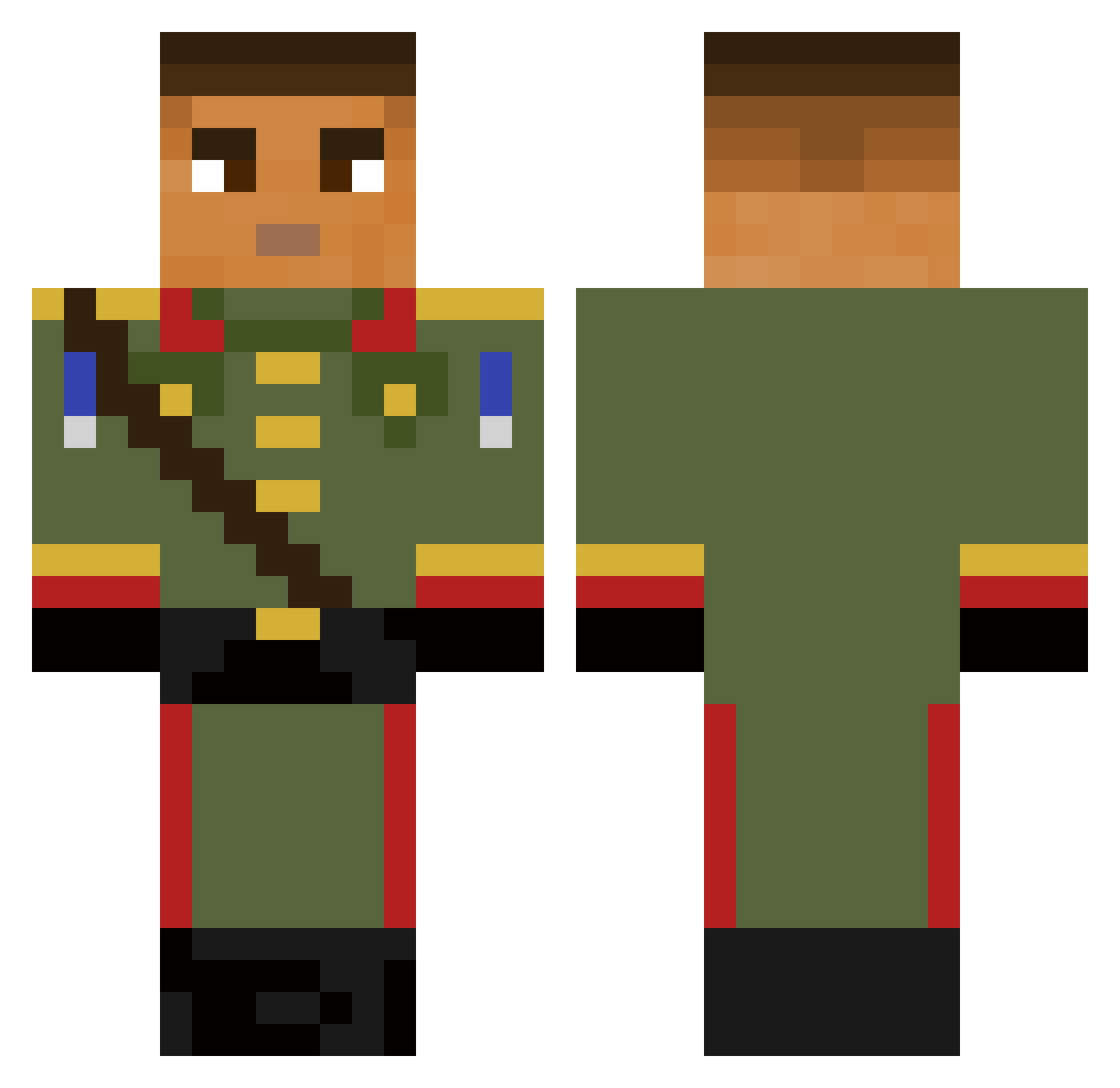
Current Minecraft skin of the player Hunterfire11, loaded from the official Mojang API. Rotate the 3D model with your mouse or finger, then download the skin as a PNG file and use it in Minecraft: Bedrock Edition or Java Edition for free. When Hunterfire11 changes their skin, this page updates automatically and the old skin stays in the history below.
Other players with this skin (58)
Hunterfire11 was the 21st player we have seen with this skin, first spotted on 04.09.2026. The same skin was seen on these players. Open a nickname to see their current skin and skin history.
 petitnarval onixxx212 vKeyx Kewea Minecraft_risq Vini55___ TheRyde05 preza01 Magic_SASso Atsukawaii Genzel_ allancod GEB403 love_kebab EmersedSpace745 ry5nnn BreakersBen CienistyWilk491 bibol lar_10 10letnizakolak AmezXTV TheOnlystev Jenkxy
 lam9egg Wagg_Lik
 Patz_26 SamyTube Qoope _Wedro_ Lewie23459 PabloTrung_99 Sdorx Zaaifer Thortz69
 Szeryfkko_
 soudeDeus alesnox13
 GABBO03XI I974I IDragon_Potato
 oki90
oki90 Darginstan Dualme562 Mandarino3232 __Xlol TwinsBro02 GOHX1234 zestie22 Arm174 kiliandictador Mojza007
 szark555 17hao _Shank_ LuKaSsOuLeT hhgngghgh miisiiek
More General Minecraft skins
How to install the Hunterfire11 skin
- Press the Download button above to save the skin as a PNG file.
- Minecraft: Bedrock Edition (PE): open the Dressing Room from the main menu (or tap your character → Edit Character), go to Classic Skins → Owned, press the + (new skin) button, choose the downloaded PNG and pick the Classic (Steve) model. Works on PC and mobile; consoles cannot import custom skins.
- Minecraft: Java Edition: open the Minecraft Launcher, go to the Skins tab, click New Skin, load the PNG, pick the Classic (Steve) model and press Save & Use. You can also upload it at minecraft.net → Profile → Change Skin.
The skin does not show up after import - what should I do?
Restart Minecraft and open the Dressing Room again - imported skins sometimes appear only after a restart. Also make sure you selected the imported skin and picked the Classic (Steve) model.
Which model should I choose, Classic or Slim?
This skin is designed for the Classic (Steve) model. If you pick the wrong model, the arms of the skin will look stretched or squeezed.
Is the skin of Hunterfire11 free to download?
Yes. Press Download, save the PNG file and use it in Minecraft: Bedrock Edition or Java Edition - no payment or registration needed. The skin also works on multiplayer servers and Realms.
More skins
Looking for more? Go back to all Minecraft skins and check the top skins of the week, month and all time, or find any player's skin by nickname.