
HollyG03 - Minecraft Skins & Skin History
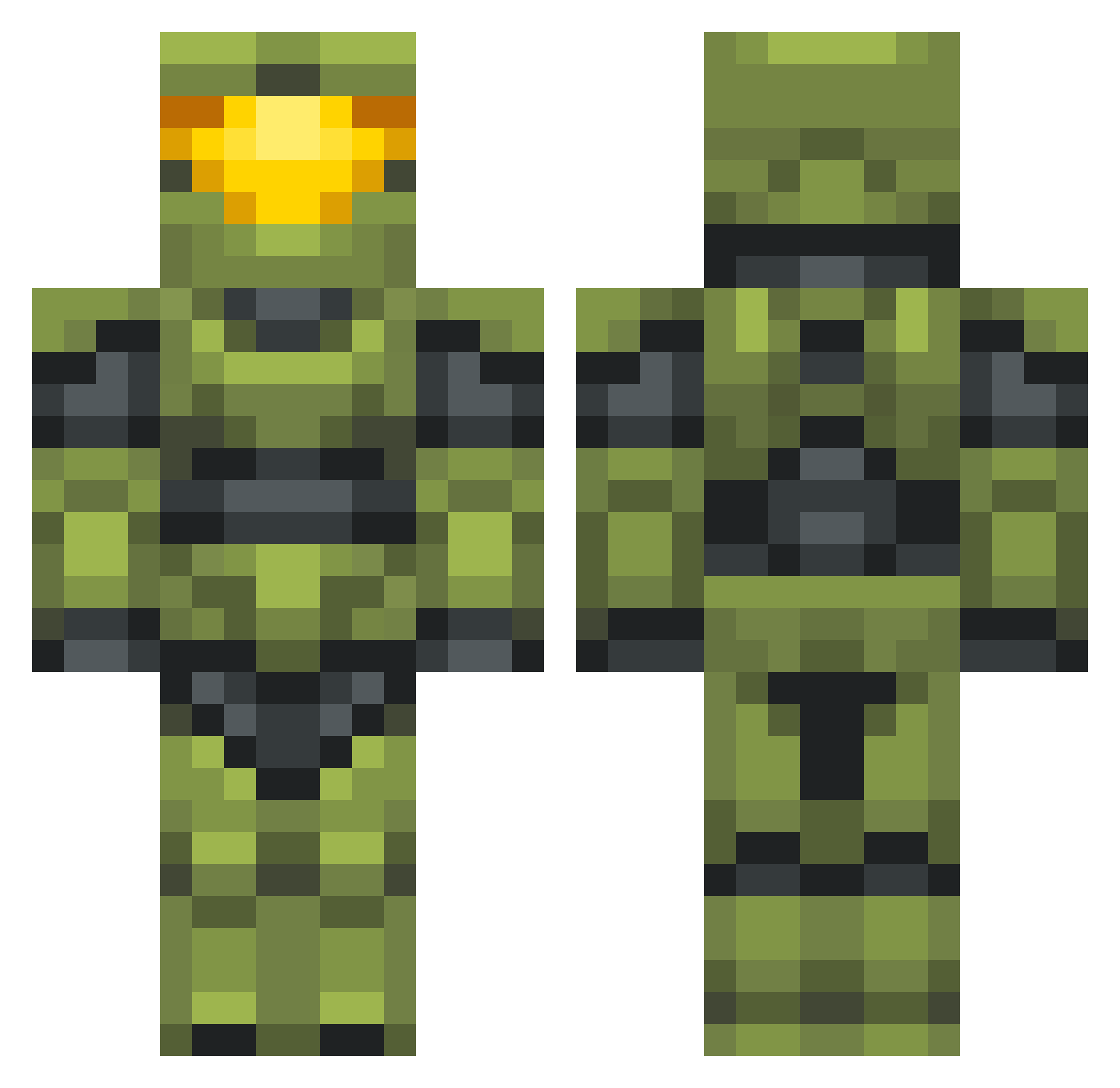
Current Minecraft skin of the player HollyG03, loaded from the official Mojang API. Rotate the 3D model with your mouse or finger, then download the skin as a PNG file and use it in Minecraft: Bedrock Edition or Java Edition for free. When HollyG03 changes their skin, this page updates automatically and the old skin stays in the history below.
Other players with this skin (702)
HollyG03 was the 645th player we have seen with this skin, first spotted on 29.10.2026. The same skin was seen on these players. Open a nickname to see their current skin and skin history.
 BlockeleyChief Willow__Trees TheMasterChris JANAMAN HerobrineDubstep seanathon_9 Alexlund123 TheMightyTor2008 Oropeza Valtyx Andydrew232 SnowyFox726 AspectBinary JackCeee Valerbear Egglert Throwzen CawfeeBrew JF937 OlliOxenFreee JJMM2 sadseal1821 Bleeblebrox Driblex BAdemon1 MasterChoof117 Poobloo PUPUNEITOR FerociousFlunky noizypuppet Devestator113 FruityToot882 inbxundz RitchFlac Ayyubid AlanB ElChabloEscobar CPTN1BbLeS Elekthor90 BLONDJOKES crackaddict73 McBlue006 Schachter89 Ketley1996 Dolmito13 PulsanoTBSA wittlewasp Speedy498 fuckner610 Cybii_ FZJ117 SoppierBrute9 Sargent littlefischie Fasttux ____Digger____ Akehurst2704 LarD0g pix_els Denote218
More Master Chief Minecraft skins
See all 538 Master Chief skins
How to install the HollyG03 skin
- Press the Download button above to save the skin as a PNG file.
- Minecraft: Bedrock Edition (PE): open the Dressing Room from the main menu (or tap your character → Edit Character), go to Classic Skins → Owned, press the + (new skin) button, choose the downloaded PNG and pick the Classic (Steve) model. Works on PC and mobile; consoles cannot import custom skins.
- Minecraft: Java Edition: open the Minecraft Launcher, go to the Skins tab, click New Skin, load the PNG, pick the Classic (Steve) model and press Save & Use. You can also upload it at minecraft.net → Profile → Change Skin.
The skin does not show up after import - what should I do?
Restart Minecraft and open the Dressing Room again - imported skins sometimes appear only after a restart. Also make sure you selected the imported skin and picked the Classic (Steve) model.
Which model should I choose, Classic or Slim?
This skin is designed for the Classic (Steve) model. If you pick the wrong model, the arms of the skin will look stretched or squeezed.
Is the skin of HollyG03 free to download?
Yes. Press Download, save the PNG file and use it in Minecraft: Bedrock Edition or Java Edition - no payment or registration needed. The skin also works on multiplayer servers and Realms.
More skins
Looking for more? Go back to all Minecraft skins and check the top skins of the week, month and all time, or find any player's skin by nickname.