
Hekuri - Minecraft Skins & Skin History
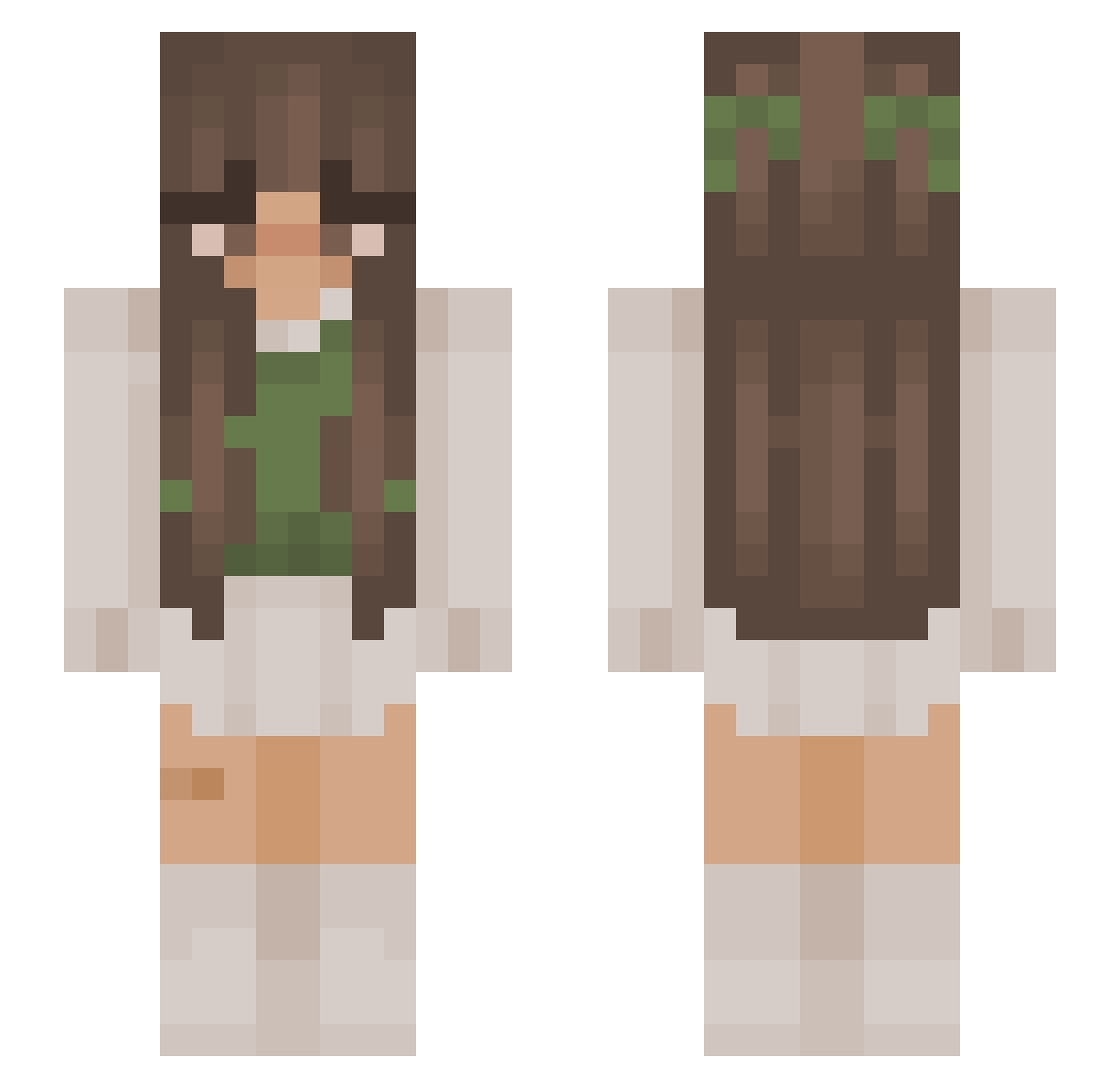
Current Minecraft skin of the player Hekuri, loaded from the official Mojang API. Rotate the 3D model with your mouse or finger, then download the skin as a PNG file and use it in Minecraft: Bedrock Edition or Java Edition for free. When Hekuri changes their skin, this page updates automatically and the old skin stays in the history below.
Other players with this skin (878)
Hekuri was the 781st player we have seen with this skin, first spotted on 12.10.2026. The same skin was seen on these players. Open a nickname to see their current skin and skin history.
 Nonstopette Sara77177 jayameow Kaylachka2004 Alaskai ImikoToga noapakita Narrulha milly556 Alishalisha cutestgirlfriend Talitaco La_Canaille klebbi LittlestGloria Sarah_____ juniperplays _xKrypto ginacatlover STR4NG3R_TH1NGS mareburger sensiitive Cxralyss sabinaaatt snoopykiki xMelootje ixinieks taytayloh HerbertDasWahre TOMAS225 Sn3akySn3k42 llMayumill Rryn22 Vroniee Sofsss27 giovannamello ningen7 MaiLhan Yeli_m flieaway nathalie___ Mel210 MiimmiOff acatastrophe nadiafaye0 seggsylady Aursai mama_mia_05 JosPop123 SwaggyBail XxSunny_Whiskers liv5598 pezsii p1ps Thieksee MichelaVi MellowMiranda COCOMAMA01 ameliefaye_ Renatoes
More Cottagecore Minecraft skins
See all 5814 Cottagecore skins
How to install the Hekuri skin
- Press the Download button above to save the skin as a PNG file.
- Minecraft: Bedrock Edition (PE): open the Dressing Room from the main menu (or tap your character → Edit Character), go to Classic Skins → Owned, press the + (new skin) button, choose the downloaded PNG and pick the Slim (Alex) model. Works on PC and mobile; consoles cannot import custom skins.
- Minecraft: Java Edition: open the Minecraft Launcher, go to the Skins tab, click New Skin, load the PNG, pick the Slim (Alex) model and press Save & Use. You can also upload it at minecraft.net → Profile → Change Skin.
The skin does not show up after import - what should I do?
Restart Minecraft and open the Dressing Room again - imported skins sometimes appear only after a restart. Also make sure you selected the imported skin and picked the Slim (Alex) model.
Which model should I choose, Classic or Slim?
This skin is designed for the Slim (Alex) model. If you pick the wrong model, the arms of the skin will look stretched or squeezed.
Is the skin of Hekuri free to download?
Yes. Press Download, save the PNG file and use it in Minecraft: Bedrock Edition or Java Edition - no payment or registration needed. The skin also works on multiplayer servers and Realms.
More skins
Looking for more? Go back to all Minecraft skins and check the top skins of the week, month and all time, or find any player's skin by nickname.