
Haricotrougeoff - Minecraft Skins & Skin History
Current Minecraft skin of the player Haricotrougeoff, loaded from the official Mojang API. Rotate the 3D model with your mouse or finger, then download the skin as a PNG file and use it in Minecraft: Bedrock Edition or Java Edition for free. When Haricotrougeoff changes their skin, this page updates automatically and the old skin stays in the history below.
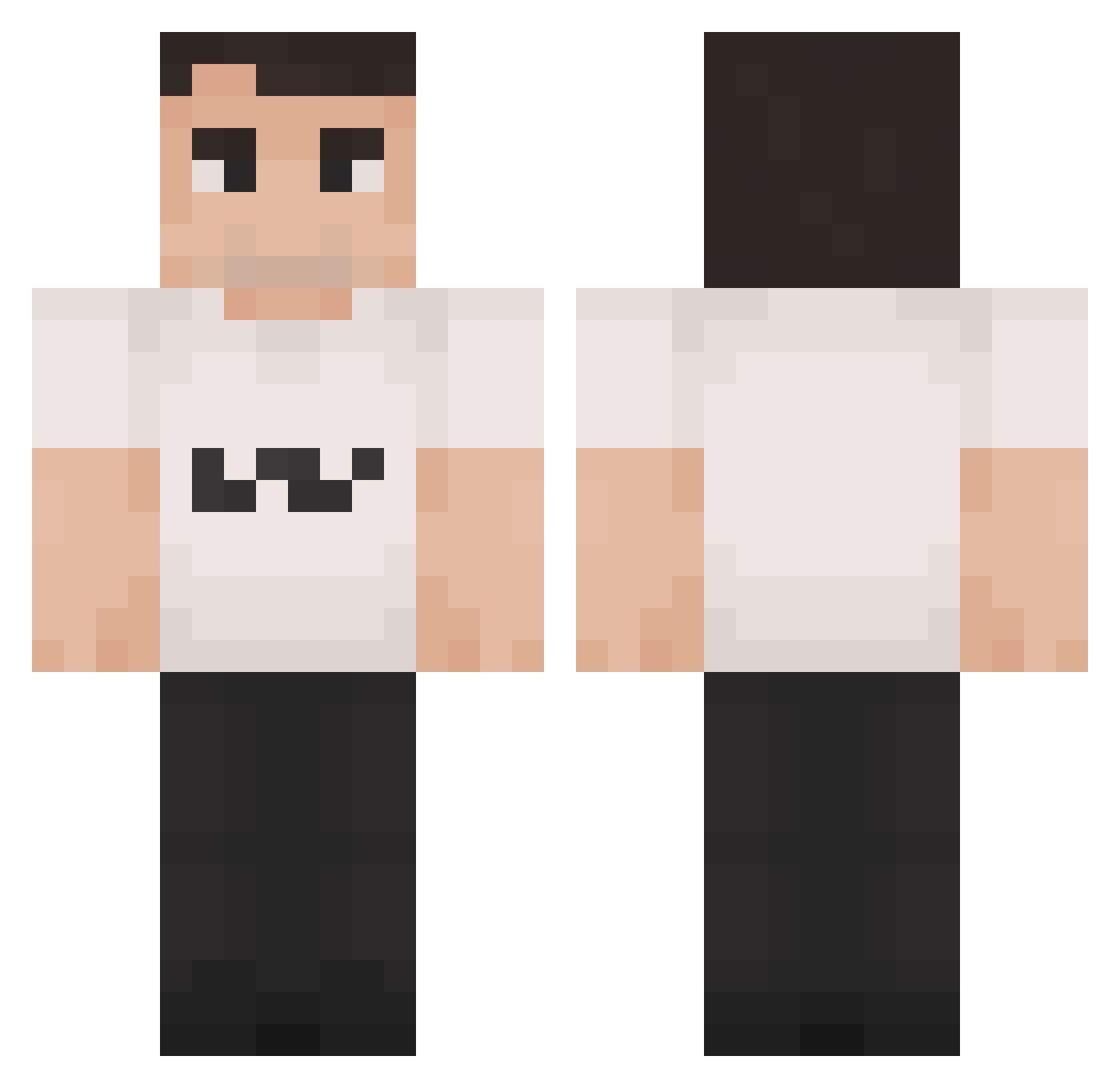
Other players with this skin (1190)
Haricotrougeoff was the 230th player we have seen with this skin, first spotted on 10.08.2026. The same skin was seen on these players. Open a nickname to see their current skin and skin history.
 dxran Mixon_PL Wbluntrotaion69
 orlandomp3 Gatope13
 jwwc MP3Y Touchywouchy Tx_marvin lubal07 ArchiiMB big_boi_obama_69 Charlie_Kirk_RIP XiPerplex Monkey_RX manfromcave cagueinacalca PS_JukeZ ComedyAspect64 welseyr FNAF_Bonnie03 Lucca2006 p4p4no3l Apollow__ panzerpond yngfaz G2_Caliste Apollon6611 CharliErika supermeme2 TETRIS_99 Lead_Consumer Branko2592 Charlie_Kirk_ Florian_MUFC OrieskovaOmietka
 thebestpotato27 chucholi s3bassss intro2008a ObliviousYums kinderboekjes Floppa4_Life luhdripdrip YungBoogie T_R_Q jasmz pikachu8956 horsehairvase
 chudyorn deneb06 Fym_Ac3 Nancat21 cchamaa ceyhunbas Ansosh1 alanc_1004 Erik6627 StatsR4Losers
 UntitldDuck
More Schlatt Minecraft skins
How to install the Haricotrougeoff skin
- Press the Download button above to save the skin as a PNG file.
- Minecraft: Bedrock Edition (PE): open the Dressing Room from the main menu (or tap your character → Edit Character), go to Classic Skins → Owned, press the + (new skin) button, choose the downloaded PNG and pick the Classic (Steve) model. Works on PC and mobile; consoles cannot import custom skins.
- Minecraft: Java Edition: open the Minecraft Launcher, go to the Skins tab, click New Skin, load the PNG, pick the Classic (Steve) model and press Save & Use. You can also upload it at minecraft.net → Profile → Change Skin.
The skin does not show up after import - what should I do?
Restart Minecraft and open the Dressing Room again - imported skins sometimes appear only after a restart. Also make sure you selected the imported skin and picked the Classic (Steve) model.
Which model should I choose, Classic or Slim?
This skin is designed for the Classic (Steve) model. If you pick the wrong model, the arms of the skin will look stretched or squeezed.
Is the skin of Haricotrougeoff free to download?
Yes. Press Download, save the PNG file and use it in Minecraft: Bedrock Edition or Java Edition - no payment or registration needed. The skin also works on multiplayer servers and Realms.
More skins
Looking for more? Go back to all Minecraft skins and check the top skins of the week, month and all time, or find any player's skin by nickname.