
Hailey_LStarr - Minecraft Skins & Skin History
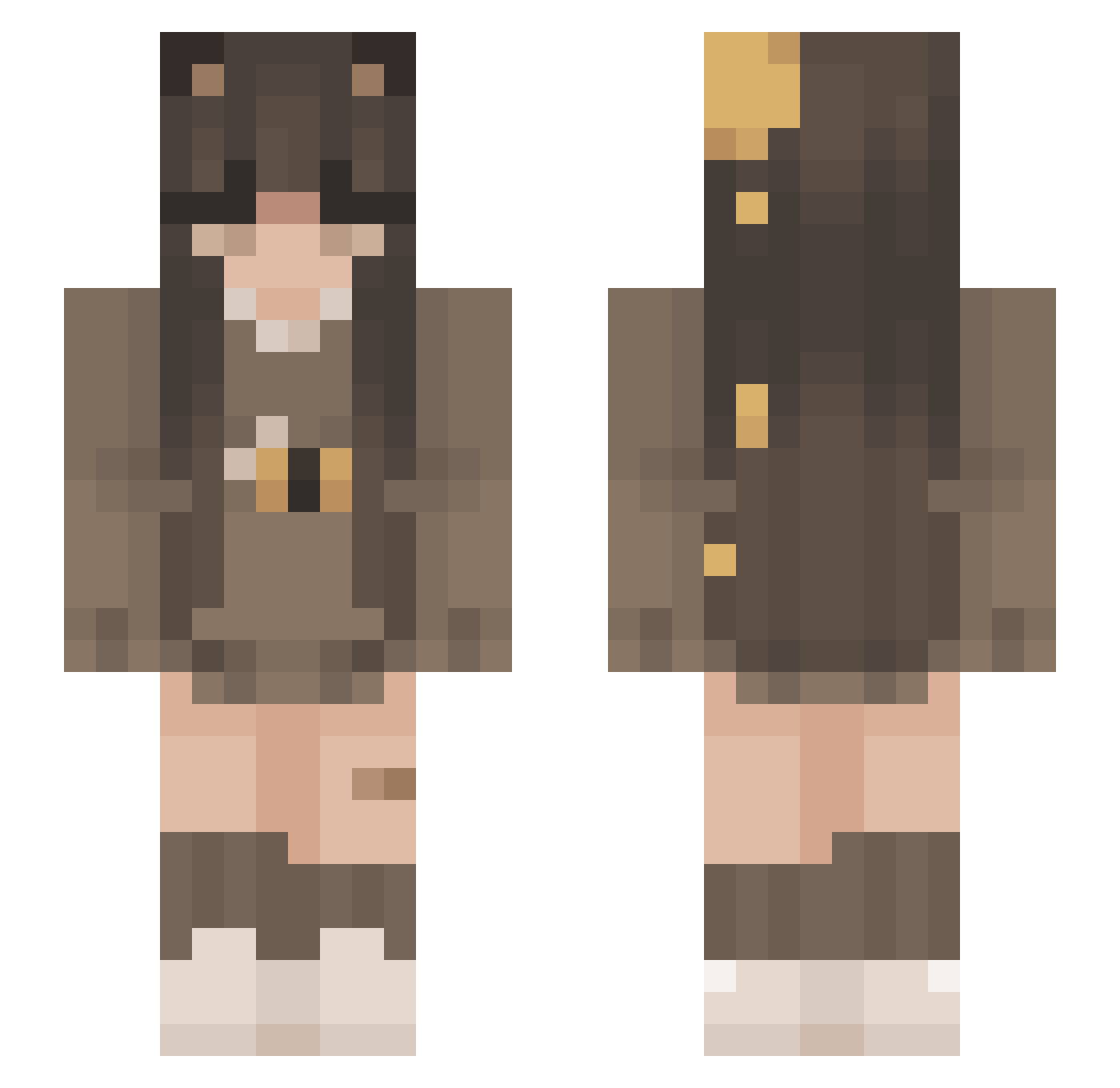
Current Minecraft skin of the player Hailey_LStarr, loaded from the official Mojang API. Rotate the 3D model with your mouse or finger, then download the skin as a PNG file and use it in Minecraft: Bedrock Edition or Java Edition for free. When Hailey_LStarr changes their skin, this page updates automatically and the old skin stays in the history below.
Other players with this skin (233)
Hailey_LStarr was the 170th player we have seen with this skin, first spotted on 05.10.2026. The same skin was seen on these players. Open a nickname to see their current skin and skin history.
 skibidi2014 Rachel1003 FemboyCheese_ I_milknhoney_I __BubbleTea__ MacacoD4 catg0sk Fox20112352 Karyoke Auralie5802 asasin05 SANDR4 HoneyCats makattac1980 notcindi akajupiter isiiiwiii boxedeggs goop59 Innanimmates 20julix20 ryoshusgf SexyBaby9263 suqce Avababava ForestTiem CozyLaura kayla_bee Skaiira AvaMinPark _Juliaaaa__ AJammer56 gnat4246 HolySage2006 yahetxo xEIIie_ MasnyProMax2116 DromyPlo coffeebean004 CooperBC Bella2go lindyblockz Shaurina wikiee grtrwwrth Asal_ Bubbelgumx MilLusia OLIVIAKS2209 moon6dit cloudystars1973 TheBeeMaker gothiic itsst H4rmoni Circaoak PraiseBingus SleepingGiant Harley_Quentin 4503
More Bee Minecraft skins
How to install the Hailey_LStarr skin
- Press the Download button above to save the skin as a PNG file.
- Minecraft: Bedrock Edition (PE): open the Dressing Room from the main menu (or tap your character → Edit Character), go to Classic Skins → Owned, press the + (new skin) button, choose the downloaded PNG and pick the Slim (Alex) model. Works on PC and mobile; consoles cannot import custom skins.
- Minecraft: Java Edition: open the Minecraft Launcher, go to the Skins tab, click New Skin, load the PNG, pick the Slim (Alex) model and press Save & Use. You can also upload it at minecraft.net → Profile → Change Skin.
The skin does not show up after import - what should I do?
Restart Minecraft and open the Dressing Room again - imported skins sometimes appear only after a restart. Also make sure you selected the imported skin and picked the Slim (Alex) model.
Which model should I choose, Classic or Slim?
This skin is designed for the Slim (Alex) model. If you pick the wrong model, the arms of the skin will look stretched or squeezed.
Is the skin of Hailey_LStarr free to download?
Yes. Press Download, save the PNG file and use it in Minecraft: Bedrock Edition or Java Edition - no payment or registration needed. The skin also works on multiplayer servers and Realms.
More skins
Looking for more? Go back to all Minecraft skins and check the top skins of the week, month and all time, or find any player's skin by nickname.