
HYUNN9050 - Minecraft Skins & Skin History
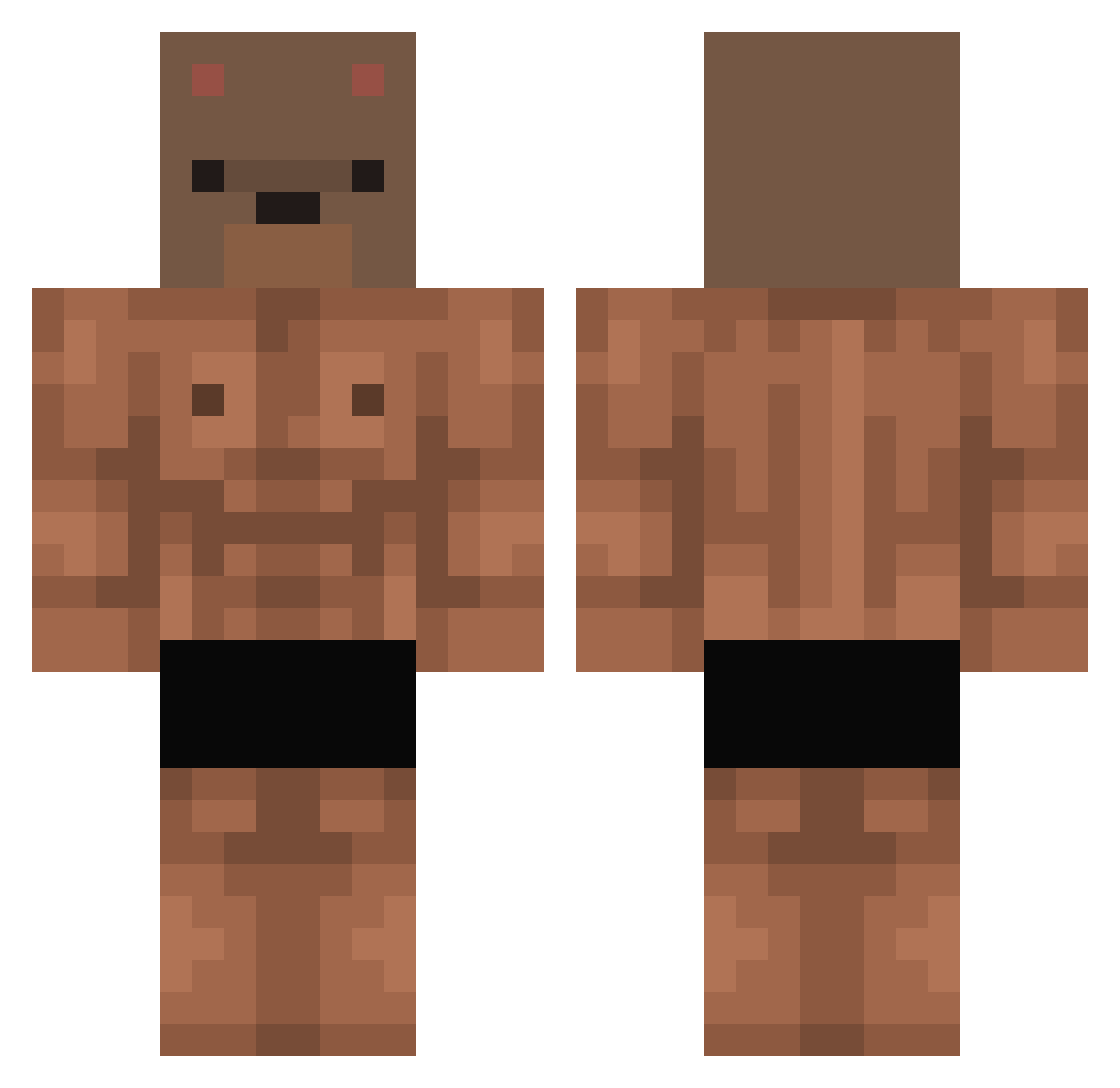
Current Minecraft skin of the player HYUNN9050, loaded from the official Mojang API. Rotate the 3D model with your mouse or finger, then download the skin as a PNG file and use it in Minecraft: Bedrock Edition or Java Edition for free. When HYUNN9050 changes their skin, this page updates automatically and the old skin stays in the history below.
Other players with this skin (412)
HYUNN9050 was the 352nd player we have seen with this skin, first spotted on 21.10.2026. The same skin was seen on these players. Open a nickname to see their current skin and skin history.
 rladbstn7799 Deokbae06 Ma_soon marcelinhocr7 por920 Ceckss __Min___ PatzcalB xXtomOMGXx Shapeas BumbulaZ _834R_ milo32cd Toleros S_BOB woawoawoa Maxisiuuz LynxEmperor2 SPOPNICE Break_Tequila ivvnbn b_uns ssjpatin mafyin159 sulkybear WLYVER MESOHEX1 B1sco Alejandro150809v elbiks ShoTeeZ91 saaaaaaaom JamonNinnja Moon_Pobi LimChaeMu711 Gambling_Addict_ korek1234567 V1G trufflegirl bibigoo Aokiji306 juty59 popsandtv HankaliaIII POLSKY45 Rindamain Crazy0113 bootani Baked_bearz MamasLawnMower Randaelle flickzera deyakun KiHaB3 iWinnie00 dh213 SandorG Davutropadocalvo iKeviin12 Traka94
More Bear Mask Minecraft skins
How to install the HYUNN9050 skin
- Press the Download button above to save the skin as a PNG file.
- Minecraft: Bedrock Edition (PE): open the Dressing Room from the main menu (or tap your character → Edit Character), go to Classic Skins → Owned, press the + (new skin) button, choose the downloaded PNG and pick the Classic (Steve) model. Works on PC and mobile; consoles cannot import custom skins.
- Minecraft: Java Edition: open the Minecraft Launcher, go to the Skins tab, click New Skin, load the PNG, pick the Classic (Steve) model and press Save & Use. You can also upload it at minecraft.net → Profile → Change Skin.
The skin does not show up after import - what should I do?
Restart Minecraft and open the Dressing Room again - imported skins sometimes appear only after a restart. Also make sure you selected the imported skin and picked the Classic (Steve) model.
Which model should I choose, Classic or Slim?
This skin is designed for the Classic (Steve) model. If you pick the wrong model, the arms of the skin will look stretched or squeezed.
Is the skin of HYUNN9050 free to download?
Yes. Press Download, save the PNG file and use it in Minecraft: Bedrock Edition or Java Edition - no payment or registration needed. The skin also works on multiplayer servers and Realms.
More skins
Looking for more? Go back to all Minecraft skins and check the top skins of the week, month and all time, or find any player's skin by nickname.