
HAro0713 - Minecraft Skins & Skin History
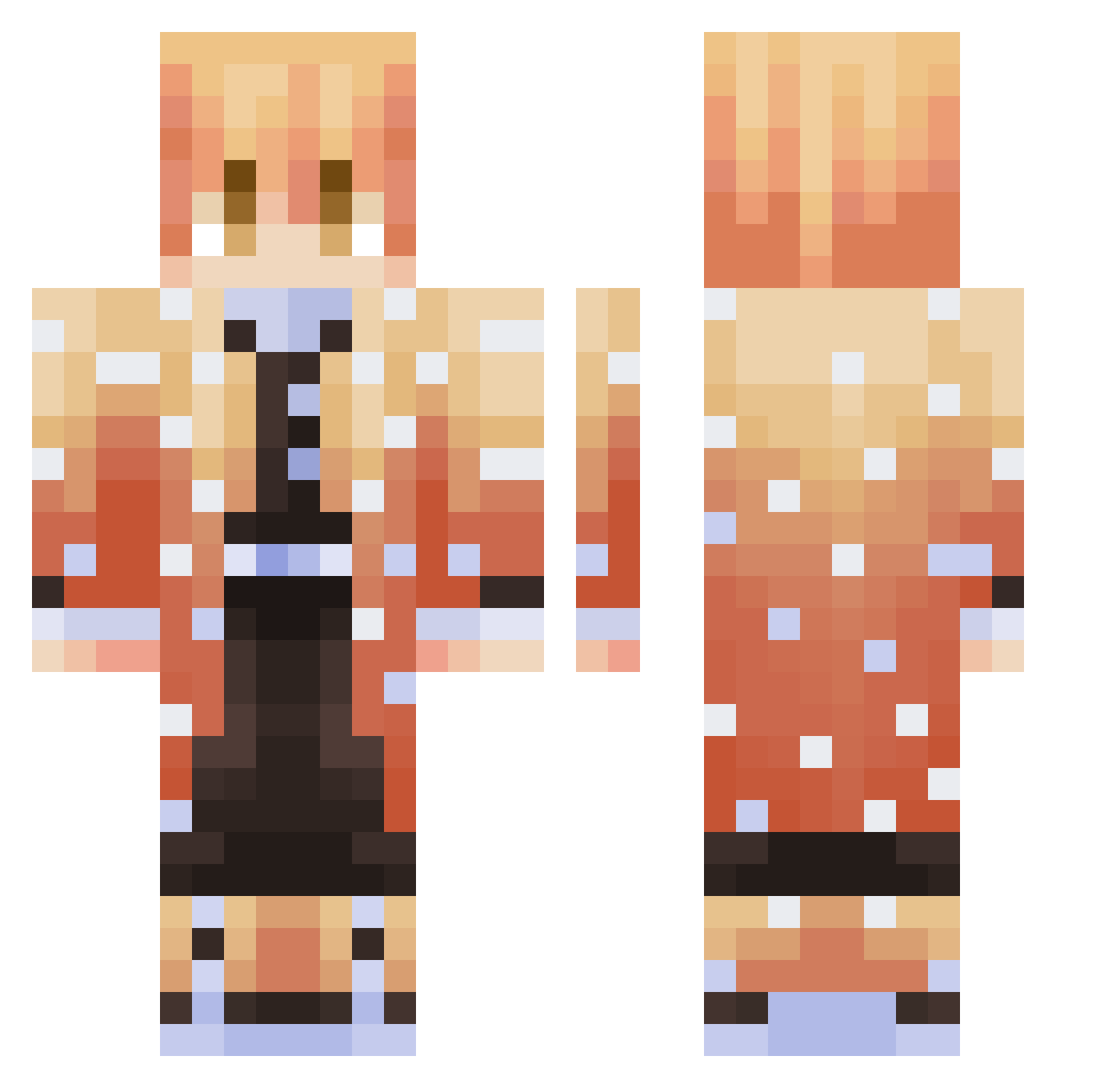
Current Minecraft skin of the player HAro0713, loaded from the official Mojang API. Rotate the 3D model with your mouse or finger, then download the skin as a PNG file and use it in Minecraft: Bedrock Edition or Java Edition for free. When HAro0713 changes their skin, this page updates automatically and the old skin stays in the history below.
Other players with this skin (393)
HAro0713 was the 365th player we have seen with this skin, first spotted on 05.11.2026. The same skin was seen on these players. Open a nickname to see their current skin and skin history.
 Suryak Yagi225 MohawkMan14 RPH_Twitch Yutopia_ nitsu00 Fighter_donnie Michael_KAMI YoviRGK HypedKnuckles posey_don Lukey__21 camimouw Keebaun Salchibox Murat13 eltigrouu Tlusk Treerex24 Tafido ArduousOcean782 jacob30soccer Mew33333 _Xenthros_ Vvenson Neevyxo Kw1ft_ Fixet_life MrAnimation Tombo69420 aaallleeee bbangseong groswa fouand phantom_2143 boublefizz Tikator flakus08 Wishing0 Hogor007 chrisgalaxy5865 1Pollux1 MINUOo GWANHYO Zynth3r TheRugster iDAO gutarav Blueberries2319 YoukaiKazuto ErickUWU Smuzy_ Spykeinyc N1coT99 NickyFant Fujo_ Pedrow1406 Zenitsu_MC JamesMo Darren21365
More Zenitsu Agatsuma Minecraft skins
See all 213 Zenitsu Agatsuma skins
How to install the HAro0713 skin
- Press the Download button above to save the skin as a PNG file.
- Minecraft: Bedrock Edition (PE): open the Dressing Room from the main menu (or tap your character → Edit Character), go to Classic Skins → Owned, press the + (new skin) button, choose the downloaded PNG and pick the Classic (Steve) model. Works on PC and mobile; consoles cannot import custom skins.
- Minecraft: Java Edition: open the Minecraft Launcher, go to the Skins tab, click New Skin, load the PNG, pick the Classic (Steve) model and press Save & Use. You can also upload it at minecraft.net → Profile → Change Skin.
The skin does not show up after import - what should I do?
Restart Minecraft and open the Dressing Room again - imported skins sometimes appear only after a restart. Also make sure you selected the imported skin and picked the Classic (Steve) model.
Which model should I choose, Classic or Slim?
This skin is designed for the Classic (Steve) model. If you pick the wrong model, the arms of the skin will look stretched or squeezed.
Is the skin of HAro0713 free to download?
Yes. Press Download, save the PNG file and use it in Minecraft: Bedrock Edition or Java Edition - no payment or registration needed. The skin also works on multiplayer servers and Realms.
More skins
Looking for more? Go back to all Minecraft skins and check the top skins of the week, month and all time, or find any player's skin by nickname.