
GwWarner1 - Minecraft Skins & Skin History
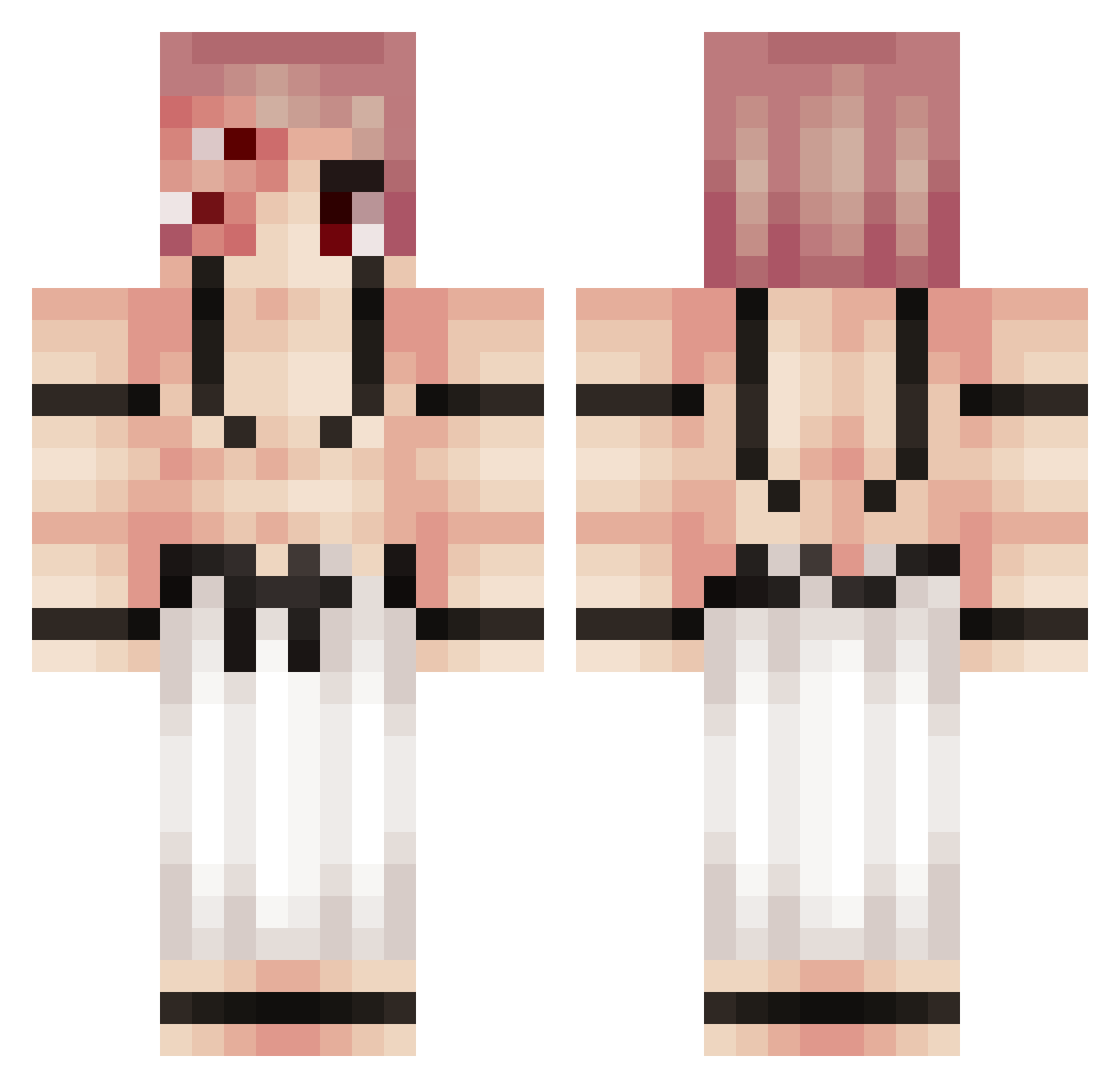
Current Minecraft skin of the player GwWarner1, loaded from the official Mojang API. Rotate the 3D model with your mouse or finger, then download the skin as a PNG file and use it in Minecraft: Bedrock Edition or Java Edition for free. When GwWarner1 changes their skin, this page updates automatically and the old skin stays in the history below.
Other players with this skin (217)
GwWarner1 was the 202nd player we have seen with this skin, first spotted on 12.10.2026. The same skin was seen on these players. Open a nickname to see their current skin and skin history.
 EkinRS troll_n TYPH0N2 PenguinGuy41 GGomesz30 Benito2002 Yovvi_ vepiko Thewdfd temka2011_ Ayanokuji123 TwoBreh MerowNyr IamJooHyuk mariio_riico Mereninuvy KaMeRaZe hujn1 Pana_Calabaza mccjjccmc The_boyjr Gabba8 Alexopoulos_1 noahpanero Nukuna_ Morelatooo tommycox77 thebucheron777 biscottinomatte JiaHon0324 NaD_K Nonny1812 nsim21 GABRIEL_Fan_Acc Jelko4 Wsh_Fire TiXz0 mabea021 jisutzuu swjssi Xx_SGTC_xX srivi14 Edypower aktocan flytelo99 77Kaan FTT_Ricardo LETSGOSKIII1 igoostoso ZHAIQ lavaguest V0IK1 Andante01 CrypticIndex qNot_ olafeL_ Aquino_32 RuairidhLu Azghal_Sigrid Mutella_gamer
More Kokushibo Minecraft skins
How to install the GwWarner1 skin
- Press the Download button above to save the skin as a PNG file.
- Minecraft: Bedrock Edition (PE): open the Dressing Room from the main menu (or tap your character → Edit Character), go to Classic Skins → Owned, press the + (new skin) button, choose the downloaded PNG and pick the Classic (Steve) model. Works on PC and mobile; consoles cannot import custom skins.
- Minecraft: Java Edition: open the Minecraft Launcher, go to the Skins tab, click New Skin, load the PNG, pick the Classic (Steve) model and press Save & Use. You can also upload it at minecraft.net → Profile → Change Skin.
The skin does not show up after import - what should I do?
Restart Minecraft and open the Dressing Room again - imported skins sometimes appear only after a restart. Also make sure you selected the imported skin and picked the Classic (Steve) model.
Which model should I choose, Classic or Slim?
This skin is designed for the Classic (Steve) model. If you pick the wrong model, the arms of the skin will look stretched or squeezed.
Is the skin of GwWarner1 free to download?
Yes. Press Download, save the PNG file and use it in Minecraft: Bedrock Edition or Java Edition - no payment or registration needed. The skin also works on multiplayer servers and Realms.
More skins
Looking for more? Go back to all Minecraft skins and check the top skins of the week, month and all time, or find any player's skin by nickname.