
GrodanGnaskar - Minecraft Skins & Skin History
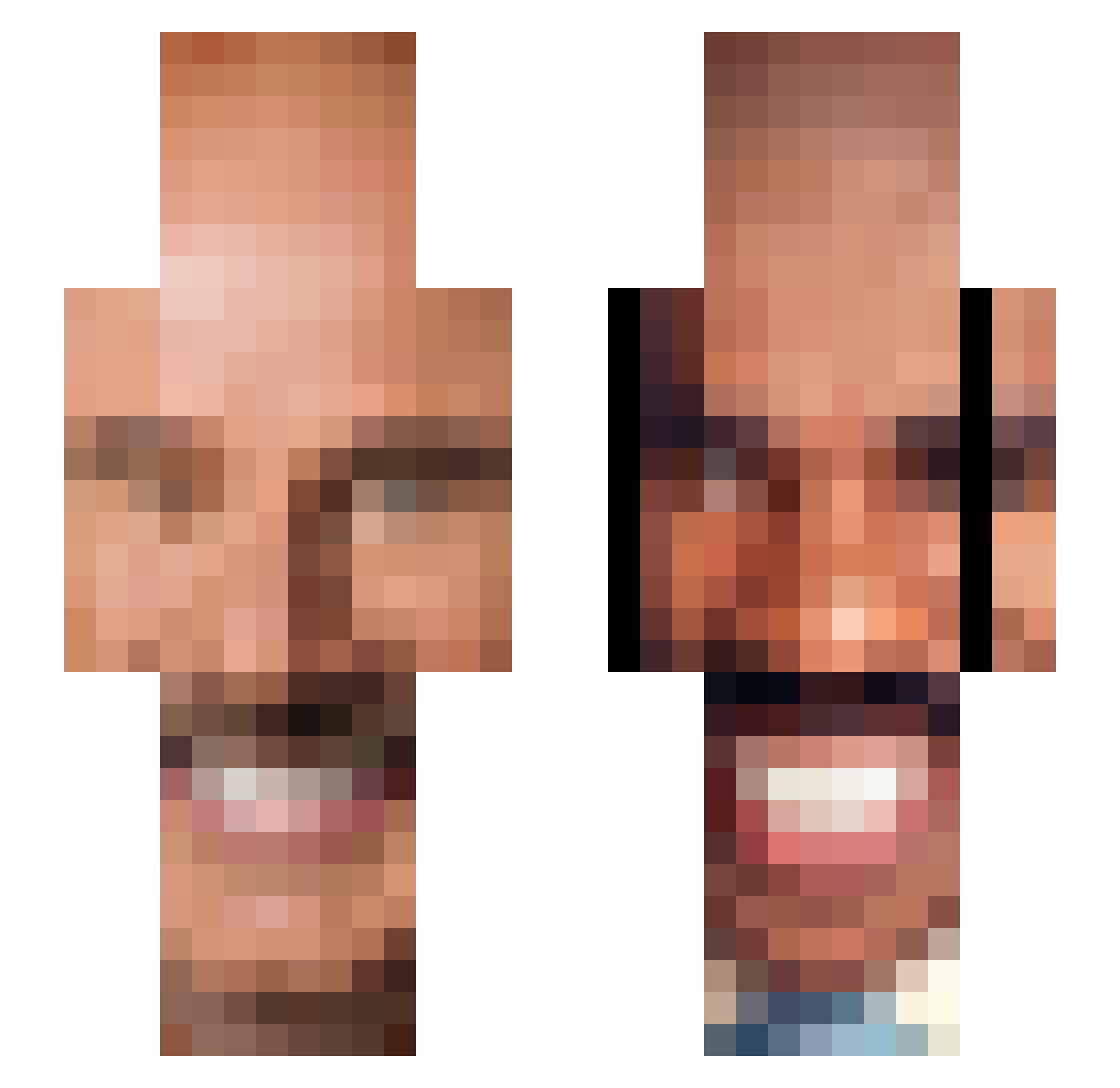
Current Minecraft skin of the player GrodanGnaskar, loaded from the official Mojang API. Rotate the 3D model with your mouse or finger, then download the skin as a PNG file and use it in Minecraft: Bedrock Edition or Java Edition for free. When GrodanGnaskar changes their skin, this page updates automatically and the old skin stays in the history below.
Other players with this skin (66)
GrodanGnaskar was the 30th player we have seen with this skin, first spotted on 09.09.2026. The same skin was seen on these players. Open a nickname to see their current skin and skin history.
 PrimalFerrari CH3IFSKULLHEAD skunis_ riceydiceyboi matthepas niffty10 SalmonCrib69 Jah_Rule Littlecarkiller CrossFiiire LargeBootyClap jaenings DonnAz34 jhgjhgmh Jebisimater adement123 RELZZUGMUC CanadaIsntReal_ finlay0208 BoywithBurritos GryffinFitz BountyKing Certified_Sped BroMomentum11
 IrationalOne Rigby724 bensplat123 gloria_borgia Fortress_Crab denji1uvr ArlinderBoy breadfishhh hopeidiesoon 1Nikola Eplaa2 AJ30603 Jsherry sdessart trunds MilkCarton pupamensch Mr_Meerkatz Fridge1072 Mojojump _dej BuzzMePls bindiLight Ben_Karel ConManRoadz chris_201004 King_oft1ttycity Timjim34 cuzzpt flowerpotchild ueatallmabeans TomaTos27 100Jiggers Lateen LizardStudios77 4JoeBrown
How to install the GrodanGnaskar skin
- Press the Download button above to save the skin as a PNG file.
- Minecraft: Bedrock Edition (PE): open the Dressing Room from the main menu (or tap your character → Edit Character), go to Classic Skins → Owned, press the + (new skin) button, choose the downloaded PNG and pick the Slim (Alex) model. Works on PC and mobile; consoles cannot import custom skins.
- Minecraft: Java Edition: open the Minecraft Launcher, go to the Skins tab, click New Skin, load the PNG, pick the Slim (Alex) model and press Save & Use. You can also upload it at minecraft.net → Profile → Change Skin.
The skin does not show up after import - what should I do?
Restart Minecraft and open the Dressing Room again - imported skins sometimes appear only after a restart. Also make sure you selected the imported skin and picked the Slim (Alex) model.
Which model should I choose, Classic or Slim?
This skin is designed for the Slim (Alex) model. If you pick the wrong model, the arms of the skin will look stretched or squeezed.
Is the skin of GrodanGnaskar free to download?
Yes. Press Download, save the PNG file and use it in Minecraft: Bedrock Edition or Java Edition - no payment or registration needed. The skin also works on multiplayer servers and Realms.
More skins
Looking for more? Go back to all Minecraft skins and check the top skins of the week, month and all time, or find any player's skin by nickname.