
Greatlach - Minecraft Skins & Skin History
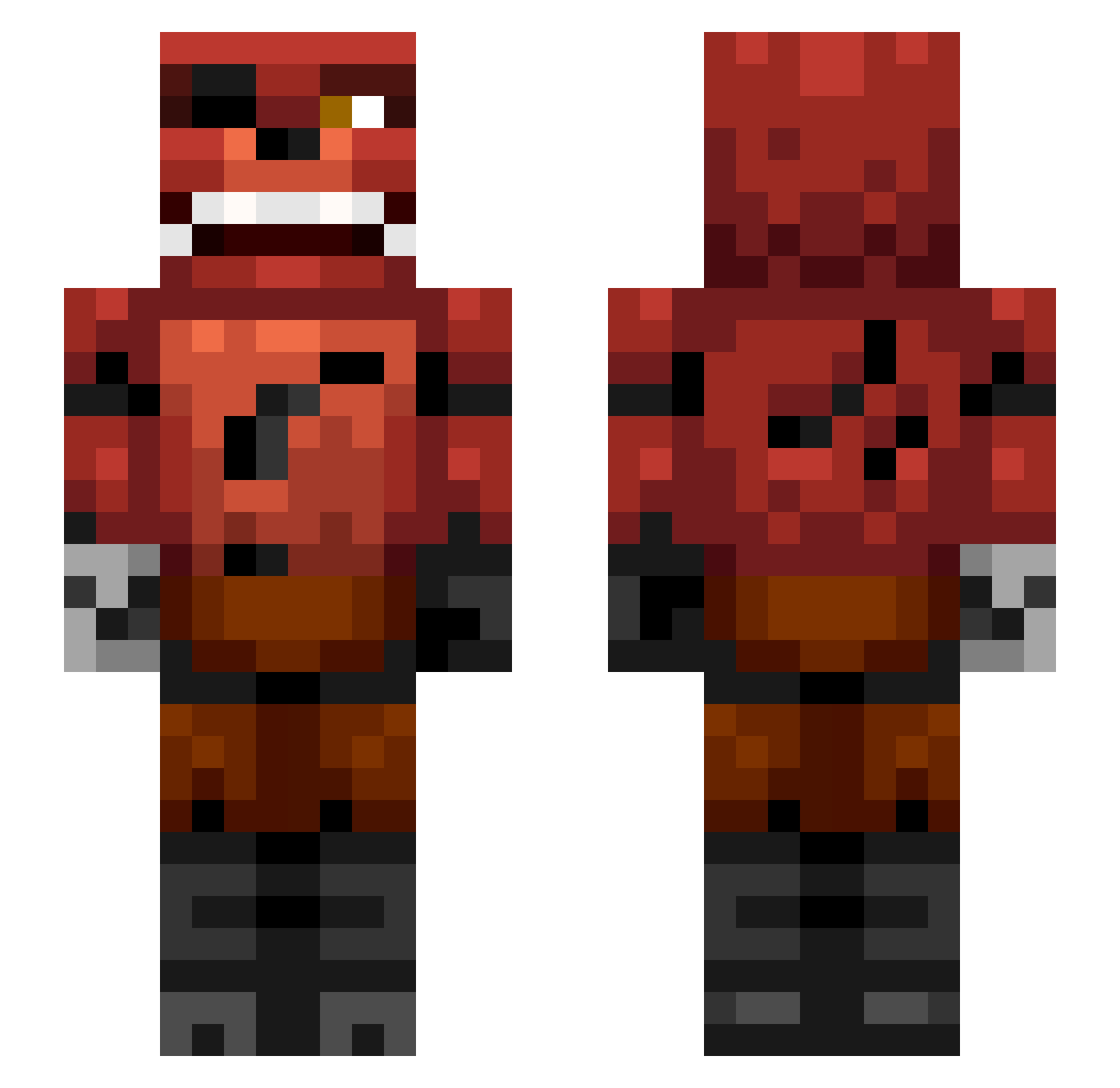
Current Minecraft skin of the player Greatlach, loaded from the official Mojang API. Rotate the 3D model with your mouse or finger, then download the skin as a PNG file and use it in Minecraft: Bedrock Edition or Java Edition for free. When Greatlach changes their skin, this page updates automatically and the old skin stays in the history below.
Other players with this skin (336)
Greatlach was the 34th player we have seen with this skin, first spotted on 03.08.2026. The same skin was seen on these players. Open a nickname to see their current skin and skin history.
 peebody4 creeperkiller782 karl_smart13 ALEXIN_QQ Raptorsarus999 giggen wrigleysam kmark1234 mikkelsw mishamishami Emil_11 DreamZ75 TheDominatorForU CuFc_x_Jacko ETOE58 chyahpapaiya monsterhyperman FindlayK Futurastic SorenC rayn11e loujelly12 CTrebley sonnet6 iimaul WVUfan77 ZombieKillerGA canadianzombies sativadiva Budscope matthewrc8 lilyukyuks ChalupaSupreme TRXzZ13 LTFraser Baphijmm gamingwizard1 Paolayep Jonso89 Hugh_Honey LKT87 LavaCreepa notnotch12109 LizardNinja Sidwarkslinky200 fnaflucas airhogs11 soccerben34 StickMasterBen44 110INCLINE Triforce99 scalenepear1 combatlord1905 Noose_ITO j1mm3y97 Jack144 P1nKz pwonyhof Ojohn the_better_foxxy
More Foxy Minecraft skins
How to install the Greatlach skin
- Press the Download button above to save the skin as a PNG file.
- Minecraft: Bedrock Edition (PE): open the Dressing Room from the main menu (or tap your character → Edit Character), go to Classic Skins → Owned, press the + (new skin) button, choose the downloaded PNG and pick the Slim (Alex) model. Works on PC and mobile; consoles cannot import custom skins.
- Minecraft: Java Edition: open the Minecraft Launcher, go to the Skins tab, click New Skin, load the PNG, pick the Slim (Alex) model and press Save & Use. You can also upload it at minecraft.net → Profile → Change Skin.
The skin does not show up after import - what should I do?
Restart Minecraft and open the Dressing Room again - imported skins sometimes appear only after a restart. Also make sure you selected the imported skin and picked the Slim (Alex) model.
Which model should I choose, Classic or Slim?
This skin is designed for the Slim (Alex) model. If you pick the wrong model, the arms of the skin will look stretched or squeezed.
Is the skin of Greatlach free to download?
Yes. Press Download, save the PNG file and use it in Minecraft: Bedrock Edition or Java Edition - no payment or registration needed. The skin also works on multiplayer servers and Realms.
More skins
Looking for more? Go back to all Minecraft skins and check the top skins of the week, month and all time, or find any player's skin by nickname.