
Ginoproino123 - Minecraft Skins & Skin History
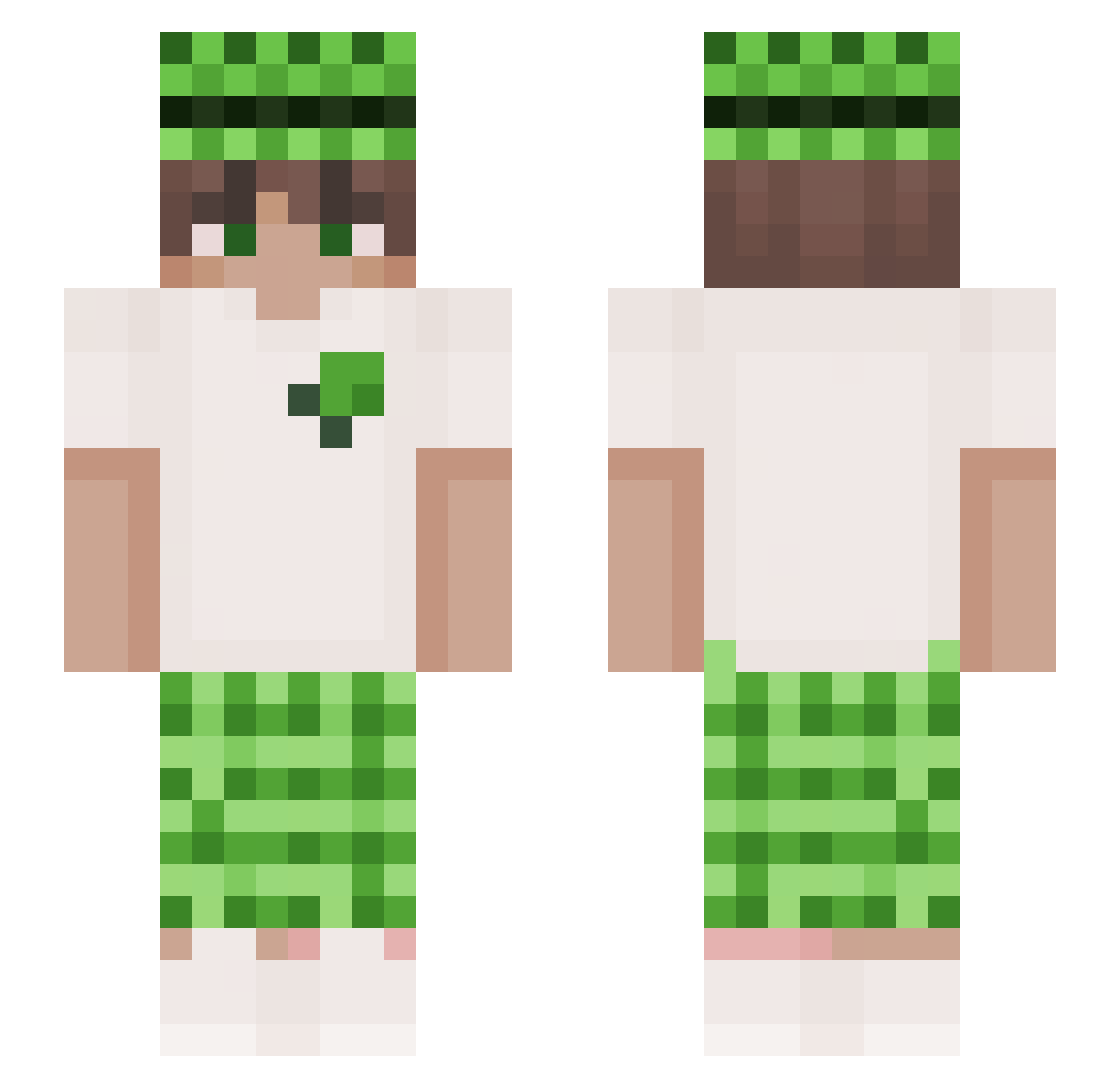
Current Minecraft skin of the player Ginoproino123, loaded from the official Mojang API. Rotate the 3D model with your mouse or finger, then download the skin as a PNG file and use it in Minecraft: Bedrock Edition or Java Edition for free. When Ginoproino123 changes their skin, this page updates automatically and the old skin stays in the history below.
Other players with this skin (192)
Ginoproino123 was the 155th player we have seen with this skin, first spotted on 12.10.2026. The same skin was seen on these players. Open a nickname to see their current skin and skin history.
 Beanoci _sand_wich_ Kisiellek chanjin_0704 AffeMitRaffe Swindlerss Tugra0606 J00NGe Expinokyo Z_X3r1u5_ Philippoooo123 MUJIN1108 Raptordooms Archerwelll Krux164 Jhair3andres_TM Astr0X04 ChillRhyme ztxcb zennPC Finland886 Z_Tuna Klumpi2707 Jogax zhangtuotuo YoTakeNotes Linkii1 Xyr7n KorayErhn Lemousa weeeelly 7oosotin qinjiaqi Uraniumzxz emanuelle05 korbowod YT_sen Szymanski053 Lao_bai_ ORDUOYUNTR GzunicoBW CreeperAtomico MiNi_00 WYA1314 wornhowtobossYT Thzzzin meisu123 NutellaTM Silnuxa SatoruGojo7701 Kermit_15 Chiquibaster ilovring VulksPt NewYearsCake kaerune_ 1Chong TiagoIWNLL CrocodilE933 Akke999999
More Plaid Minecraft skins
How to install the Ginoproino123 skin
- Press the Download button above to save the skin as a PNG file.
- Minecraft: Bedrock Edition (PE): open the Dressing Room from the main menu (or tap your character → Edit Character), go to Classic Skins → Owned, press the + (new skin) button, choose the downloaded PNG and pick the Slim (Alex) model. Works on PC and mobile; consoles cannot import custom skins.
- Minecraft: Java Edition: open the Minecraft Launcher, go to the Skins tab, click New Skin, load the PNG, pick the Slim (Alex) model and press Save & Use. You can also upload it at minecraft.net → Profile → Change Skin.
The skin does not show up after import - what should I do?
Restart Minecraft and open the Dressing Room again - imported skins sometimes appear only after a restart. Also make sure you selected the imported skin and picked the Slim (Alex) model.
Which model should I choose, Classic or Slim?
This skin is designed for the Slim (Alex) model. If you pick the wrong model, the arms of the skin will look stretched or squeezed.
Is the skin of Ginoproino123 free to download?
Yes. Press Download, save the PNG file and use it in Minecraft: Bedrock Edition or Java Edition - no payment or registration needed. The skin also works on multiplayer servers and Realms.
More skins
Looking for more? Go back to all Minecraft skins and check the top skins of the week, month and all time, or find any player's skin by nickname.