
GiannisPantazis - Minecraft Skins & Skin History
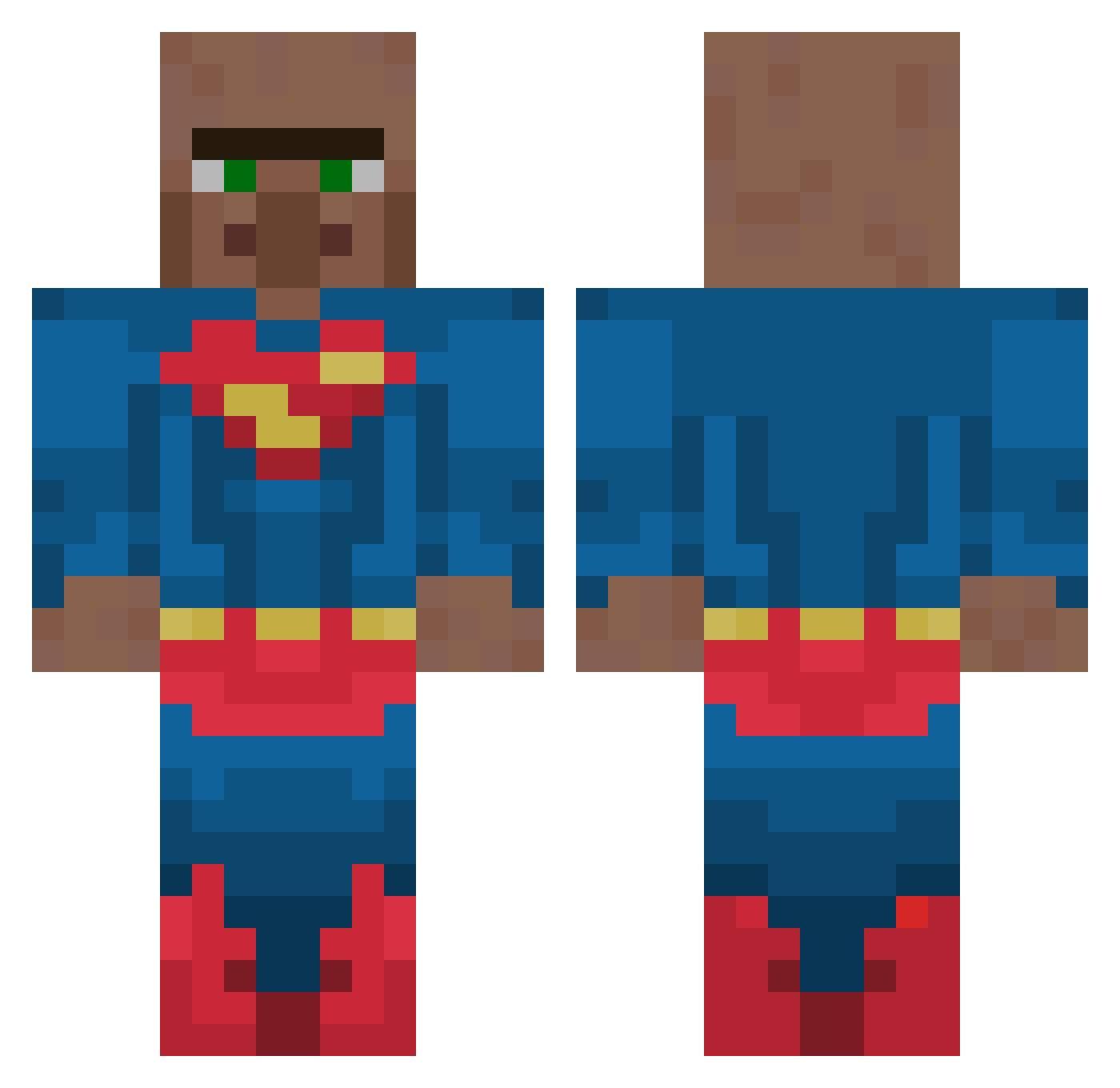
Current Minecraft skin of the player GiannisPantazis, loaded from the official Mojang API. Rotate the 3D model with your mouse or finger, then download the skin as a PNG file and use it in Minecraft: Bedrock Edition or Java Edition for free. When GiannisPantazis changes their skin, this page updates automatically and the old skin stays in the history below.
Other players with this skin (130)
GiannisPantazis was the 45th player we have seen with this skin, first spotted on 23.08.2026. The same skin was seen on these players. Open a nickname to see their current skin and skin history.
 RobisBb Qbula beavizz Rayanash xinoZkl bert5512 instantfail_L SupermanVillager Yoya206 Allux33 Pervasiz
 ratatouile
 TlayMC
 TigerV23 mungaeh NibaDE 1mansquad_
 Ridd1er101 grislylily55119 BigTargetBoss ChezWhiz MrReduxo AlessaLecter Znake83 Strutshalsen AdmiralUltra P0ck3t72 Pacow13 KritoZzZz Bango_MangoNr1 ArlingtonSpecial zVerklickt_ huni2197 MA12138 ThePlagueDoc hhs0201 3ly__ CherryPepis MengelLegend
 Hello123456781 MUROWANACEGLA babypino
 sonnywarriors rester_kawaine fsnuked Araszcn EpicEemil
 TF34_ GeneralKingpin manny157 FishAGibbs 33ltiq BAZ6800 Lord_wex wrld4lux CrazyPizza1039 NOGmason Kampevoll Jafex_11 Joppegamer
More Superman Minecraft skins
How to install the GiannisPantazis skin
- Press the Download button above to save the skin as a PNG file.
- Minecraft: Bedrock Edition (PE): open the Dressing Room from the main menu (or tap your character → Edit Character), go to Classic Skins → Owned, press the + (new skin) button, choose the downloaded PNG and pick the Classic (Steve) model. Works on PC and mobile; consoles cannot import custom skins.
- Minecraft: Java Edition: open the Minecraft Launcher, go to the Skins tab, click New Skin, load the PNG, pick the Classic (Steve) model and press Save & Use. You can also upload it at minecraft.net → Profile → Change Skin.
The skin does not show up after import - what should I do?
Restart Minecraft and open the Dressing Room again - imported skins sometimes appear only after a restart. Also make sure you selected the imported skin and picked the Classic (Steve) model.
Which model should I choose, Classic or Slim?
This skin is designed for the Classic (Steve) model. If you pick the wrong model, the arms of the skin will look stretched or squeezed.
Is the skin of GiannisPantazis free to download?
Yes. Press Download, save the PNG file and use it in Minecraft: Bedrock Edition or Java Edition - no payment or registration needed. The skin also works on multiplayer servers and Realms.
More skins
Looking for more? Go back to all Minecraft skins and check the top skins of the week, month and all time, or find any player's skin by nickname.