
Ghostly_Onyx68 - Minecraft Skins & Skin History
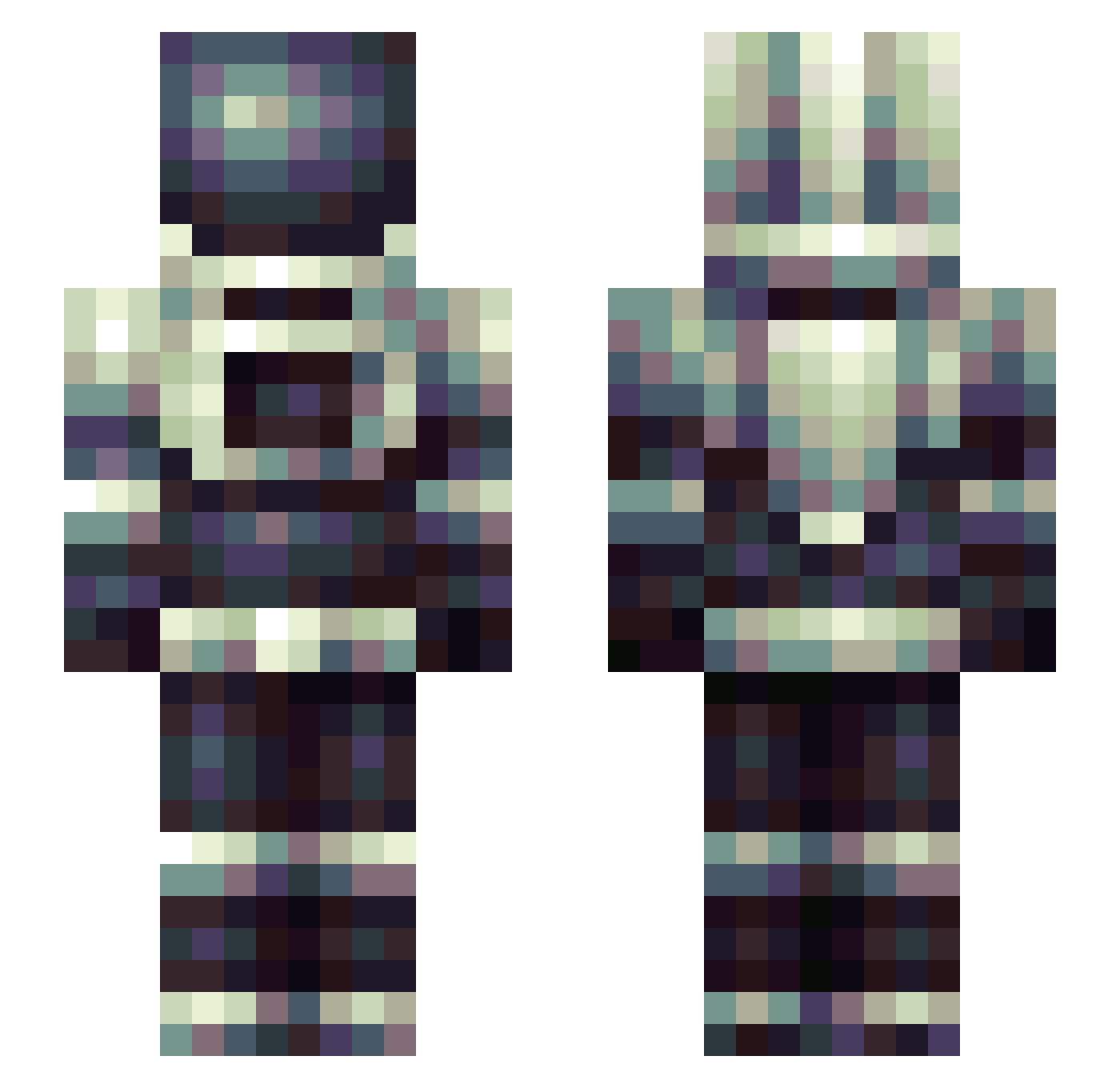
Current Minecraft skin of the player Ghostly_Onyx68, loaded from the official Mojang API. Rotate the 3D model with your mouse or finger, then download the skin as a PNG file and use it in Minecraft: Bedrock Edition or Java Edition for free. When Ghostly_Onyx68 changes their skin, this page updates automatically and the old skin stays in the history below.
Other players with this skin (245)
Ghostly_Onyx68 was the 53rd player we have seen with this skin, first spotted on 16.08.2026. The same skin was seen on these players. Open a nickname to see their current skin and skin history.
 PeenoyBoi DropSmile phantasythenoob Demreso Tryfo123 crowler_ Kraeuterwickel YsFM14 Qwertyz1 THEEGGONTHESPACE Apoptosome Shuvi22 2pac_1610 BA_4262 PirateMex Ultravioletray_ SureFire58_ PaTriX_PlayS ZoobCaboose tentaclebeat Doomsday77 Sevded Sigh42 NickTheFellow LordNorticus Graveyardlocal Wilnamax infinityhack777 SoyLord Ca1lahan predatorm2 Der_Krasse_Jim
 TacticGravity Celloplayer34 MangoBonBon04 alleveFPS Grimly Bluffing13 ValidEntity Grillon657tendre Sanguisugent Steinsson xaveroos ES5515 polarsix JonahB ZiNaps Edoxia72 highfrquency TyvinceC Seiphima DanproT Soul_Reaper1 vegas_AI brunair23 Luma_29 Fire_Faerie InfamousNoodle
 Jafuso CustomGladiator
More Spacesuit Minecraft skins
How to install the Ghostly_Onyx68 skin
- Press the Download button above to save the skin as a PNG file.
- Minecraft: Bedrock Edition (PE): open the Dressing Room from the main menu (or tap your character → Edit Character), go to Classic Skins → Owned, press the + (new skin) button, choose the downloaded PNG and pick the Slim (Alex) model. Works on PC and mobile; consoles cannot import custom skins.
- Minecraft: Java Edition: open the Minecraft Launcher, go to the Skins tab, click New Skin, load the PNG, pick the Slim (Alex) model and press Save & Use. You can also upload it at minecraft.net → Profile → Change Skin.
The skin does not show up after import - what should I do?
Restart Minecraft and open the Dressing Room again - imported skins sometimes appear only after a restart. Also make sure you selected the imported skin and picked the Slim (Alex) model.
Which model should I choose, Classic or Slim?
This skin is designed for the Slim (Alex) model. If you pick the wrong model, the arms of the skin will look stretched or squeezed.
Is the skin of Ghostly_Onyx68 free to download?
Yes. Press Download, save the PNG file and use it in Minecraft: Bedrock Edition or Java Edition - no payment or registration needed. The skin also works on multiplayer servers and Realms.
More skins
Looking for more? Go back to all Minecraft skins and check the top skins of the week, month and all time, or find any player's skin by nickname.