
Geaner_9 - Minecraft Skins & Skin History
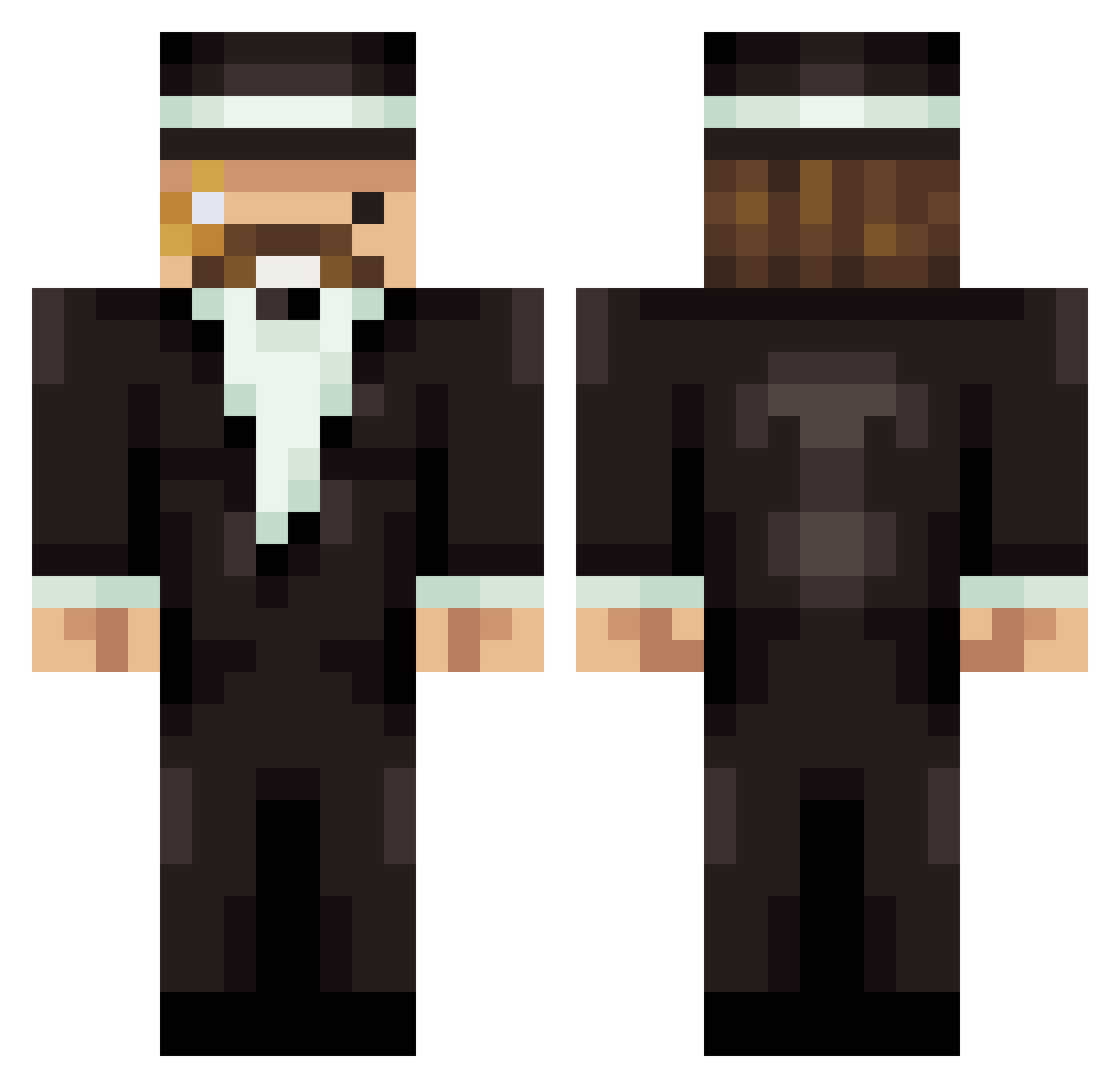
Current Minecraft skin of the player Geaner_9, loaded from the official Mojang API. Rotate the 3D model with your mouse or finger, then download the skin as a PNG file and use it in Minecraft: Bedrock Edition or Java Edition for free. When Geaner_9 changes their skin, this page updates automatically and the old skin stays in the history below.
Other players with this skin (101)
Geaner_9 was the 25th player we have seen with this skin, first spotted on 02.09.2026. The same skin was seen on these players. Open a nickname to see their current skin and skin history.
 maidoon caduw okeq
 robyto DonutDuke szkolnystrzelec CaptainMukuri DieRenteEnte Jrodnin VegetaPL iNakzu CNTPD Gaplay Rhlym cammyb1 Than1 Babotrain_08 Kerem208 NoooGooo HTG12456 baymire Acquuit Ismael89 qaming Gaddy Waesucks Nicko_Mitaro Nizzy124 onbed LeGrandCigar cravingchickfila ZeroGravity Bodeg Solidko zeliturrinii J0chen_ tonky0 SgtNuggz Furpz nickieslayer21 JPS_Clan MoonShinKR Luke90123 Apinha007 Juicy008 Johnneyz SercanZurna DavidElPatron BurakAskan Vecreep
 _Barcode___ ImBillyBobJoe 11A1 tomas231 Gofer_ek phil_sxak Baris_Reyiz KonaldRoeman tux_0000 LouisDuy
More Mumbo Jumbo Minecraft skins
How to install the Geaner_9 skin
- Press the Download button above to save the skin as a PNG file.
- Minecraft: Bedrock Edition (PE): open the Dressing Room from the main menu (or tap your character → Edit Character), go to Classic Skins → Owned, press the + (new skin) button, choose the downloaded PNG and pick the Classic (Steve) model. Works on PC and mobile; consoles cannot import custom skins.
- Minecraft: Java Edition: open the Minecraft Launcher, go to the Skins tab, click New Skin, load the PNG, pick the Classic (Steve) model and press Save & Use. You can also upload it at minecraft.net → Profile → Change Skin.
The skin does not show up after import - what should I do?
Restart Minecraft and open the Dressing Room again - imported skins sometimes appear only after a restart. Also make sure you selected the imported skin and picked the Classic (Steve) model.
Which model should I choose, Classic or Slim?
This skin is designed for the Classic (Steve) model. If you pick the wrong model, the arms of the skin will look stretched or squeezed.
Is the skin of Geaner_9 free to download?
Yes. Press Download, save the PNG file and use it in Minecraft: Bedrock Edition or Java Edition - no payment or registration needed. The skin also works on multiplayer servers and Realms.
More skins
Looking for more? Go back to all Minecraft skins and check the top skins of the week, month and all time, or find any player's skin by nickname.