
GUSEHDDL - Minecraft Skins & Skin History
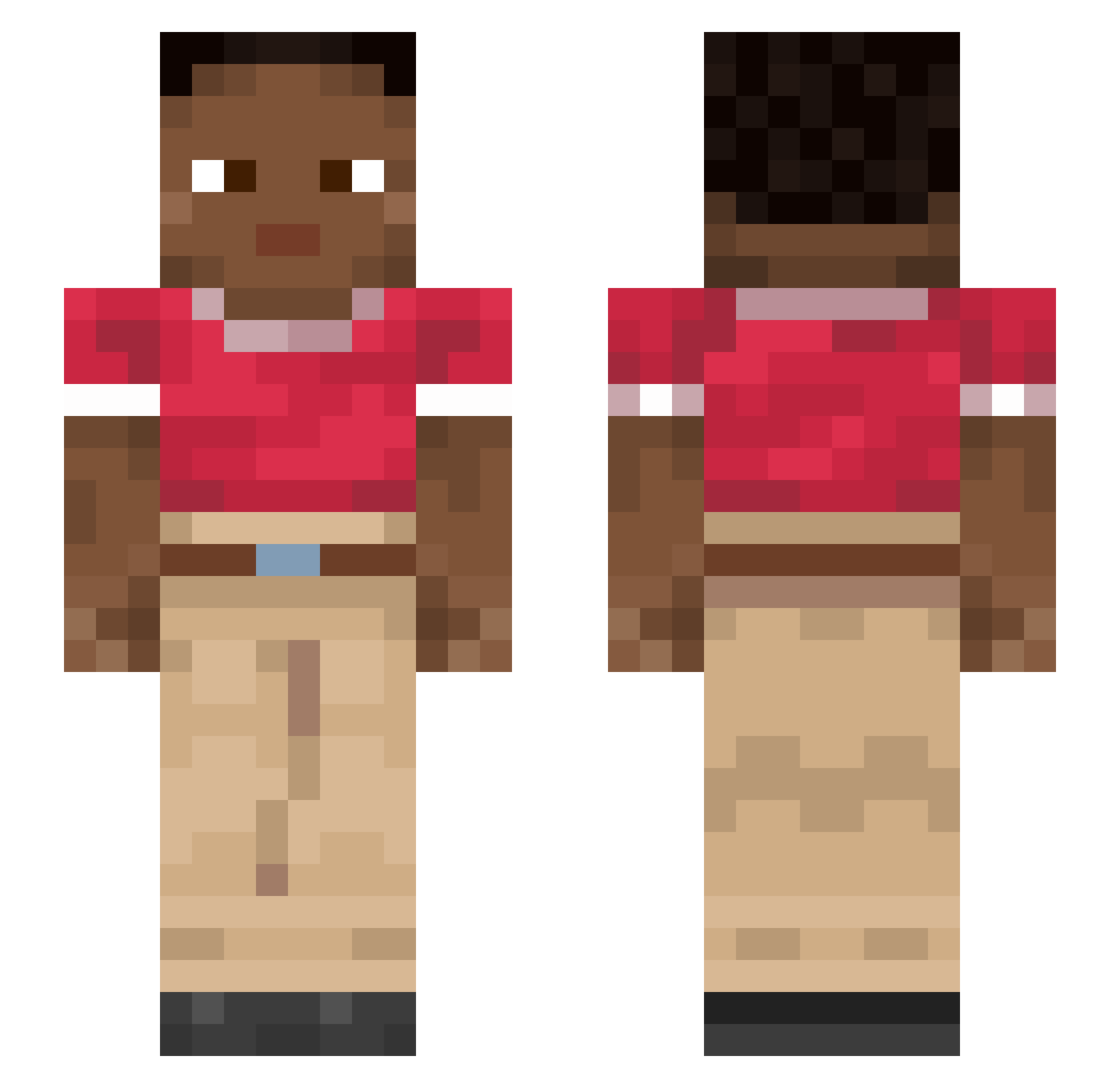
Current Minecraft skin of the player GUSEHDDL, loaded from the official Mojang API. Rotate the 3D model with your mouse or finger, then download the skin as a PNG file and use it in Minecraft: Bedrock Edition or Java Edition for free. When GUSEHDDL changes their skin, this page updates automatically and the old skin stays in the history below.
Other players with this skin (915)
GUSEHDDL was the 155th player we have seen with this skin, first spotted on 12.08.2026. The same skin was seen on these players. Open a nickname to see their current skin and skin history.
 rampick Tuberculosis Exust DrPepppr Stropping HeitH777 Rupturing Roni445 Thunor Penetralia lincster1 SARILER ANESTIS69 slushed Gillenia Recitatif a0tls danigameZ disporting MashallahSebi Gapped BreadBoi000 passepied Sadite Parachrose mikki2001 HoverCar TaterTotLord Uncombinable stepbrothers GitanicoGamer777 Pirogen Goldeye amaxacl PACHOULI Shakes1114 Tofuria anemotaxis Gabrys2009 Fell RIVERMAN
 DannyTheG06
 pxrzy Tswana Kite_Man diarrhea Robisvaldo Toxophilite Coalface AsianFiddler123 TwistingTexas74
 OHM012 Anoil TEETERS jo20040125
 arielelimelech avadavat 003_ thatMrLemon Bumblebees
How to install the GUSEHDDL skin
- Press the Download button above to save the skin as a PNG file.
- Minecraft: Bedrock Edition (PE): open the Dressing Room from the main menu (or tap your character → Edit Character), go to Classic Skins → Owned, press the + (new skin) button, choose the downloaded PNG and pick the Slim (Alex) model. Works on PC and mobile; consoles cannot import custom skins.
- Minecraft: Java Edition: open the Minecraft Launcher, go to the Skins tab, click New Skin, load the PNG, pick the Slim (Alex) model and press Save & Use. You can also upload it at minecraft.net → Profile → Change Skin.
The skin does not show up after import - what should I do?
Restart Minecraft and open the Dressing Room again - imported skins sometimes appear only after a restart. Also make sure you selected the imported skin and picked the Slim (Alex) model.
Which model should I choose, Classic or Slim?
This skin is designed for the Slim (Alex) model. If you pick the wrong model, the arms of the skin will look stretched or squeezed.
Is the skin of GUSEHDDL free to download?
Yes. Press Download, save the PNG file and use it in Minecraft: Bedrock Edition or Java Edition - no payment or registration needed. The skin also works on multiplayer servers and Realms.
More skins
Looking for more? Go back to all Minecraft skins and check the top skins of the week, month and all time, or find any player's skin by nickname.