
Fudgeman02 - Minecraft Skins & Skin History
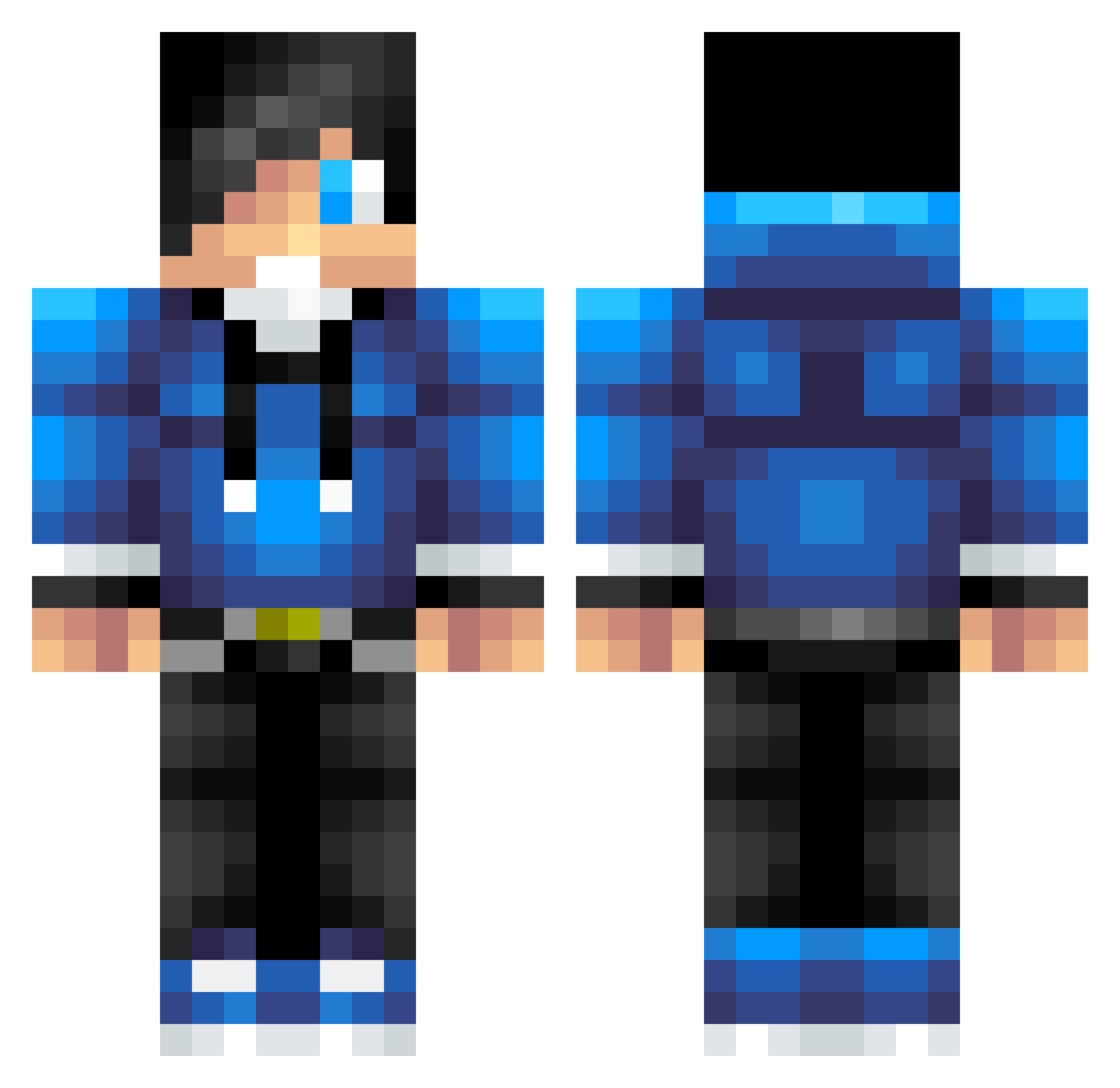
Current Minecraft skin of the player Fudgeman02, loaded from the official Mojang API. Rotate the 3D model with your mouse or finger, then download the skin as a PNG file and use it in Minecraft: Bedrock Edition or Java Edition for free. When Fudgeman02 changes their skin, this page updates automatically and the old skin stays in the history below.
Other players with this skin (623)
Fudgeman02 was the 73rd player we have seen with this skin, first spotted on 04.08.2026. The same skin was seen on these players. Open a nickname to see their current skin and skin history.
 mariuspm04 Ahmedali5432 littlestinker12 miertijn bergenseren shnyggoV2 CipasTheGamer rubentenkate callumroid2 Rinlix Woods158 Dectrinic _0h_ junhe22 Drake523 DEGUUSB Roefpoof freechri BaSe_R3FLEXZz weeluka03 jacobsa12 app235 ethanhansen2 ConstiP Ghouldigger02 theawesomedude49 ErikVDM KnoxyZplayZ astep72 Wolfboy5454 evilshadow12 AdeDum Wild_Something onlineman01 ribery7payphone SethPG BlattVomBaum TheEnderGames TOXICBEAST42 puki2003 Habonist TheSmoothSnipez cooljack9259 Nayder1 Dench10 JOSHUA3414 Potato499 seffy2004 ertyughjk legotennis Kiefer133 C_napkin quintensousa AmazingPlaysMC MARCHUSSR Elias_Strandjord CallMePreY gmod136 nimbus888 warrior132001
How to install the Fudgeman02 skin
- Press the Download button above to save the skin as a PNG file.
- Minecraft: Bedrock Edition (PE): open the Dressing Room from the main menu (or tap your character → Edit Character), go to Classic Skins → Owned, press the + (new skin) button, choose the downloaded PNG and pick the Classic (Steve) model. Works on PC and mobile; consoles cannot import custom skins.
- Minecraft: Java Edition: open the Minecraft Launcher, go to the Skins tab, click New Skin, load the PNG, pick the Classic (Steve) model and press Save & Use. You can also upload it at minecraft.net → Profile → Change Skin.
The skin does not show up after import - what should I do?
Restart Minecraft and open the Dressing Room again - imported skins sometimes appear only after a restart. Also make sure you selected the imported skin and picked the Classic (Steve) model.
Which model should I choose, Classic or Slim?
This skin is designed for the Classic (Steve) model. If you pick the wrong model, the arms of the skin will look stretched or squeezed.
Is the skin of Fudgeman02 free to download?
Yes. Press Download, save the PNG file and use it in Minecraft: Bedrock Edition or Java Edition - no payment or registration needed. The skin also works on multiplayer servers and Realms.
More skins
Looking for more? Go back to all Minecraft skins and check the top skins of the week, month and all time, or find any player's skin by nickname.