
Franow2013 - Minecraft Skins & Skin History
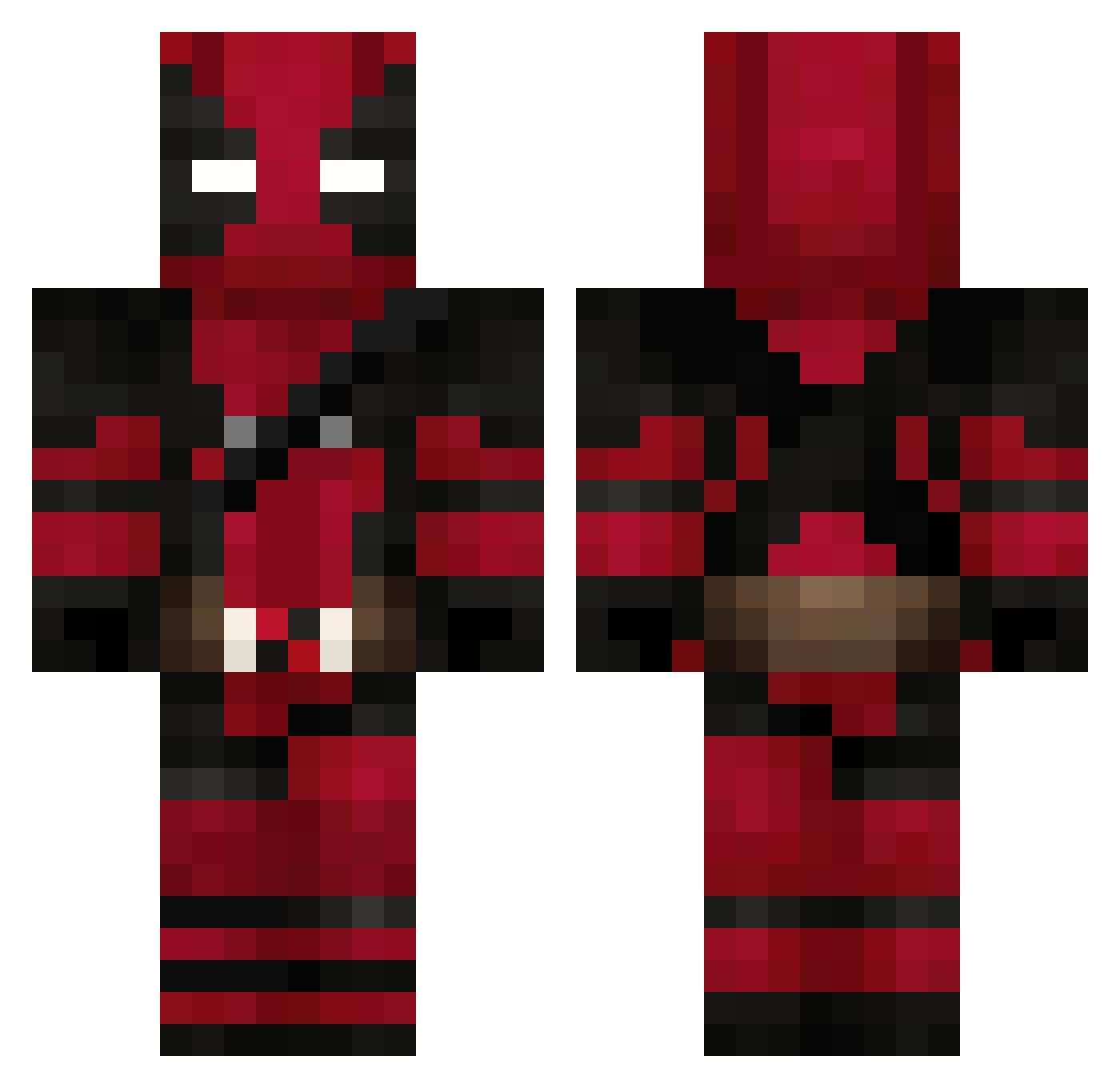
Current Minecraft skin of the player Franow2013, loaded from the official Mojang API. Rotate the 3D model with your mouse or finger, then download the skin as a PNG file and use it in Minecraft: Bedrock Edition or Java Edition for free. When Franow2013 changes their skin, this page updates automatically and the old skin stays in the history below.
Other players with this skin (842)
Franow2013 was the 685th player we have seen with this skin, first spotted on 27.10.2026. The same skin was seen on these players. Open a nickname to see their current skin and skin history.
 emokan20 rOtten3579 Samuel66512 cmdr_bly TheOmiix God_Slayer34 TOTOMATO7 PashaaX61 KinglyXD Migs091002 Kengamer017 Izcann gu1t0x SorenTaylor IminAweofMyTism Ty_mouton Edravenae DekaW0LFF JhonDyneOF xSoldad vinnicius1 DragonDaddy82 shademir Mic1130 ComanderPipovitz TobiasNoFlias Cel_42 PoluxAl The_redghost09 ElChe53 ABRISS_BIRNE amirultra Major_Metallicon Cams1305 RuoBaioO Frutyi Gutierrez122 Armanjack Dobrinha Philxxxx13 J_Slate23 TermosEs coolbyo Vypere04 ging3rnut RedstoneIng1 WhySoSadBoy cosplamaric Kinsc UmutZeki TheRealPrayer _spaziale_ SerejaLazarev MTH7REI Liquid_k1ll3r T1Kun Mjhavary W1LFR3D71 KURO_japan Portilla4
More Deadpool Minecraft skins
How to install the Franow2013 skin
- Press the Download button above to save the skin as a PNG file.
- Minecraft: Bedrock Edition (PE): open the Dressing Room from the main menu (or tap your character → Edit Character), go to Classic Skins → Owned, press the + (new skin) button, choose the downloaded PNG and pick the Classic (Steve) model. Works on PC and mobile; consoles cannot import custom skins.
- Minecraft: Java Edition: open the Minecraft Launcher, go to the Skins tab, click New Skin, load the PNG, pick the Classic (Steve) model and press Save & Use. You can also upload it at minecraft.net → Profile → Change Skin.
The skin does not show up after import - what should I do?
Restart Minecraft and open the Dressing Room again - imported skins sometimes appear only after a restart. Also make sure you selected the imported skin and picked the Classic (Steve) model.
Which model should I choose, Classic or Slim?
This skin is designed for the Classic (Steve) model. If you pick the wrong model, the arms of the skin will look stretched or squeezed.
Is the skin of Franow2013 free to download?
Yes. Press Download, save the PNG file and use it in Minecraft: Bedrock Edition or Java Edition - no payment or registration needed. The skin also works on multiplayer servers and Realms.
More skins
Looking for more? Go back to all Minecraft skins and check the top skins of the week, month and all time, or find any player's skin by nickname.