
Fourfingerz - Minecraft Skins & Skin History
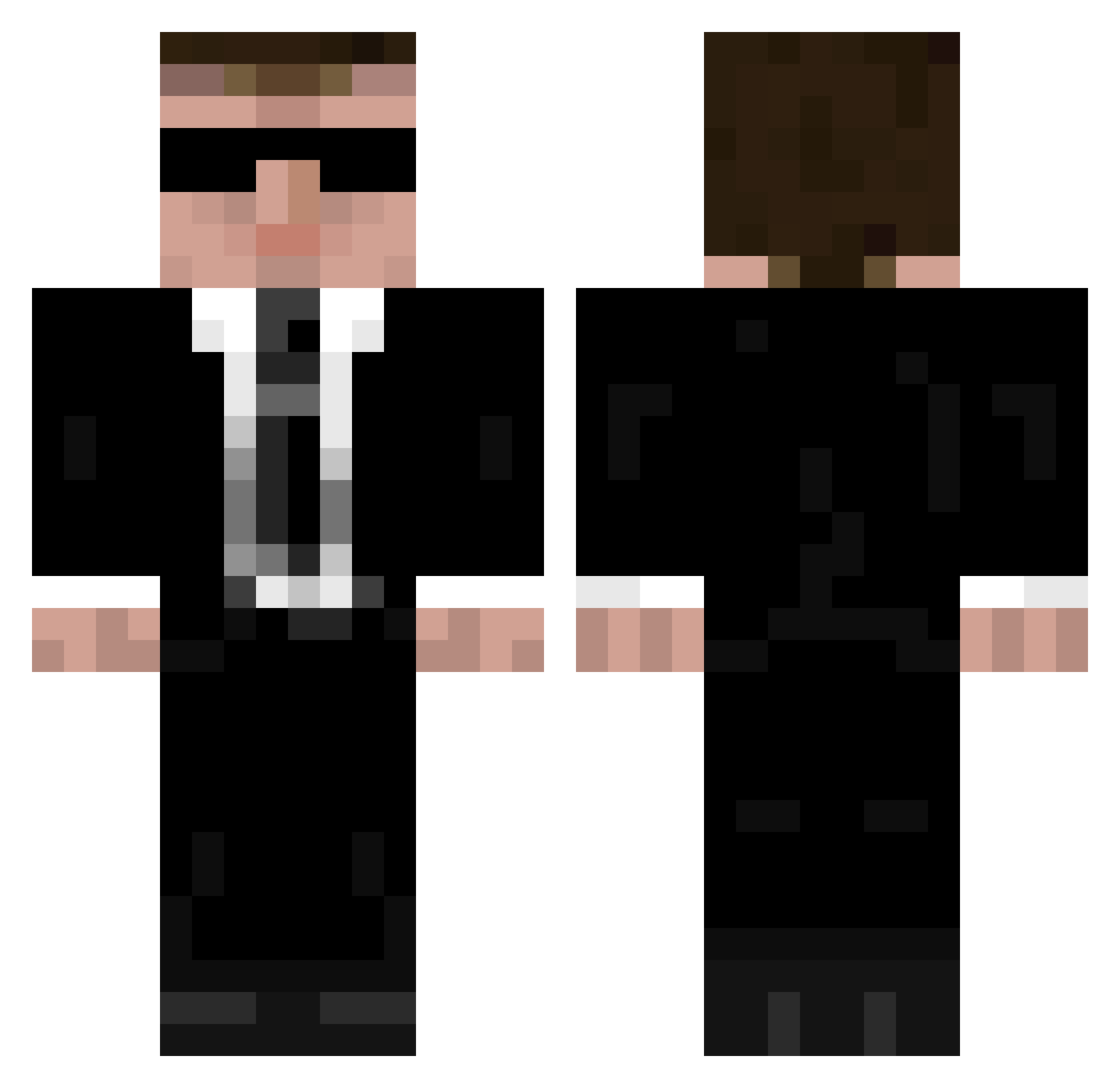
Current Minecraft skin of the player Fourfingerz, loaded from the official Mojang API. Rotate the 3D model with your mouse or finger, then download the skin as a PNG file and use it in Minecraft: Bedrock Edition or Java Edition for free. When Fourfingerz changes their skin, this page updates automatically and the old skin stays in the history below.
Other players with this skin (948)
Fourfingerz was the 709th player we have seen with this skin, first spotted on 04.10.2026. The same skin was seen on these players. Open a nickname to see their current skin and skin history.
 Nyroon dymon out_of_kontrol Matt_Demon Plumbtree JWH8 masterrift32 RealDimi Tupperwars olde_12345 Dood246 toxiccash Georged100 ronnyju Steffen34 PerryYu yakbabbler x2harry TheAmazingRobot Derawin sexidexi Nowheyr Waterwalker212 VanadiumXY kantonishen Etsumy MrProcrastinator PLOOOKI SimonSays77 Nedmeister niteryder Blackdeath28 TheWhammo interfaqs iiMaGiCiaN britishseal Chris_King97 pelumax naokinaokiryota asceion Tymvas Silvan_0816 Williot2012 tABD rororororo7 jckruz fsusmithc2 dantenorio93 xCaZuaaL LMWISBACK Shadonymous UnderCoverIsBad Brianjohnfart IceShad0w Ashes_skull hyperthermogenic Lucky110607 Denden_nik Bloodylazybeast papinnie
More Agent 47 Minecraft skins
How to install the Fourfingerz skin
- Press the Download button above to save the skin as a PNG file.
- Minecraft: Bedrock Edition (PE): open the Dressing Room from the main menu (or tap your character → Edit Character), go to Classic Skins → Owned, press the + (new skin) button, choose the downloaded PNG and pick the Classic (Steve) model. Works on PC and mobile; consoles cannot import custom skins.
- Minecraft: Java Edition: open the Minecraft Launcher, go to the Skins tab, click New Skin, load the PNG, pick the Classic (Steve) model and press Save & Use. You can also upload it at minecraft.net → Profile → Change Skin.
The skin does not show up after import - what should I do?
Restart Minecraft and open the Dressing Room again - imported skins sometimes appear only after a restart. Also make sure you selected the imported skin and picked the Classic (Steve) model.
Which model should I choose, Classic or Slim?
This skin is designed for the Classic (Steve) model. If you pick the wrong model, the arms of the skin will look stretched or squeezed.
Is the skin of Fourfingerz free to download?
Yes. Press Download, save the PNG file and use it in Minecraft: Bedrock Edition or Java Edition - no payment or registration needed. The skin also works on multiplayer servers and Realms.
More skins
Looking for more? Go back to all Minecraft skins and check the top skins of the week, month and all time, or find any player's skin by nickname.