
ForsikYT - Minecraft Skins & Skin History
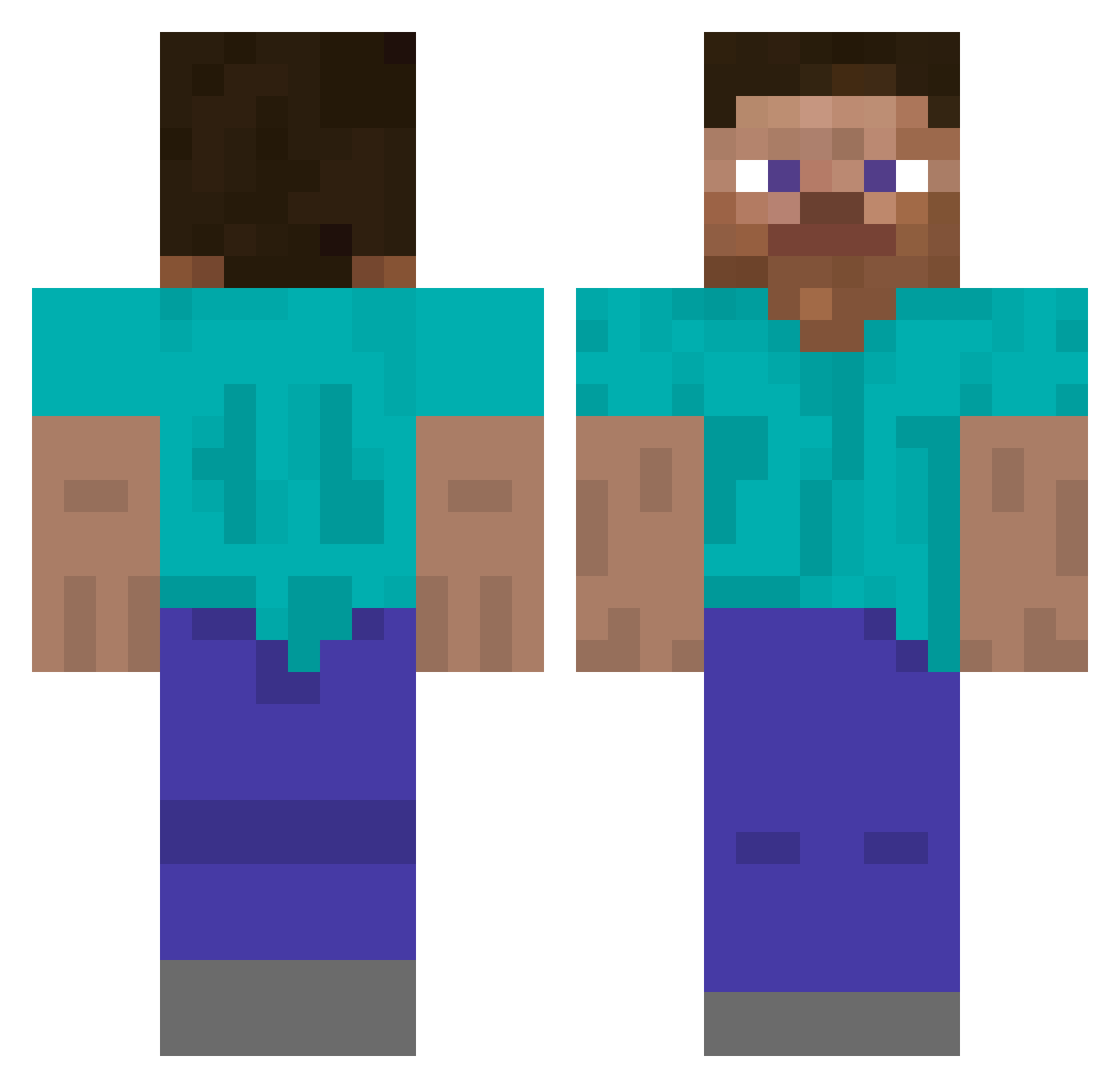
Current Minecraft skin of the player ForsikYT, loaded from the official Mojang API. Rotate the 3D model with your mouse or finger, then download the skin as a PNG file and use it in Minecraft: Bedrock Edition or Java Edition for free. When ForsikYT changes their skin, this page updates automatically and the old skin stays in the history below.
Other players with this skin (509)
ForsikYT was the 129th player we have seen with this skin, first spotted on 21.08.2026. The same skin was seen on these players. Open a nickname to see their current skin and skin history.
 ParabolaPanda squidWizard
 paopaoch VTolki W11Z4RD
 Vesperti1ion Hm9an poupouuche 5G__Victim pappylikecoco Redpilote test296 immovingg XXXXXXXXXXXXXXZX Wurzi pigcclf KuyKiste Fudgyfish wayie BruhDefender Dojinongaku Nouq smackdabooty Blue_Imposter tangtangxs Seigneur_Prout34 ALittlePeckish
 Stennos00 saranderson Reifu0 chengnanJm Junfangs F26pink 78mph l363l Axter TonyTTATT suineg123 ArtMed99 LeanLankyDaddy ilikeallpizza tymokoks0307 AllumeLecran Weaponer613 NemesisG5 ynxball Vruuno Pefsa Elipsiss3 a6v6a luddeluff Boredom_inc Kelvin0112 TZM_Kriss MercyXTD eret135 BoogerBreath Black_platinum_ Generuim mrchud88
How to install the ForsikYT skin
- Press the Download button above to save the skin as a PNG file.
- Minecraft: Bedrock Edition (PE): open the Dressing Room from the main menu (or tap your character → Edit Character), go to Classic Skins → Owned, press the + (new skin) button, choose the downloaded PNG and pick the Classic (Steve) model. Works on PC and mobile; consoles cannot import custom skins.
- Minecraft: Java Edition: open the Minecraft Launcher, go to the Skins tab, click New Skin, load the PNG, pick the Classic (Steve) model and press Save & Use. You can also upload it at minecraft.net → Profile → Change Skin.
The skin does not show up after import - what should I do?
Restart Minecraft and open the Dressing Room again - imported skins sometimes appear only after a restart. Also make sure you selected the imported skin and picked the Classic (Steve) model.
Which model should I choose, Classic or Slim?
This skin is designed for the Classic (Steve) model. If you pick the wrong model, the arms of the skin will look stretched or squeezed.
Is the skin of ForsikYT free to download?
Yes. Press Download, save the PNG file and use it in Minecraft: Bedrock Edition or Java Edition - no payment or registration needed. The skin also works on multiplayer servers and Realms.
More skins
Looking for more? Go back to all Minecraft skins and check the top skins of the week, month and all time, or find any player's skin by nickname.