
Fenrir0704 - Minecraft Skins & Skin History
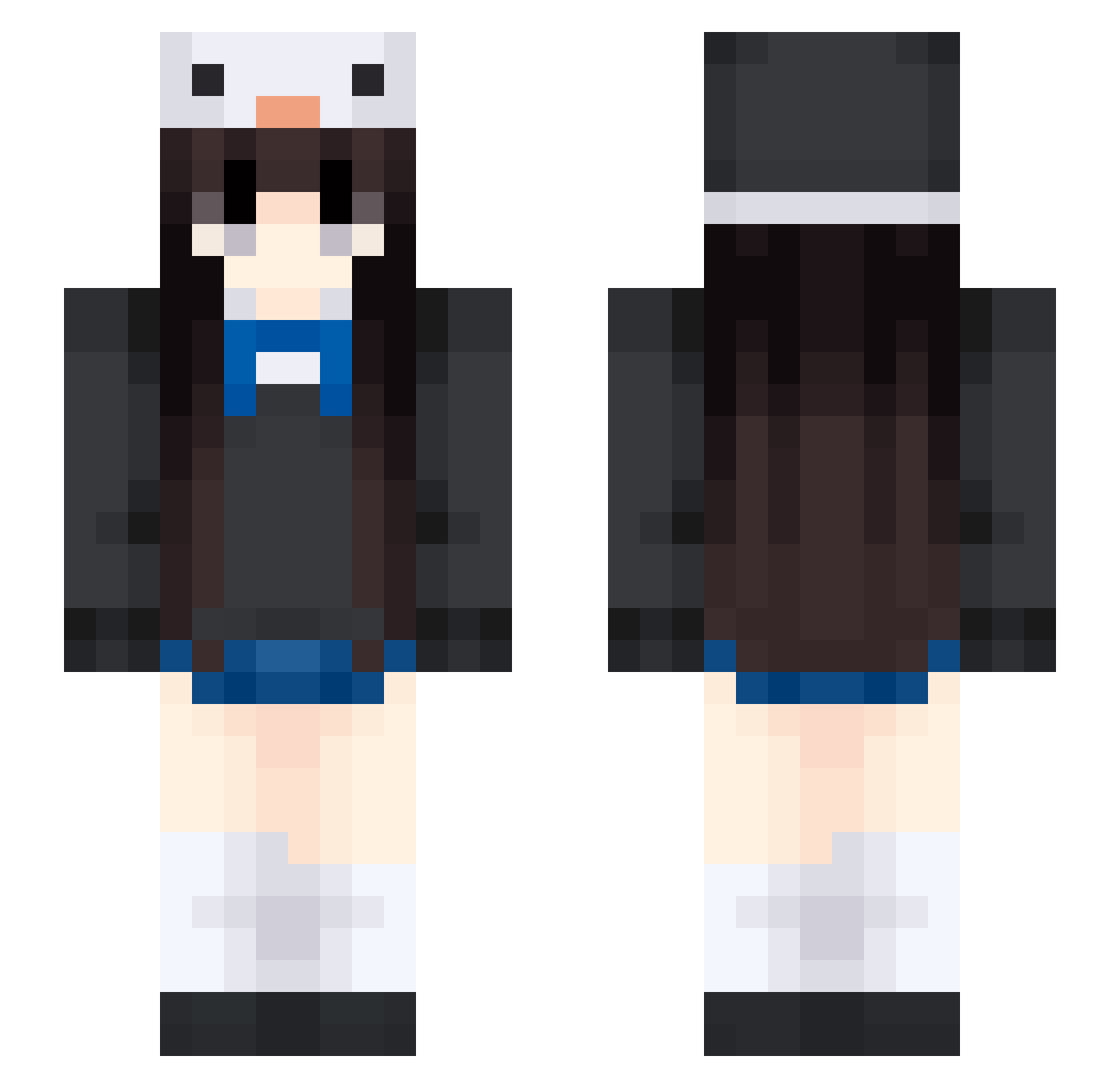
Current Minecraft skin of the player Fenrir0704, loaded from the official Mojang API. Rotate the 3D model with your mouse or finger, then download the skin as a PNG file and use it in Minecraft: Bedrock Edition or Java Edition for free. When Fenrir0704 changes their skin, this page updates automatically and the old skin stays in the history below.
Other players with this skin (453)
Fenrir0704 was the 97th player we have seen with this skin, first spotted on 18.08.2026. The same skin was seen on these players. Open a nickname to see their current skin and skin history.
 ZobiKura wangwang111 katie6978
 pikadoudou wushuiboluo Puffer111 Minattw AztekenKartoffel Smallhill03 valeboo TempStar yangcai520 DDDawn R1lD occupy1001 Voidd01 EricFeng2 MoshiiU RoxyRut loulouella berry_a_0 freedomdm kokeshi5555 dearUncleJohn Powerfulsong roastytoasty0 beakobea mlawn21 LWW330 miette0v0
 moyu177 Ahouaa WaryAssassin H23guerrier_x nevyvy14 Jeanix31 UToFu Orlondi emilka_2 iShyrx Yu_wan_H miriamroose SniperGirl MoonLight1497 lichangshou dzziwnee Mike970116 evyx0ii wikzer Murakamih Miracle_Light cvcy ATCCAT whaitGX Eliiiuki_ Camvicky H0sh_ Smooth_Hollow SL_4HGXAw_05_29 Lyricred
More Penguin Hat Minecraft skins
How to install the Fenrir0704 skin
- Press the Download button above to save the skin as a PNG file.
- Minecraft: Bedrock Edition (PE): open the Dressing Room from the main menu (or tap your character → Edit Character), go to Classic Skins → Owned, press the + (new skin) button, choose the downloaded PNG and pick the Slim (Alex) model. Works on PC and mobile; consoles cannot import custom skins.
- Minecraft: Java Edition: open the Minecraft Launcher, go to the Skins tab, click New Skin, load the PNG, pick the Slim (Alex) model and press Save & Use. You can also upload it at minecraft.net → Profile → Change Skin.
The skin does not show up after import - what should I do?
Restart Minecraft and open the Dressing Room again - imported skins sometimes appear only after a restart. Also make sure you selected the imported skin and picked the Slim (Alex) model.
Which model should I choose, Classic or Slim?
This skin is designed for the Slim (Alex) model. If you pick the wrong model, the arms of the skin will look stretched or squeezed.
Is the skin of Fenrir0704 free to download?
Yes. Press Download, save the PNG file and use it in Minecraft: Bedrock Edition or Java Edition - no payment or registration needed. The skin also works on multiplayer servers and Realms.
More skins
Looking for more? Go back to all Minecraft skins and check the top skins of the week, month and all time, or find any player's skin by nickname.