
FDS_solo - Minecraft Skins & Skin History
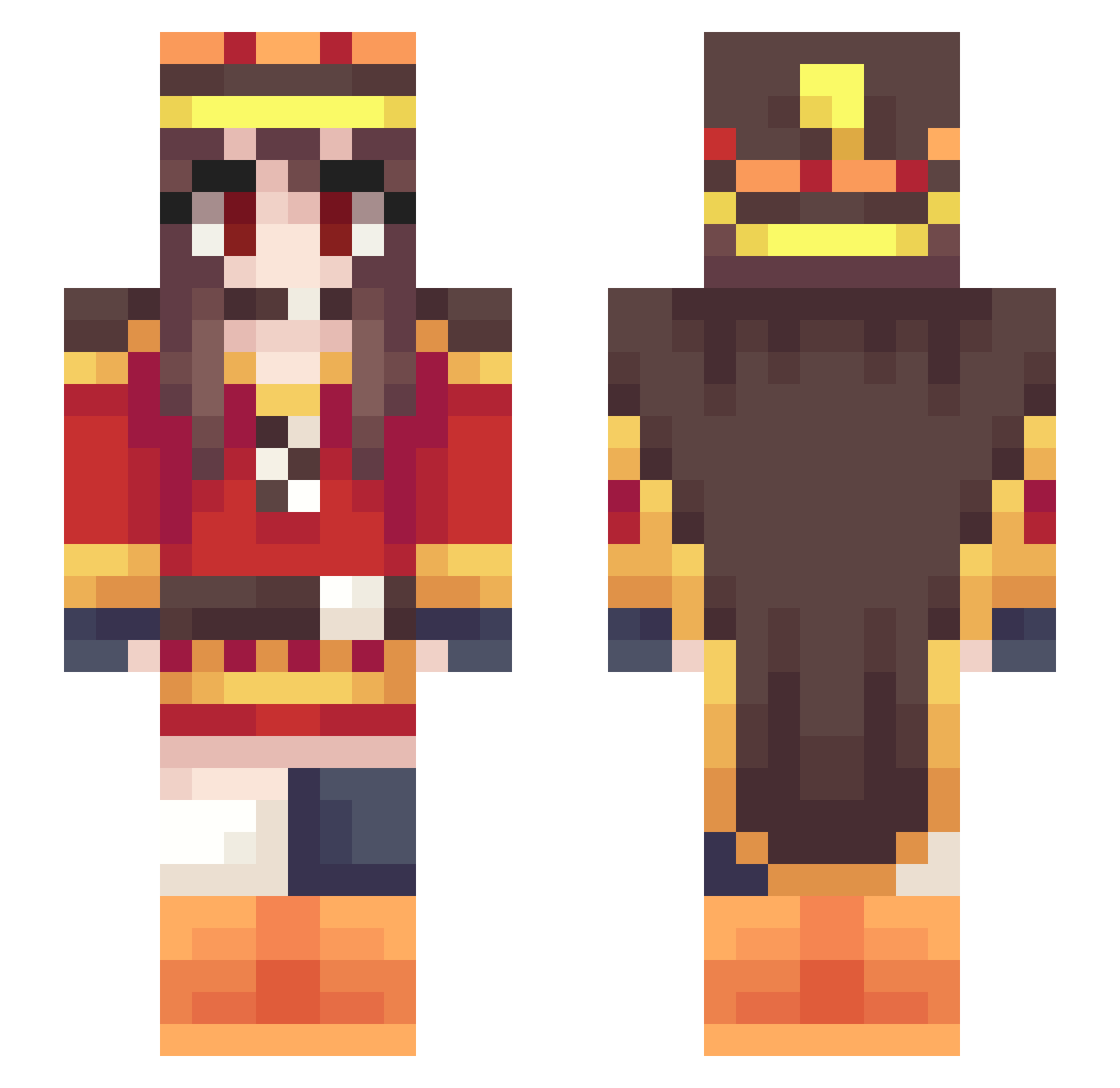
Current Minecraft skin of the player FDS_solo, loaded from the official Mojang API. Rotate the 3D model with your mouse or finger, then download the skin as a PNG file and use it in Minecraft: Bedrock Edition or Java Edition for free. When FDS_solo changes their skin, this page updates automatically and the old skin stays in the history below.
Other players with this skin (302)
FDS_solo was the 139th player we have seen with this skin, first spotted on 12.09.2026. The same skin was seen on these players. Open a nickname to see their current skin and skin history.
 nobarknoonan420 724148 UM_ling Solato111 shizu0802 Bear_Poi Afilak 3466Fennekin Not_AzureZ AbuelitaAsesina xiaoluxxx Cherubini500 FourzeAiman27 Pa_King yasakazu trrrrri Miraaii Polnga04 diamondmob789 KanCtasia joey1709 Cagma Diego0212 Cross_Xii AlonsoBelmont Harmoe_P minami1228 yeeing4869 Hachapury007 AzureZ5051 Dorothy_Haze_ your_senpai_1 Banangi K_R_T EmiliaLoveD Jun_ba Sorafox Hitoshi_0w0_ PointBreak2310 knock33 KABOOMMate jackin232 Er3Wolf ApCisso TimidLemon Ponilek UsedPoro miyabi001 Rmeat wangcaiyo Lorenchiu Ranmarusan10 ghdowe_15 SSRtnz Recca07 JuicySimon NamuEru harurun2525 FredNIV UselessMage
More Royalty Minecraft skins
How to install the FDS_solo skin
- Press the Download button above to save the skin as a PNG file.
- Minecraft: Bedrock Edition (PE): open the Dressing Room from the main menu (or tap your character → Edit Character), go to Classic Skins → Owned, press the + (new skin) button, choose the downloaded PNG and pick the Slim (Alex) model. Works on PC and mobile; consoles cannot import custom skins.
- Minecraft: Java Edition: open the Minecraft Launcher, go to the Skins tab, click New Skin, load the PNG, pick the Slim (Alex) model and press Save & Use. You can also upload it at minecraft.net → Profile → Change Skin.
The skin does not show up after import - what should I do?
Restart Minecraft and open the Dressing Room again - imported skins sometimes appear only after a restart. Also make sure you selected the imported skin and picked the Slim (Alex) model.
Which model should I choose, Classic or Slim?
This skin is designed for the Slim (Alex) model. If you pick the wrong model, the arms of the skin will look stretched or squeezed.
Is the skin of FDS_solo free to download?
Yes. Press Download, save the PNG file and use it in Minecraft: Bedrock Edition or Java Edition - no payment or registration needed. The skin also works on multiplayer servers and Realms.
More skins
Looking for more? Go back to all Minecraft skins and check the top skins of the week, month and all time, or find any player's skin by nickname.