
F4D4 - Minecraft Skins & Skin History
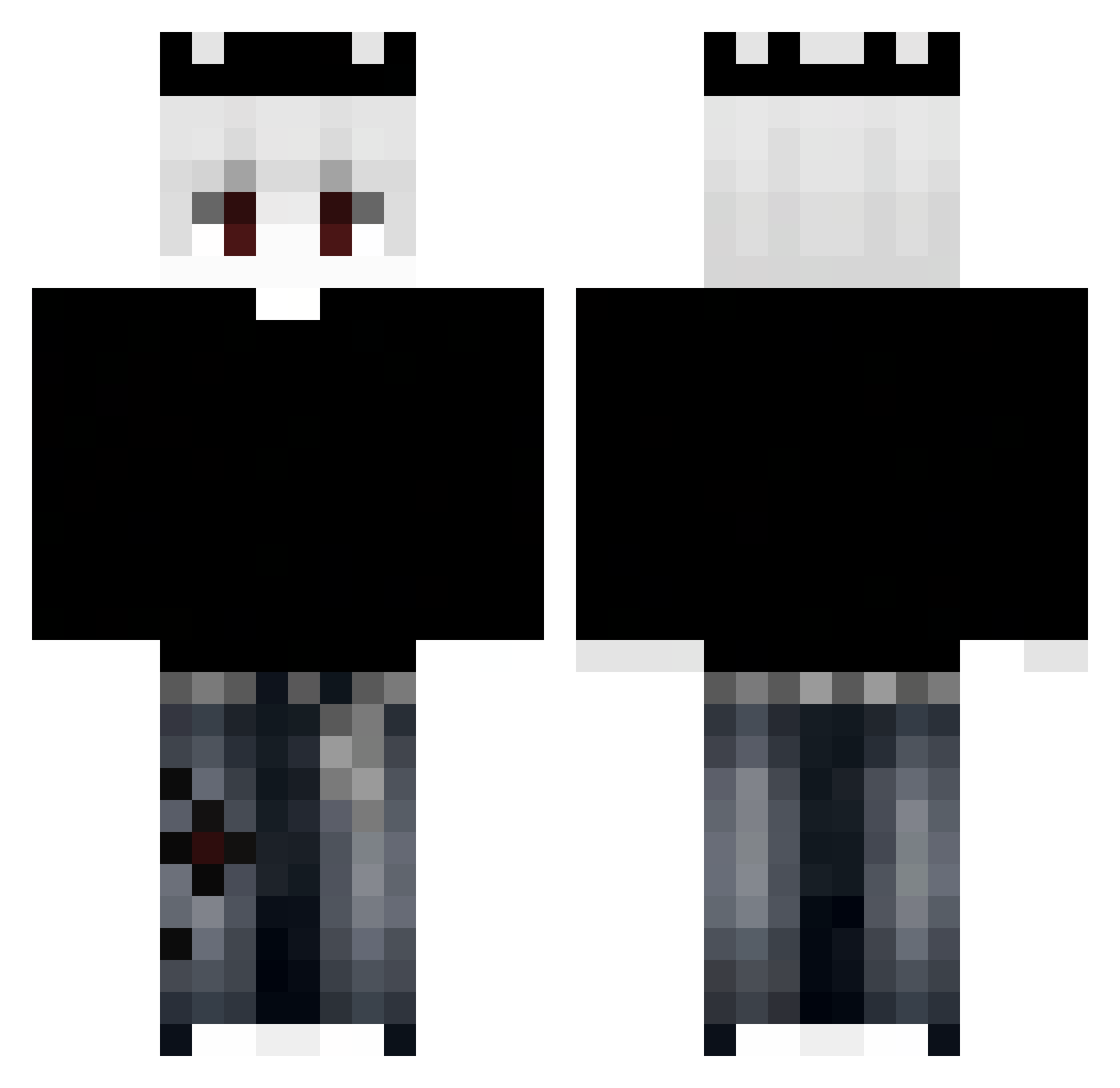
Current Minecraft skin of the player F4D4, loaded from the official Mojang API. Rotate the 3D model with your mouse or finger, then download the skin as a PNG file and use it in Minecraft: Bedrock Edition or Java Edition for free. When F4D4 changes their skin, this page updates automatically and the old skin stays in the history below.
Other players with this skin (345)
F4D4 was the 115th player we have seen with this skin, first spotted on 24.08.2026. The same skin was seen on these players. Open a nickname to see their current skin and skin history.
 vLadimirKOzLIcov abo_slo MarcinOnTop Anchory_ yechan7844 DongHui_2 zelownik Ninjadude7433 Eros__x fusialka amouxo xFuryy_ T0relli Hongpvp Mzzzzzznnnn EVAN130325 Luxfay Turtzzzz
 thorkruth2015 No_idk Pepiih KitKatOnTop_ yujilpbb GodSpeed11_exe Jnbh CHICKEN_YAMYAM ITzBassam Fuzn_ speedyrko2921 GoodxNight38 Suplicado noobskall MTien xFrostis JackpotX11 Zenestia_01 24kvxyeiq_ c0ns4gr4d0 gura0913 SupOrca yoAirq_ SeDiYT GardiaN__ NotAlon3Z santi_1904 MuneebShah_12301 SyloAres sampuscze Ask_DLJef_05_01 Zhuxwang Zamint 89np czux67
 Davidfalba
 juanmeier31 Yokaisenn DucTaiDz Me_Travis ShxdowsX2
 Licensedr
More Grunge Minecraft skins
How to install the F4D4 skin
- Press the Download button above to save the skin as a PNG file.
- Minecraft: Bedrock Edition (PE): open the Dressing Room from the main menu (or tap your character → Edit Character), go to Classic Skins → Owned, press the + (new skin) button, choose the downloaded PNG and pick the Classic (Steve) model. Works on PC and mobile; consoles cannot import custom skins.
- Minecraft: Java Edition: open the Minecraft Launcher, go to the Skins tab, click New Skin, load the PNG, pick the Classic (Steve) model and press Save & Use. You can also upload it at minecraft.net → Profile → Change Skin.
The skin does not show up after import - what should I do?
Restart Minecraft and open the Dressing Room again - imported skins sometimes appear only after a restart. Also make sure you selected the imported skin and picked the Classic (Steve) model.
Which model should I choose, Classic or Slim?
This skin is designed for the Classic (Steve) model. If you pick the wrong model, the arms of the skin will look stretched or squeezed.
Is the skin of F4D4 free to download?
Yes. Press Download, save the PNG file and use it in Minecraft: Bedrock Edition or Java Edition - no payment or registration needed. The skin also works on multiplayer servers and Realms.
More skins
Looking for more? Go back to all Minecraft skins and check the top skins of the week, month and all time, or find any player's skin by nickname.