
Ellanerd - Minecraft Skins & Skin History
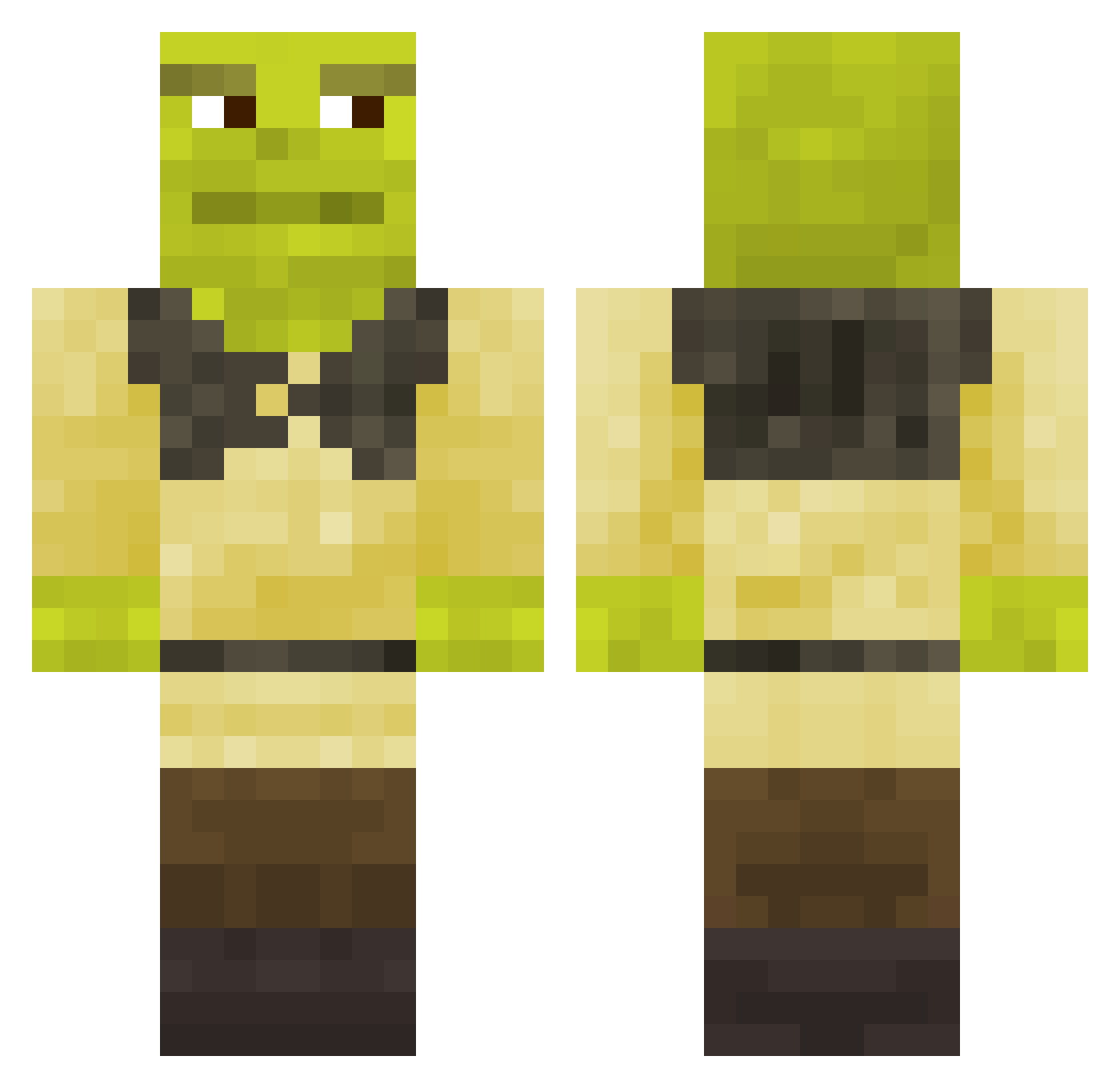
Current Minecraft skin of the player Ellanerd, loaded from the official Mojang API. Rotate the 3D model with your mouse or finger, then download the skin as a PNG file and use it in Minecraft: Bedrock Edition or Java Edition for free. When Ellanerd changes their skin, this page updates automatically and the old skin stays in the history below.
Other players with this skin (910)
Ellanerd was the 820th player we have seen with this skin, first spotted on 08.11.2026. The same skin was seen on these players. Open a nickname to see their current skin and skin history.
 toemalone94 Galaxyolee Melaneau NormalGuy_33 Zilibobka BROKATHEONE Windmill__ Merlin_20 Dank_07 fendervii JaxsonVB_ Exaustia Bastochhe eximius31 DabClty vroooooommmmy Get_good88 Sadida_ TheMrGames777 willcosby69 Neloru rumaroma_ TunaBust Bitoniau Paco412 Dezgore LGD_Bubbel dveree UneChoco RoadManMark Philoy zcb__ Sixtripple Jack11wagner BigBankerMan hayeetley roseavenues Badgeman Fikreta Batman9889 Sr_Gh0st twojstaryez Zack_Noob thnnh treeckoos XAT7C tuomik JOSHUAJORDAN12 MrGamerBoi10 Nopetito UncleFudgeCake XxBig_ShrekxX Grandpaslurpurpp GMACDIK SextusEmpiricus Stingus BeMoreHappyy FightCheddar FBI_MiST kakutiss
More Shrek Minecraft skins
How to install the Ellanerd skin
- Press the Download button above to save the skin as a PNG file.
- Minecraft: Bedrock Edition (PE): open the Dressing Room from the main menu (or tap your character → Edit Character), go to Classic Skins → Owned, press the + (new skin) button, choose the downloaded PNG and pick the Classic (Steve) model. Works on PC and mobile; consoles cannot import custom skins.
- Minecraft: Java Edition: open the Minecraft Launcher, go to the Skins tab, click New Skin, load the PNG, pick the Classic (Steve) model and press Save & Use. You can also upload it at minecraft.net → Profile → Change Skin.
The skin does not show up after import - what should I do?
Restart Minecraft and open the Dressing Room again - imported skins sometimes appear only after a restart. Also make sure you selected the imported skin and picked the Classic (Steve) model.
Which model should I choose, Classic or Slim?
This skin is designed for the Classic (Steve) model. If you pick the wrong model, the arms of the skin will look stretched or squeezed.
Is the skin of Ellanerd free to download?
Yes. Press Download, save the PNG file and use it in Minecraft: Bedrock Edition or Java Edition - no payment or registration needed. The skin also works on multiplayer servers and Realms.
More skins
Looking for more? Go back to all Minecraft skins and check the top skins of the week, month and all time, or find any player's skin by nickname.