
Elitegamer156 - Minecraft Skins & Skin History
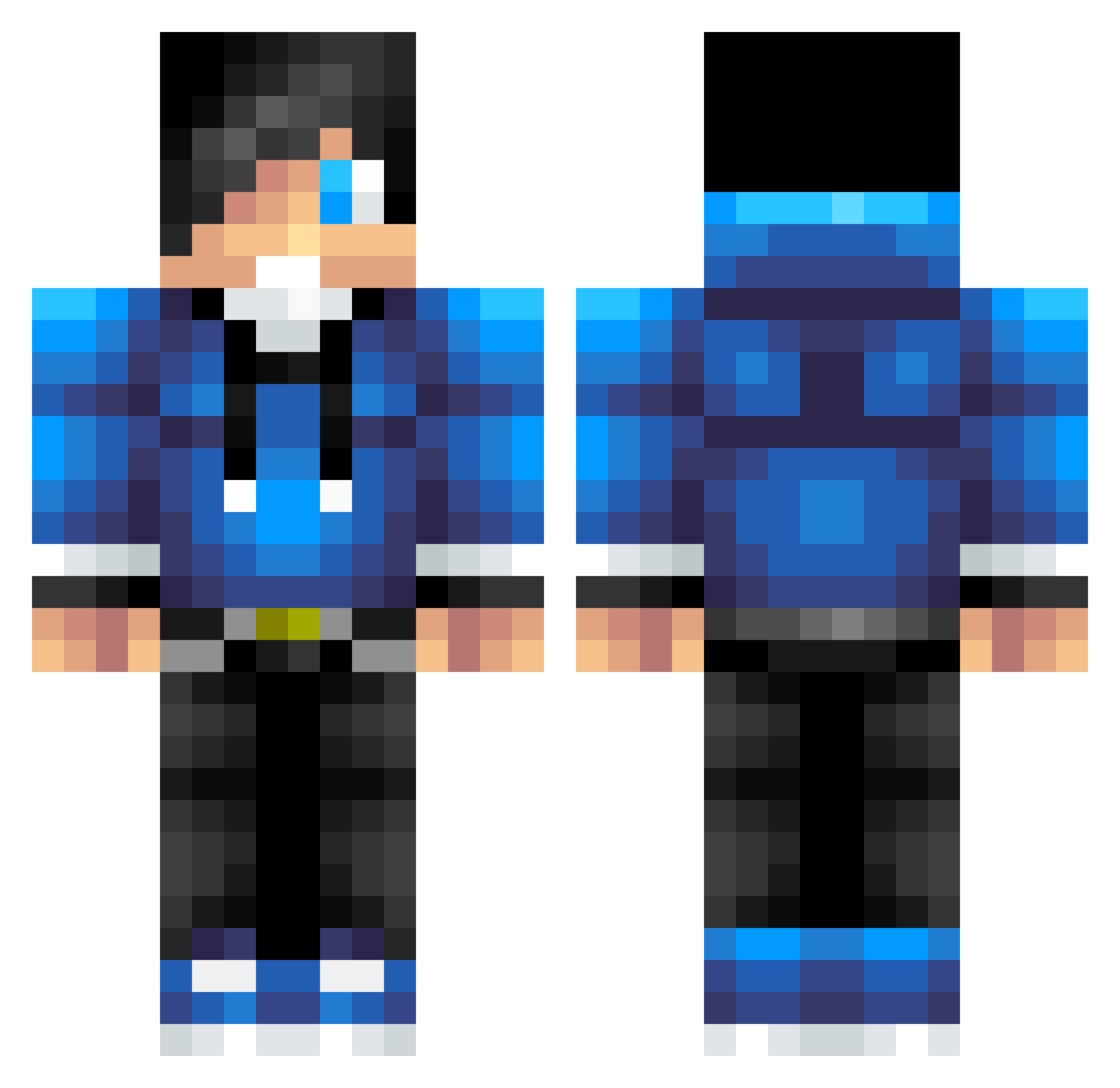
Current Minecraft skin of the player Elitegamer156, loaded from the official Mojang API. Rotate the 3D model with your mouse or finger, then download the skin as a PNG file and use it in Minecraft: Bedrock Edition or Java Edition for free. When Elitegamer156 changes their skin, this page updates automatically and the old skin stays in the history below.
Other players with this skin (623)
Elitegamer156 was the 171st player we have seen with this skin, first spotted on 20.08.2026. The same skin was seen on these players. Open a nickname to see their current skin and skin history.
 NiLiu_qc SpartaCaptain Swiftactics Pokemon2026 DarkSlayer2122 killershark1113 Casparian_42 ixB4D0ND3xi Opics_ oscar_daniel Proxii shadow_binky kowywowy soansmilee matias3460 zombkllr55 silent4prey Osci14 KW_killer6 Firewolf_5 JosephClaudia123 Kevmoefoe laptopakias xX_YOLOBRO_Xx iRockyz XxJehProGamerxX MadsHalkjaerr alexjamesc12345 Joeyviper26 charlie863 Martvk Gaby51rodriguez SilverVulcan79 MoBro3000 Raio40 MaxBud jacoba2003 simonjepsen1 DaRock547 EpicAC23 TheRascal154 JacobTheGod11 awood0121 baotp xCallum_14 pluZzMa mert2303 taavetti500 raulmanana0912 Kerav1993 GameDestroyer6 sammincraft123 E_WindYT KillerA55assin ikonx hitchenator_ jaojow CookieCore1993 superlugui freddieeee
How to install the Elitegamer156 skin
- Press the Download button above to save the skin as a PNG file.
- Minecraft: Bedrock Edition (PE): open the Dressing Room from the main menu (or tap your character → Edit Character), go to Classic Skins → Owned, press the + (new skin) button, choose the downloaded PNG and pick the Classic (Steve) model. Works on PC and mobile; consoles cannot import custom skins.
- Minecraft: Java Edition: open the Minecraft Launcher, go to the Skins tab, click New Skin, load the PNG, pick the Classic (Steve) model and press Save & Use. You can also upload it at minecraft.net → Profile → Change Skin.
The skin does not show up after import - what should I do?
Restart Minecraft and open the Dressing Room again - imported skins sometimes appear only after a restart. Also make sure you selected the imported skin and picked the Classic (Steve) model.
Which model should I choose, Classic or Slim?
This skin is designed for the Classic (Steve) model. If you pick the wrong model, the arms of the skin will look stretched or squeezed.
Is the skin of Elitegamer156 free to download?
Yes. Press Download, save the PNG file and use it in Minecraft: Bedrock Edition or Java Edition - no payment or registration needed. The skin also works on multiplayer servers and Realms.
More skins
Looking for more? Go back to all Minecraft skins and check the top skins of the week, month and all time, or find any player's skin by nickname.