
ElRuh - Minecraft Skins & Skin History
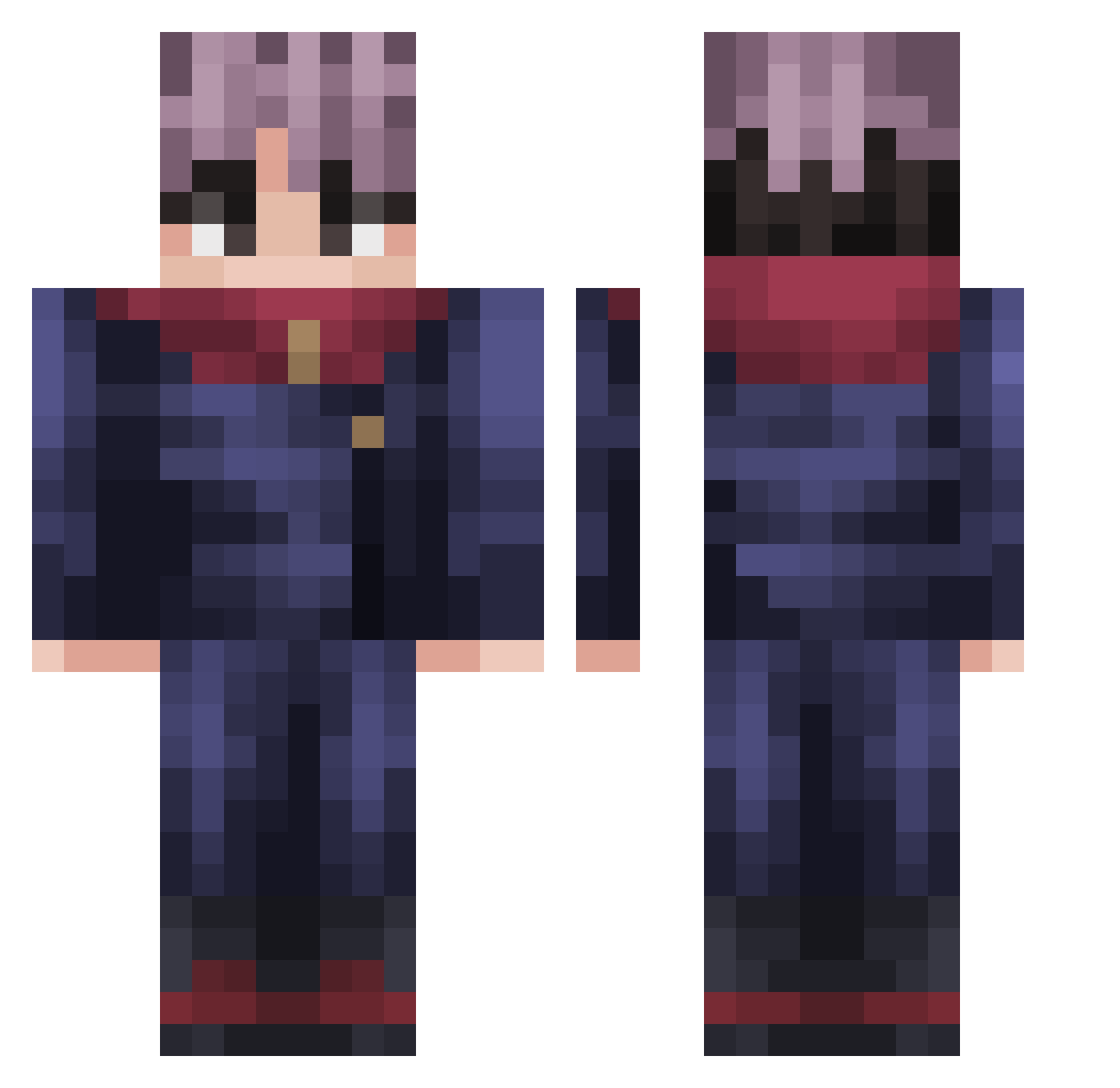
Current Minecraft skin of the player ElRuh, loaded from the official Mojang API. Rotate the 3D model with your mouse or finger, then download the skin as a PNG file and use it in Minecraft: Bedrock Edition or Java Edition for free. When ElRuh changes their skin, this page updates automatically and the old skin stays in the history below.
Other players with this skin (227)
ElRuh was the 23rd player we have seen with this skin, first spotted on 02.08.2026. The same skin was seen on these players. Open a nickname to see their current skin and skin history.
 Ketsu_uwu Piago12 MEELLIAZ sohaip camcub MashNash03 Mpaketik Haroun49 ItadoriYuuzi Nasssssssssssss SpazzocX RAPID_Mint_ sexy_foot_ Jujuonthabeats _Lovo GuilhermeDeeD CMK_Froggy0 Polargames03 JapaKawai Human1219 N1c3__ turreno felipex305 Jhasy Vitel_ Pedro1000b taeyeonhane Mamauu Hsuan1117 NkSkuza Nezzrok Castellant feathersgun PlumaHecha Brandorino _Orel picklesinmeass ThePurifierGod nhe_ Zelious060 Mahauraga Nocs27 Tide_0 RealmenteX MrNovacine VolterXR JustHiya PKlim16 Kerllonmtss DenkusFerreira
 dasu1122 NanoDanJM DinosaurKarma _Let_Me_Be_ Natas137 ItsRage96 hsgch chippuuu ElliShan_ Myrostik
More Yuji Itadori Minecraft skins
See all 225 Yuji Itadori skins
How to install the ElRuh skin
- Press the Download button above to save the skin as a PNG file.
- Minecraft: Bedrock Edition (PE): open the Dressing Room from the main menu (or tap your character → Edit Character), go to Classic Skins → Owned, press the + (new skin) button, choose the downloaded PNG and pick the Classic (Steve) model. Works on PC and mobile; consoles cannot import custom skins.
- Minecraft: Java Edition: open the Minecraft Launcher, go to the Skins tab, click New Skin, load the PNG, pick the Classic (Steve) model and press Save & Use. You can also upload it at minecraft.net → Profile → Change Skin.
The skin does not show up after import - what should I do?
Restart Minecraft and open the Dressing Room again - imported skins sometimes appear only after a restart. Also make sure you selected the imported skin and picked the Classic (Steve) model.
Which model should I choose, Classic or Slim?
This skin is designed for the Classic (Steve) model. If you pick the wrong model, the arms of the skin will look stretched or squeezed.
Is the skin of ElRuh free to download?
Yes. Press Download, save the PNG file and use it in Minecraft: Bedrock Edition or Java Edition - no payment or registration needed. The skin also works on multiplayer servers and Realms.
More skins
Looking for more? Go back to all Minecraft skins and check the top skins of the week, month and all time, or find any player's skin by nickname.