
Edwin_AL - Minecraft Skins & Skin History
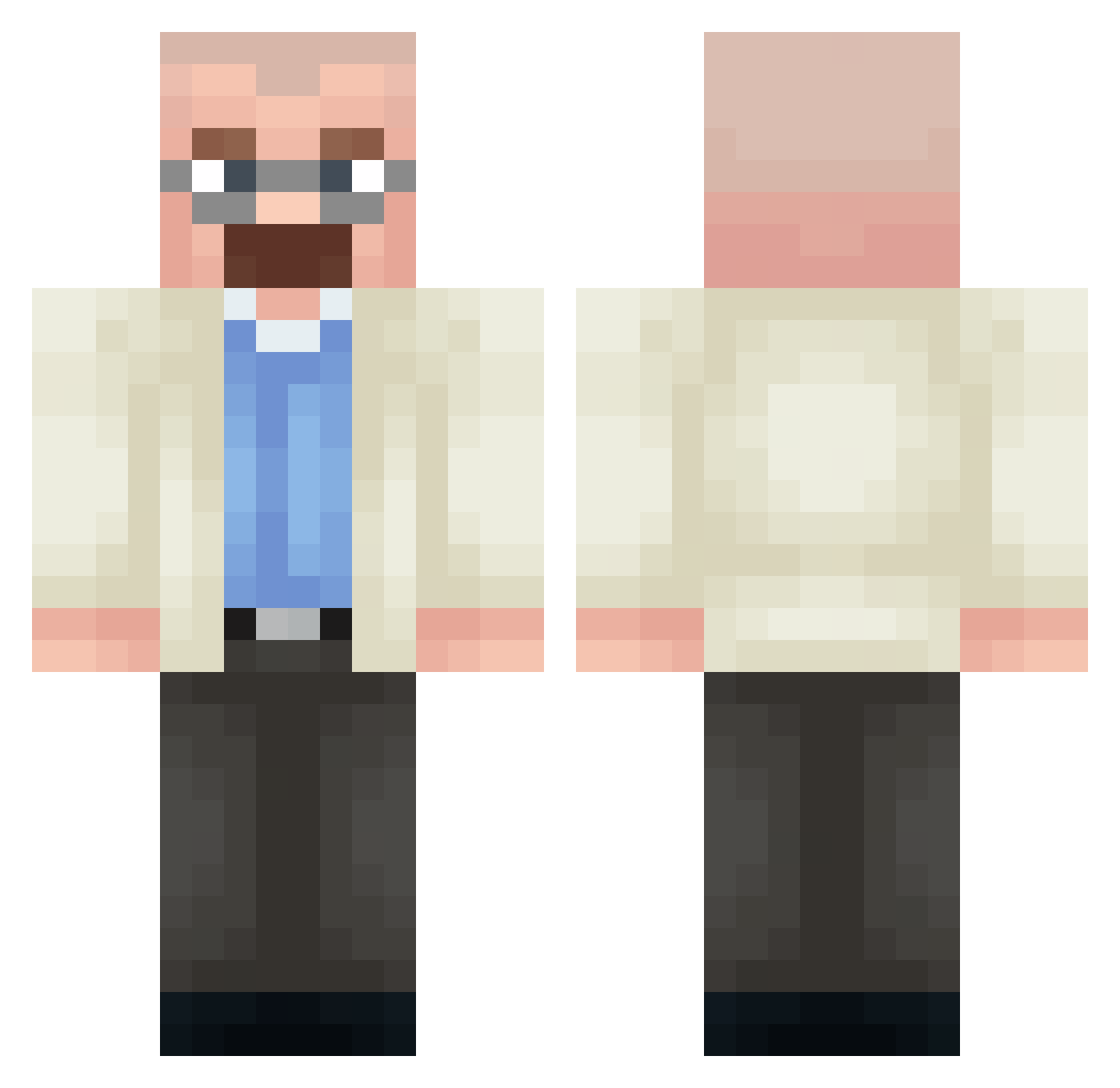
Current Minecraft skin of the player Edwin_AL, loaded from the official Mojang API. Rotate the 3D model with your mouse or finger, then download the skin as a PNG file and use it in Minecraft: Bedrock Edition or Java Edition for free. When Edwin_AL changes their skin, this page updates automatically and the old skin stays in the history below.
Other players with this skin (361)
Edwin_AL was the 26th player we have seen with this skin, first spotted on 28.07.2026. The same skin was seen on these players. Open a nickname to see their current skin and skin history.
 AnthoCrZ sajuuu_ 7ozty GualterBlanco DaFish7804 Dahut11 yourmom5513 Jay_Hunterr DeadWalter umberto1213 Segswey zjRm TONHAOGRAU itzadedmeme IkeaBowl luc__107 fighterdude56 ilian19 MrLoky brixboybigidy StainNn ElixoTV MertKaa _hapha ShadowAmbush12 HaydenTheMan joanin Matousek666 BassElf94492418
 Francoelcrack69 HyperzDerPro R3vert__
 yiet01 zachisjew Zetsuno69 KrispyKraems
 JKTaeMin
 spiffier 4ekushka RannyB zSails TheOfficialPerry
 wands1233 LokendX
 venusqwe davidnipedr123 Nico_461 FredEldenLord manga10
 chaferMC
 AdriftX
 DJsMadProgram Lapciik shuian InwardCellar514 DonkeyDean24 inquiting Cotangents felita otagoat
More Heisenberg Minecraft skins
How to install the Edwin_AL skin
- Press the Download button above to save the skin as a PNG file.
- Minecraft: Bedrock Edition (PE): open the Dressing Room from the main menu (or tap your character → Edit Character), go to Classic Skins → Owned, press the + (new skin) button, choose the downloaded PNG and pick the Classic (Steve) model. Works on PC and mobile; consoles cannot import custom skins.
- Minecraft: Java Edition: open the Minecraft Launcher, go to the Skins tab, click New Skin, load the PNG, pick the Classic (Steve) model and press Save & Use. You can also upload it at minecraft.net → Profile → Change Skin.
The skin does not show up after import - what should I do?
Restart Minecraft and open the Dressing Room again - imported skins sometimes appear only after a restart. Also make sure you selected the imported skin and picked the Classic (Steve) model.
Which model should I choose, Classic or Slim?
This skin is designed for the Classic (Steve) model. If you pick the wrong model, the arms of the skin will look stretched or squeezed.
Is the skin of Edwin_AL free to download?
Yes. Press Download, save the PNG file and use it in Minecraft: Bedrock Edition or Java Edition - no payment or registration needed. The skin also works on multiplayer servers and Realms.
More skins
Looking for more? Go back to all Minecraft skins and check the top skins of the week, month and all time, or find any player's skin by nickname.