
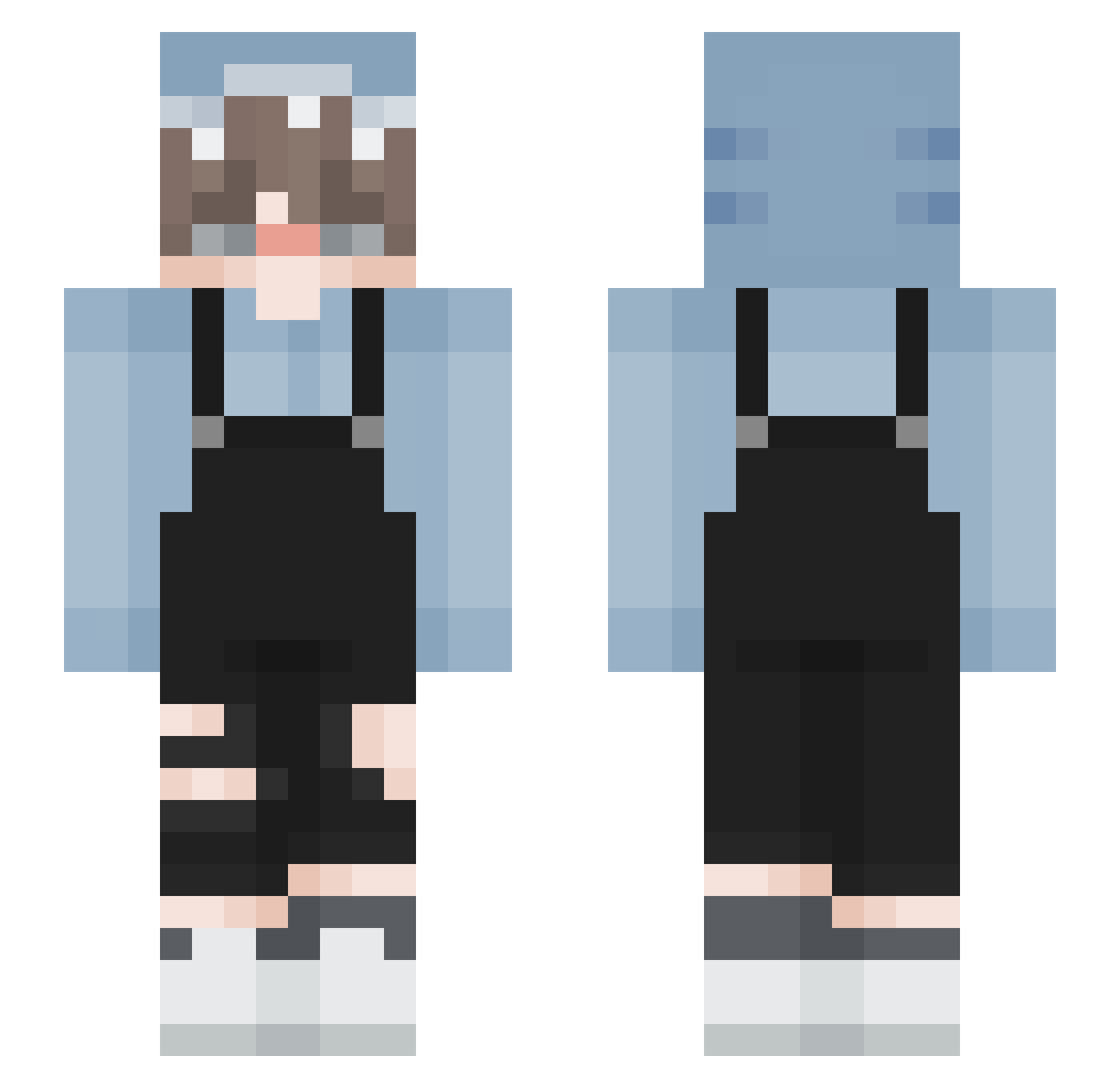
Current Minecraft skin of the player EKER_Z, loaded from the official Mojang API. Rotate the 3D model with your mouse or finger, then download the skin as a PNG file and use it in Minecraft: Bedrock Edition or Java Edition for free. When EKER_Z changes their skin, this page updates automatically and the old skin stays in the history below.
Other players with this skin (140)
EKER_Z was the 34th player we have seen with this skin, first spotted on 18.08.2026. The same skin was seen on these players. Open a nickname to see their current skin and skin history.
 aixletf dirent2 momonun hohohopapa Tonton_Manu SpaceTim1 XiaoSongShuuuuu gksruf22 MekongDragon Yiiiiiii_ trash_taco_ Manyetik_Karpuzz Hyeok0626 Wei_Yu_fisher ZizO_X RAIN_002 princecoward Iceewrld redkm06 CaTaHuCT008 skully521 WhiteCat1 jihunmama catingapromax
 Finesser420 Seven_drunk MageOnix FinerApollo Rui_5 biclighter81 _6Throne9_
 Calloome emo_boi12 Ahri04 canadiankicker77 ImarShark Darive BeerHk SantaShark KiDyong7 BOBJOYO Saffman SuccMyDic zKaizeer Tofffi Glaciem_owo sharkyyyboi hazxboo Loken01 KilledByEmBeR SleeplessS22 fonteh 4Azuro1 HappyRiots King_wang7 chanrang 06061944 Koesito Slendabtw Huntxrname
How to install the EKER_Z skin
- Press the Download button above to save the skin as a PNG file.
- Minecraft: Bedrock Edition (PE): open the Dressing Room from the main menu (or tap your character → Edit Character), go to Classic Skins → Owned, press the + (new skin) button, choose the downloaded PNG and pick the Slim (Alex) model. Works on PC and mobile; consoles cannot import custom skins.
- Minecraft: Java Edition: open the Minecraft Launcher, go to the Skins tab, click New Skin, load the PNG, pick the Slim (Alex) model and press Save & Use. You can also upload it at minecraft.net → Profile → Change Skin.
The skin does not show up after import - what should I do?
Restart Minecraft and open the Dressing Room again - imported skins sometimes appear only after a restart. Also make sure you selected the imported skin and picked the Slim (Alex) model.
Which model should I choose, Classic or Slim?
This skin is designed for the Slim (Alex) model. If you pick the wrong model, the arms of the skin will look stretched or squeezed.
Is the skin of EKER_Z free to download?
Yes. Press Download, save the PNG file and use it in Minecraft: Bedrock Edition or Java Edition - no payment or registration needed. The skin also works on multiplayer servers and Realms.
More skins
Looking for more? Go back to all Minecraft skins and check the top skins of the week, month and all time, or find any player's skin by nickname.