
EEZYKai - Minecraft Skins & Skin History
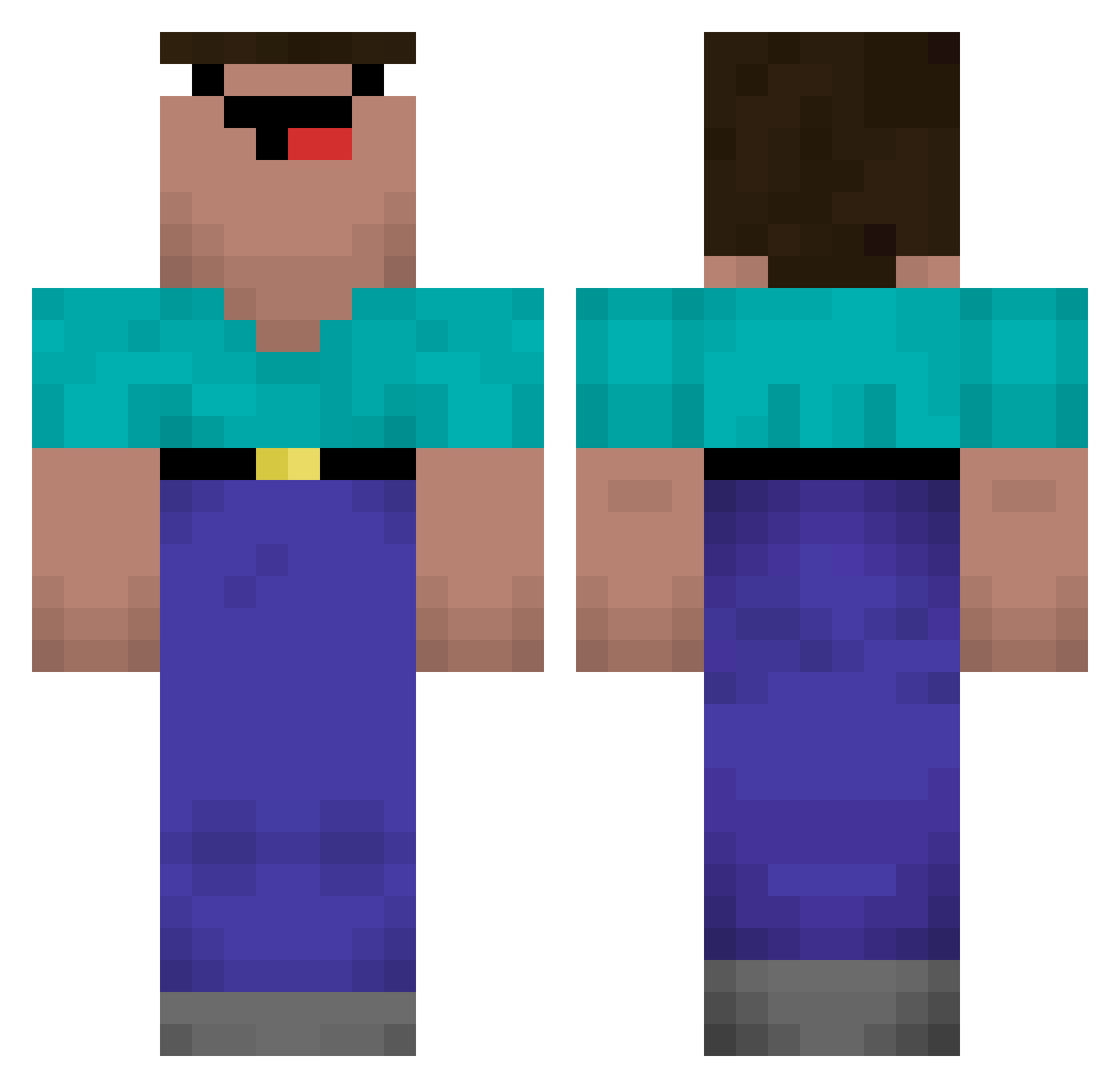
Current Minecraft skin of the player EEZYKai, loaded from the official Mojang API. Rotate the 3D model with your mouse or finger, then download the skin as a PNG file and use it in Minecraft: Bedrock Edition or Java Edition for free. When EEZYKai changes their skin, this page updates automatically and the old skin stays in the history below.
Other players with this skin (695)
EEZYKai was the 580th player we have seen with this skin, first spotted on 02.11.2026. The same skin was seen on these players. Open a nickname to see their current skin and skin history.
 KillJona3r Maddinss ydm5556 zachashow sasabei Ar7zy h1ya_ fuzhou4 Thunderbird123 naddu_ gabrigame2187 kralii Guma___ Solarfurys kakaboeno136 Nectyz NatalieJean_ Ghisleni _MykPro_ brixrt Taehyun_19 FirePvP_XD kidcozboy PotatoAddictMan nandim_frost Heraisa_olemus dng1 naizj im_poemer Mh__ LermiteXVI iSergus johnny_56 PurinTrogam Jaqqert tomassolas _Pumbaa__ ragyaaaaan Madezi BlueDaLoc AdoptedAsian42 RybarzskiPRut Prado17 paaaan1006 djdelux321 CrueL034 JmmYm smoxy_y 1qq1 MeChamavaDu Marrcino Fizikk akkun1224 LiuSuifeng TungKoTreTrau alrumaithi1 DdRamos001 populis NATHANFRANCIS Bentheking
More Classic Minecraft skins
How to install the EEZYKai skin
- Press the Download button above to save the skin as a PNG file.
- Minecraft: Bedrock Edition (PE): open the Dressing Room from the main menu (or tap your character → Edit Character), go to Classic Skins → Owned, press the + (new skin) button, choose the downloaded PNG and pick the Classic (Steve) model. Works on PC and mobile; consoles cannot import custom skins.
- Minecraft: Java Edition: open the Minecraft Launcher, go to the Skins tab, click New Skin, load the PNG, pick the Classic (Steve) model and press Save & Use. You can also upload it at minecraft.net → Profile → Change Skin.
The skin does not show up after import - what should I do?
Restart Minecraft and open the Dressing Room again - imported skins sometimes appear only after a restart. Also make sure you selected the imported skin and picked the Classic (Steve) model.
Which model should I choose, Classic or Slim?
This skin is designed for the Classic (Steve) model. If you pick the wrong model, the arms of the skin will look stretched or squeezed.
Is the skin of EEZYKai free to download?
Yes. Press Download, save the PNG file and use it in Minecraft: Bedrock Edition or Java Edition - no payment or registration needed. The skin also works on multiplayer servers and Realms.
More skins
Looking for more? Go back to all Minecraft skins and check the top skins of the week, month and all time, or find any player's skin by nickname.