
E11justusfnk - Minecraft Skins & Skin History
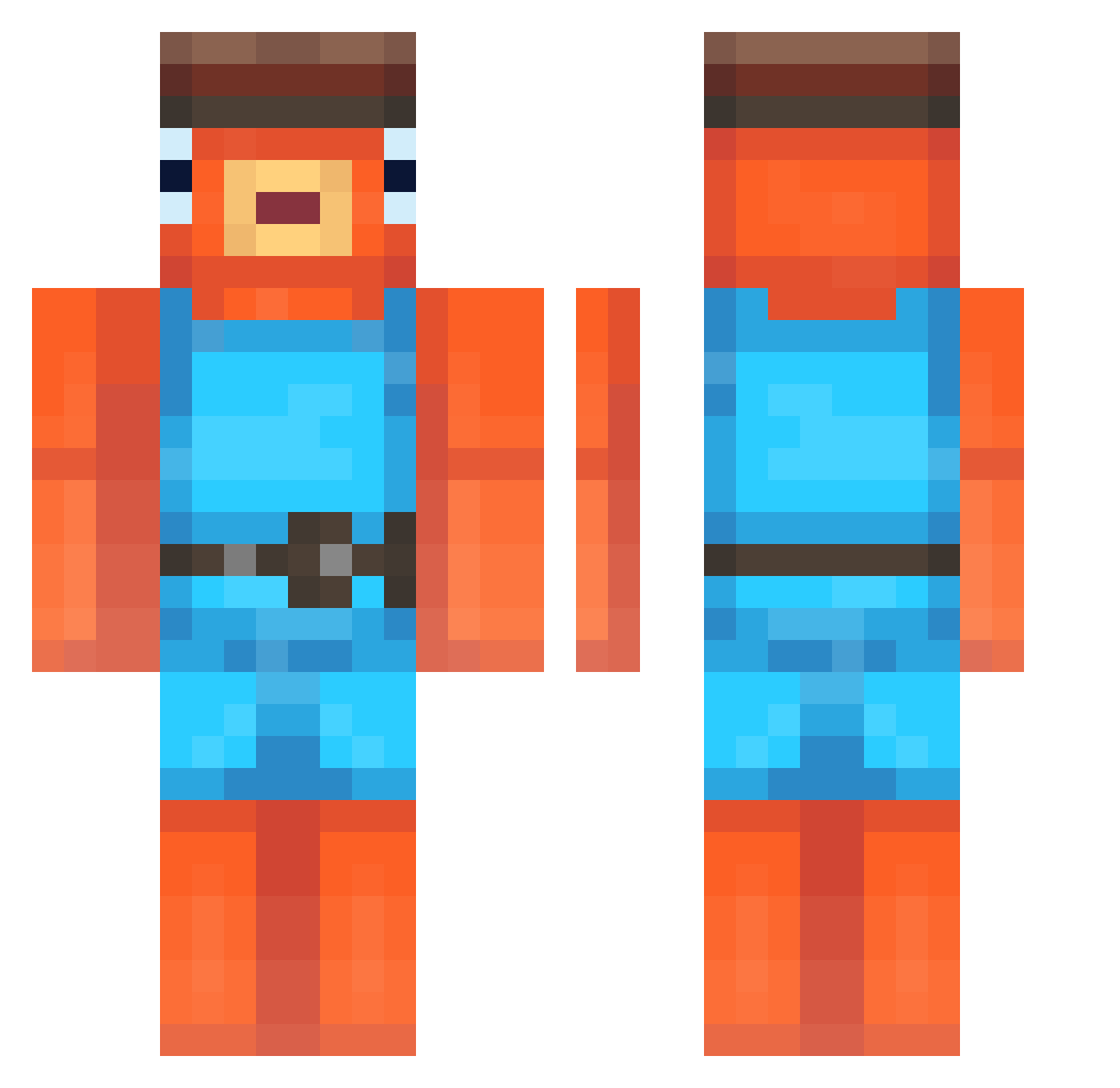
Current Minecraft skin of the player E11justusfnk, loaded from the official Mojang API. Rotate the 3D model with your mouse or finger, then download the skin as a PNG file and use it in Minecraft: Bedrock Edition or Java Edition for free. When E11justusfnk changes their skin, this page updates automatically and the old skin stays in the history below.
Other players with this skin (248)
E11justusfnk was the 36th player we have seen with this skin, first spotted on 10.08.2026. The same skin was seen on these players. Open a nickname to see their current skin and skin history.
 dexterx3 GrogBae_ nofearnomore ThugHunter_69 NaizRayz xRodrichXD L1lGinger bellehalt orangeperson omablockchain123 TheNathanator321 jeffyyy_ ZeWepre LaarsVegaars08 WrierFish PinguCro The_Fishy94 MaximPotato19 Fishof1fire Asieerdb
 Puffysirr Smiluuch FishesFishes anhe2021 Veemo_187 AustinPlays22
 Neptunezs nikolai24021 Kian7313 TheWiseFish45 OnlyPolo DaHazza__ irines BYS777 Feynex12 MayoMeister4585 leolio_04 robert18_ Dookius ajauwemndma x17_ CinnamonCase565 Kodsky Ibrahiim25 juvient3 mels1de Monkeysforever Schneeeemil Krishp2011 Kacperro4570 norfle_ alon_jelly_7156 7Frowzer oasis69 Moist_Pringle BigSnickersVein wydbenji kleymp emmanueloo Fisch3416
More Fishstick Minecraft skins
How to install the E11justusfnk skin
- Press the Download button above to save the skin as a PNG file.
- Minecraft: Bedrock Edition (PE): open the Dressing Room from the main menu (or tap your character → Edit Character), go to Classic Skins → Owned, press the + (new skin) button, choose the downloaded PNG and pick the Classic (Steve) model. Works on PC and mobile; consoles cannot import custom skins.
- Minecraft: Java Edition: open the Minecraft Launcher, go to the Skins tab, click New Skin, load the PNG, pick the Classic (Steve) model and press Save & Use. You can also upload it at minecraft.net → Profile → Change Skin.
The skin does not show up after import - what should I do?
Restart Minecraft and open the Dressing Room again - imported skins sometimes appear only after a restart. Also make sure you selected the imported skin and picked the Classic (Steve) model.
Which model should I choose, Classic or Slim?
This skin is designed for the Classic (Steve) model. If you pick the wrong model, the arms of the skin will look stretched or squeezed.
Is the skin of E11justusfnk free to download?
Yes. Press Download, save the PNG file and use it in Minecraft: Bedrock Edition or Java Edition - no payment or registration needed. The skin also works on multiplayer servers and Realms.
More skins
Looking for more? Go back to all Minecraft skins and check the top skins of the week, month and all time, or find any player's skin by nickname.