
Dudech - Minecraft Skins & Skin History
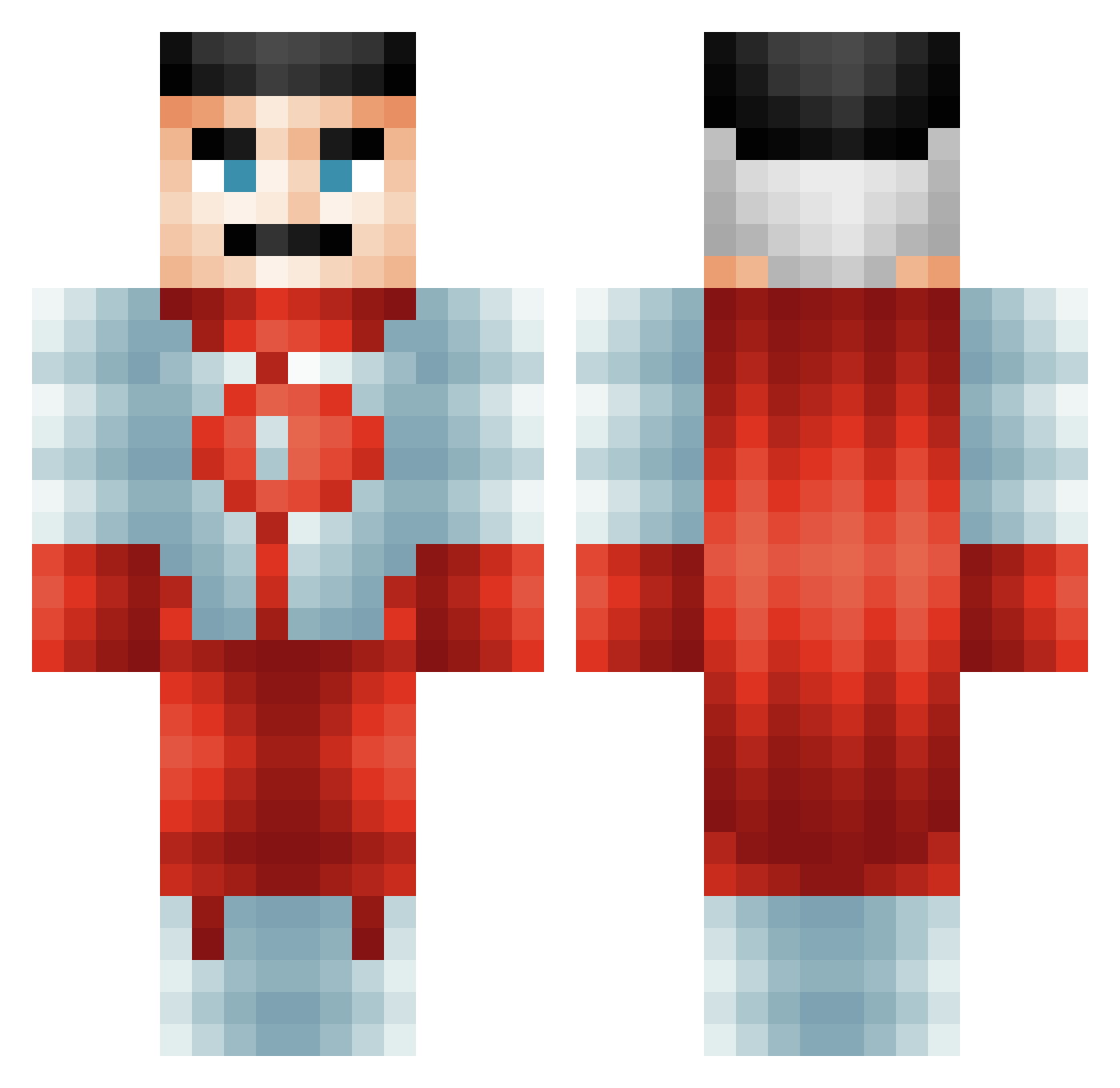
Current Minecraft skin of the player Dudech, loaded from the official Mojang API. Rotate the 3D model with your mouse or finger, then download the skin as a PNG file and use it in Minecraft: Bedrock Edition or Java Edition for free. When Dudech changes their skin, this page updates automatically and the old skin stays in the history below.
Other players with this skin (484)
Dudech was the 131st player we have seen with this skin, first spotted on 15.08.2026. The same skin was seen on these players. Open a nickname to see their current skin and skin history.
 DarkVodka NolGod
 AlexisP08 Mapleapplesauce ScottyG30 mskella SnakyCord935859 Paul_Licier MinceNTattiesMan NguynQA rByEc SaltyJonesy93 AtmaUltima Cyrillovsk hugolegay SirSigma01 OhsHos23 Syljohn Razzerr Itz_Xd01d40_y Quinnavan BBL_Driz xVoidLordKing SkibidiSigma6900 Palegay caidernm4 ISK70 YungAz VoyPuestisimo djgamer279 IamGamesis Majjox Monkyman25 Pandapunk91 indigo646 WoundedCreeper1 zzzzDreaMzzzz
 Bab1o grumpy7137 _____Natsu_____ knedlikosaurus zrr_msmc_hft LucardoNation EpocHunter tiozio drewsskiiii Asleepdeouf SamWheels
 ljmcf02
 AdriftX waybe66 Gejtu xMagicDogx Uchiha_Lark rcnmason TexeMex TonyPalmer999 Ashirofu SOUOGUEL SmokeRogen
More Omni Man Minecraft skins
How to install the Dudech skin
- Press the Download button above to save the skin as a PNG file.
- Minecraft: Bedrock Edition (PE): open the Dressing Room from the main menu (or tap your character → Edit Character), go to Classic Skins → Owned, press the + (new skin) button, choose the downloaded PNG and pick the Classic (Steve) model. Works on PC and mobile; consoles cannot import custom skins.
- Minecraft: Java Edition: open the Minecraft Launcher, go to the Skins tab, click New Skin, load the PNG, pick the Classic (Steve) model and press Save & Use. You can also upload it at minecraft.net → Profile → Change Skin.
The skin does not show up after import - what should I do?
Restart Minecraft and open the Dressing Room again - imported skins sometimes appear only after a restart. Also make sure you selected the imported skin and picked the Classic (Steve) model.
Which model should I choose, Classic or Slim?
This skin is designed for the Classic (Steve) model. If you pick the wrong model, the arms of the skin will look stretched or squeezed.
Is the skin of Dudech free to download?
Yes. Press Download, save the PNG file and use it in Minecraft: Bedrock Edition or Java Edition - no payment or registration needed. The skin also works on multiplayer servers and Realms.
More skins
Looking for more? Go back to all Minecraft skins and check the top skins of the week, month and all time, or find any player's skin by nickname.