
DrEduard - Minecraft Skins & Skin History
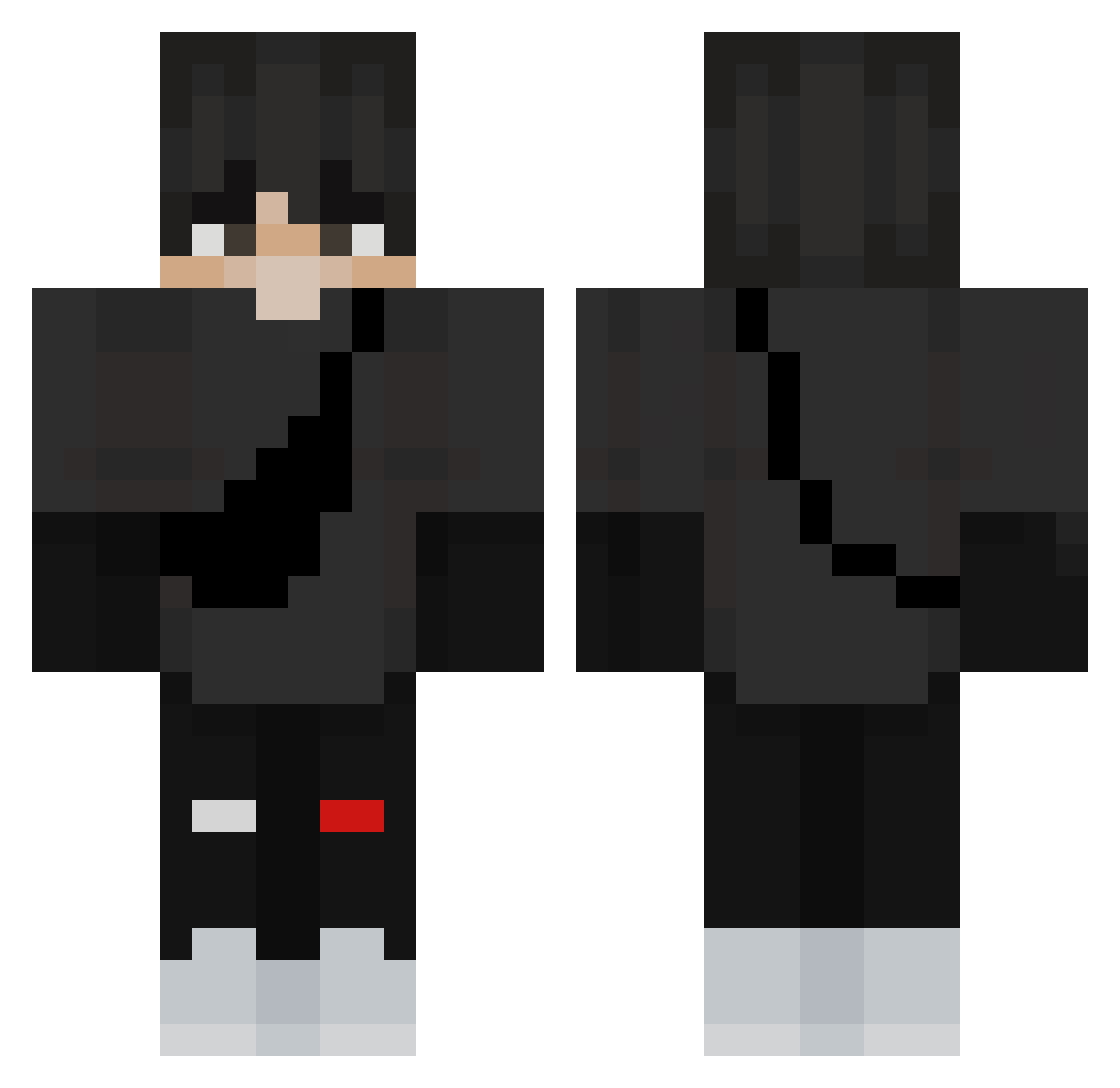
Current Minecraft skin of the player DrEduard, loaded from the official Mojang API. Rotate the 3D model with your mouse or finger, then download the skin as a PNG file and use it in Minecraft: Bedrock Edition or Java Edition for free. When DrEduard changes their skin, this page updates automatically and the old skin stays in the history below.
Other players with this skin (432)
DrEduard was the 416th player we have seen with this skin, first spotted on 15.11.2026. The same skin was seen on these players. Open a nickname to see their current skin and skin history.
 Hoxalion Wxrc vky_S0H4_m4u Nickels_02 XCDGV pvpszeff remuzi papptppp AYZEK122 KucukAdamEnes pBrenoq HaraKirio MetalElectron Den4o_ Bad_Bunny4 HuangZhong01 MyrRain DuckHoles RIP_TECHNO5172 taherbridger Dyancula NyrasMSBN joaogamer_br15 Chendry 12XS rayanboss90 VxxKarlxxV Bellux04 Kaczka_Samuraj MarieLen Mirkand Seanx_ Bubblegum58 MaciekYO xXsniper_1Xx vlojt3x JUEON9585 Jac0b69 xRxvenge5 Forthess DeadSnoz JellyOwO PacYT Mo_gly MlodyDragon AlexuMC ZacHasMegaAutism randome_me kubakistek18 Baptiste22400 Beetleman12 jpthesweqt Mathyfofo LunaticSlayer01 TheyLoveTxcca FondDegree83601 Uygar0_0 jellybin1117 Linkhen55 j_alker
More Messenger Bag Minecraft skins
See all 617 Messenger Bag skins
How to install the DrEduard skin
- Press the Download button above to save the skin as a PNG file.
- Minecraft: Bedrock Edition (PE): open the Dressing Room from the main menu (or tap your character → Edit Character), go to Classic Skins → Owned, press the + (new skin) button, choose the downloaded PNG and pick the Classic (Steve) model. Works on PC and mobile; consoles cannot import custom skins.
- Minecraft: Java Edition: open the Minecraft Launcher, go to the Skins tab, click New Skin, load the PNG, pick the Classic (Steve) model and press Save & Use. You can also upload it at minecraft.net → Profile → Change Skin.
The skin does not show up after import - what should I do?
Restart Minecraft and open the Dressing Room again - imported skins sometimes appear only after a restart. Also make sure you selected the imported skin and picked the Classic (Steve) model.
Which model should I choose, Classic or Slim?
This skin is designed for the Classic (Steve) model. If you pick the wrong model, the arms of the skin will look stretched or squeezed.
Is the skin of DrEduard free to download?
Yes. Press Download, save the PNG file and use it in Minecraft: Bedrock Edition or Java Edition - no payment or registration needed. The skin also works on multiplayer servers and Realms.
More skins
Looking for more? Go back to all Minecraft skins and check the top skins of the week, month and all time, or find any player's skin by nickname.