
Doodleskie - Minecraft Skins & Skin History
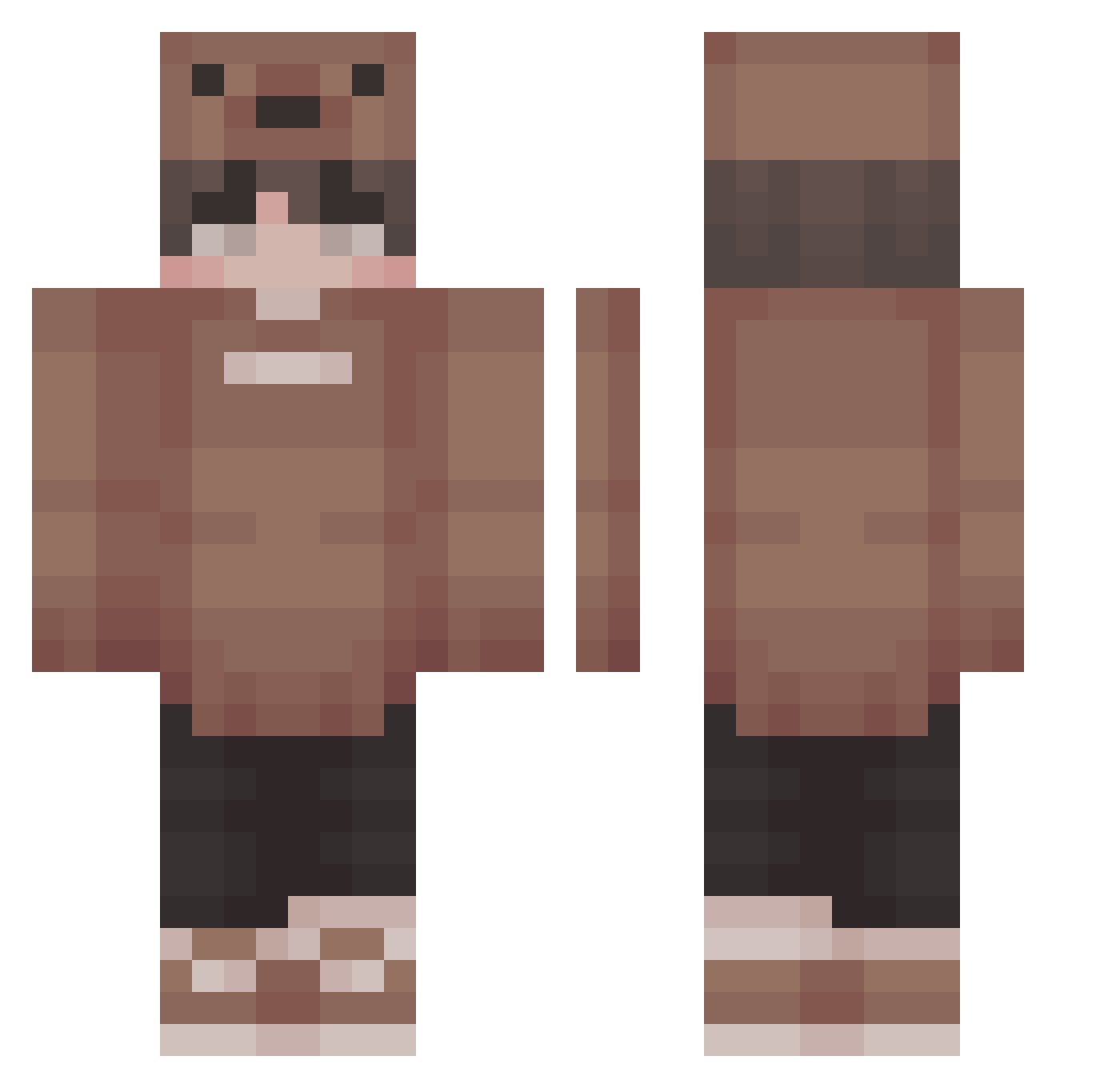
Current Minecraft skin of the player Doodleskie, loaded from the official Mojang API. Rotate the 3D model with your mouse or finger, then download the skin as a PNG file and use it in Minecraft: Bedrock Edition or Java Edition for free. When Doodleskie changes their skin, this page updates automatically and the old skin stays in the history below.
Other players with this skin (226)
Doodleskie was the 109th player we have seen with this skin, first spotted on 17.09.2026. The same skin was seen on these players. Open a nickname to see their current skin and skin history.
 Tearly Luminariex itsjcup Adas_rarr Azndoru Slajdz1k lmCloud Eikominion HipsterCrickster Fabian182008 superabcdz StrongD Godmste Jisetsu Chwome Majkx Taterstotss hellsing2004 JerryTheHacker IIILukeII Gabyvpo deathbysleep71 Informazioni Ahmedtop11 lilkrispi Reedypooo Kylleran teewer Gavin4911 Kuzeyko012 Idigaway Black_0510_ DukeLazar AsianBibleBoi _nasuno _Nebzy StormcatX LargeCauk Mavss britishfishh CykaPunch _winterbird _Melow jacobbb5952 o0o0o0oo0o0o Asgarrrr Luv_Kuma Nuggis Komjii Npyyyy Icarus_insa Bair007 TrezzyOnCrack scalierstorm BeelzebubX ItsHuntr Rohoe3 Carrot1103 SpicyPing TyroneBTW
More Cute Minecraft skins
How to install the Doodleskie skin
- Press the Download button above to save the skin as a PNG file.
- Minecraft: Bedrock Edition (PE): open the Dressing Room from the main menu (or tap your character → Edit Character), go to Classic Skins → Owned, press the + (new skin) button, choose the downloaded PNG and pick the Classic (Steve) model. Works on PC and mobile; consoles cannot import custom skins.
- Minecraft: Java Edition: open the Minecraft Launcher, go to the Skins tab, click New Skin, load the PNG, pick the Classic (Steve) model and press Save & Use. You can also upload it at minecraft.net → Profile → Change Skin.
The skin does not show up after import - what should I do?
Restart Minecraft and open the Dressing Room again - imported skins sometimes appear only after a restart. Also make sure you selected the imported skin and picked the Classic (Steve) model.
Which model should I choose, Classic or Slim?
This skin is designed for the Classic (Steve) model. If you pick the wrong model, the arms of the skin will look stretched or squeezed.
Is the skin of Doodleskie free to download?
Yes. Press Download, save the PNG file and use it in Minecraft: Bedrock Edition or Java Edition - no payment or registration needed. The skin also works on multiplayer servers and Realms.
More skins
Looking for more? Go back to all Minecraft skins and check the top skins of the week, month and all time, or find any player's skin by nickname.