
DonaJenn - Minecraft Skins & Skin History
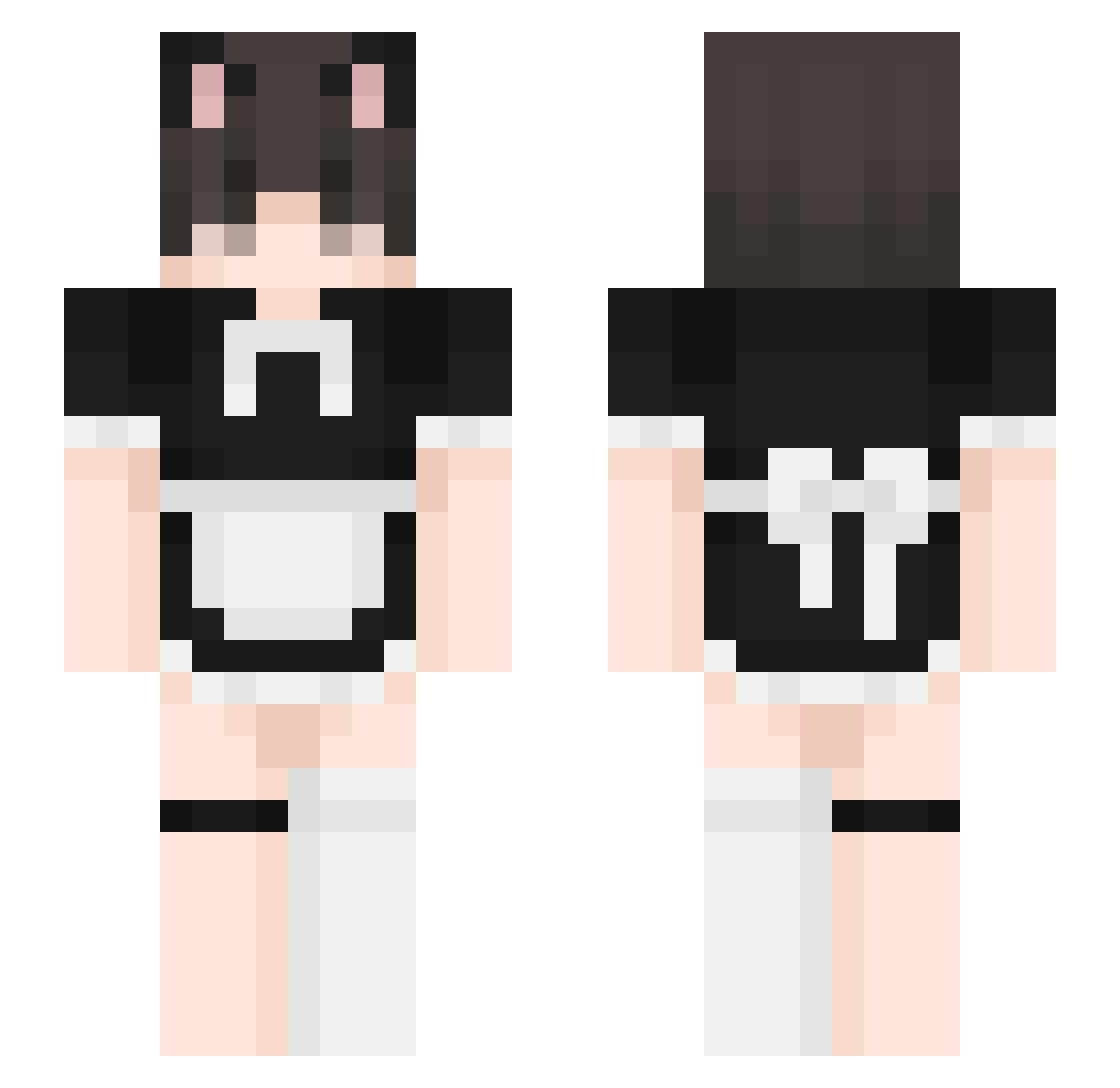
Current Minecraft skin of the player DonaJenn, loaded from the official Mojang API. Rotate the 3D model with your mouse or finger, then download the skin as a PNG file and use it in Minecraft: Bedrock Edition or Java Edition for free. When DonaJenn changes their skin, this page updates automatically and the old skin stays in the history below.
Other players with this skin (331)
DonaJenn was the 46th player we have seen with this skin, first spotted on 08.08.2026. The same skin was seen on these players. Open a nickname to see their current skin and skin history.
 YOUYOUi Wi1cey telento meownine 778qwq FemboMan Hisyam02 alex6x Reilendin Diegofacherlo Draksus SadMangoo Anaengyl NexarLP Dtapoky Wooly_1 driguinho nctjeno DaddyDill ShineCode actualsu Eleonoraaaaa
 CuteFoxyD tszxe y21h NotNovus alejajcaha Waltinho96 ligmanugg3t Fuerteventura washedupcatboy thomiguns Spud_5791 Wettmelons qqpeeme4
 Kotek_UwU0 _Dara_Dara Cryoctopus iFerSho Stonks26 FemboyThighLover Nonlike thehypixelfemboy blarmer Salem_Necro Hollowsinlol SlyGuava27 dentge cyneq CupidzzZZ Danillom69 ElAnubiZ Smeft
 ResKyuu Lolichannn
 ThatCombatMaster OMGstepbro69
 KnightRodeo sabanita juicyphrogy
More Maid Minecraft skins
How to install the DonaJenn skin
- Press the Download button above to save the skin as a PNG file.
- Minecraft: Bedrock Edition (PE): open the Dressing Room from the main menu (or tap your character → Edit Character), go to Classic Skins → Owned, press the + (new skin) button, choose the downloaded PNG and pick the Slim (Alex) model. Works on PC and mobile; consoles cannot import custom skins.
- Minecraft: Java Edition: open the Minecraft Launcher, go to the Skins tab, click New Skin, load the PNG, pick the Slim (Alex) model and press Save & Use. You can also upload it at minecraft.net → Profile → Change Skin.
The skin does not show up after import - what should I do?
Restart Minecraft and open the Dressing Room again - imported skins sometimes appear only after a restart. Also make sure you selected the imported skin and picked the Slim (Alex) model.
Which model should I choose, Classic or Slim?
This skin is designed for the Slim (Alex) model. If you pick the wrong model, the arms of the skin will look stretched or squeezed.
Is the skin of DonaJenn free to download?
Yes. Press Download, save the PNG file and use it in Minecraft: Bedrock Edition or Java Edition - no payment or registration needed. The skin also works on multiplayer servers and Realms.
More skins
Looking for more? Go back to all Minecraft skins and check the top skins of the week, month and all time, or find any player's skin by nickname.