
DeviousBad - Minecraft Skins & Skin History
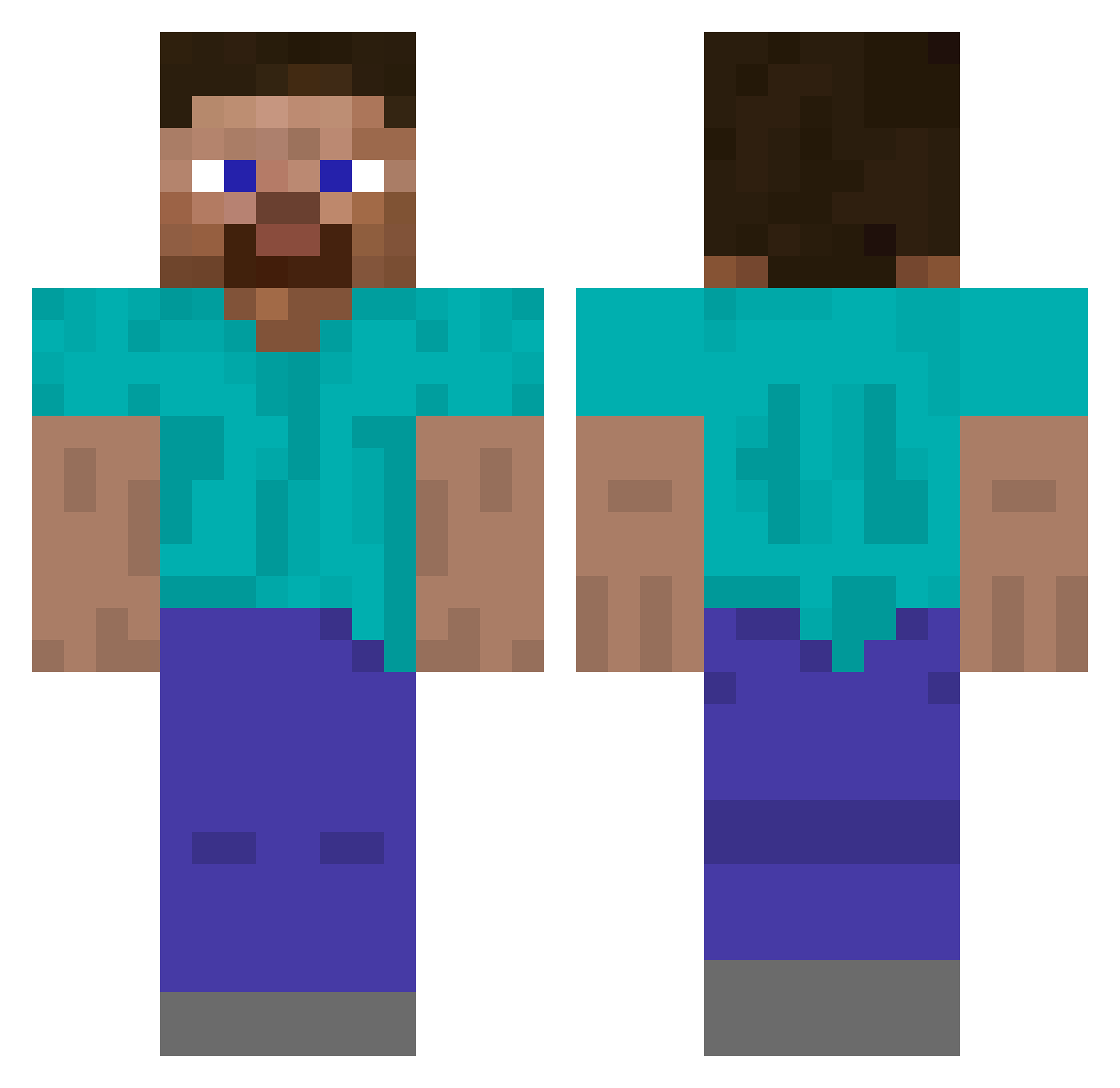
Current Minecraft skin of the player DeviousBad, loaded from the official Mojang API. Rotate the 3D model with your mouse or finger, then download the skin as a PNG file and use it in Minecraft: Bedrock Edition or Java Edition for free. When DeviousBad changes their skin, this page updates automatically and the old skin stays in the history below.
Other players with this skin (488)
DeviousBad was the 138th player we have seen with this skin, first spotted on 23.08.2026. The same skin was seen on these players. Open a nickname to see their current skin and skin history.
 tooboredtoexist Turt13s UObelisk Requeon SaltyJxss Dirtysocks74 Juansvi NearestPlayer IDrxpClean Lesave BlackPlastic SomethingAnother ToastedDonut1 TaxBuster
 dean119543 Wolver220 QeltharLOD TrionOne rastel Uname_a bear2126 SC0RND
 Moranos01 DPBOnline03 Naujoon mezzebop halloween421 Bloosk teqzzzzzzzzzzzzz naethan00 ImmoralKoala Valledoe obackh danchig Hansi PleaseClose Chr_sl Saint_Explainer Skolebord Azzeraque lorenzo_bic Cybertom11
 wojtek0203WK99 Clagz saleerix peggyyyyyy XCreeperHunterX TheCatCombatant _vegiee_ honranrun GreenNugget45 ZERIKUN RANASOL Sandra1601 Iljaech Sameemas notdwub FreddyB123_ AlexiusCaelestis Reenz
How to install the DeviousBad skin
- Press the Download button above to save the skin as a PNG file.
- Minecraft: Bedrock Edition (PE): open the Dressing Room from the main menu (or tap your character → Edit Character), go to Classic Skins → Owned, press the + (new skin) button, choose the downloaded PNG and pick the Classic (Steve) model. Works on PC and mobile; consoles cannot import custom skins.
- Minecraft: Java Edition: open the Minecraft Launcher, go to the Skins tab, click New Skin, load the PNG, pick the Classic (Steve) model and press Save & Use. You can also upload it at minecraft.net → Profile → Change Skin.
The skin does not show up after import - what should I do?
Restart Minecraft and open the Dressing Room again - imported skins sometimes appear only after a restart. Also make sure you selected the imported skin and picked the Classic (Steve) model.
Which model should I choose, Classic or Slim?
This skin is designed for the Classic (Steve) model. If you pick the wrong model, the arms of the skin will look stretched or squeezed.
Is the skin of DeviousBad free to download?
Yes. Press Download, save the PNG file and use it in Minecraft: Bedrock Edition or Java Edition - no payment or registration needed. The skin also works on multiplayer servers and Realms.
More skins
Looking for more? Go back to all Minecraft skins and check the top skins of the week, month and all time, or find any player's skin by nickname.