
Devc123456 - Minecraft Skins & Skin History
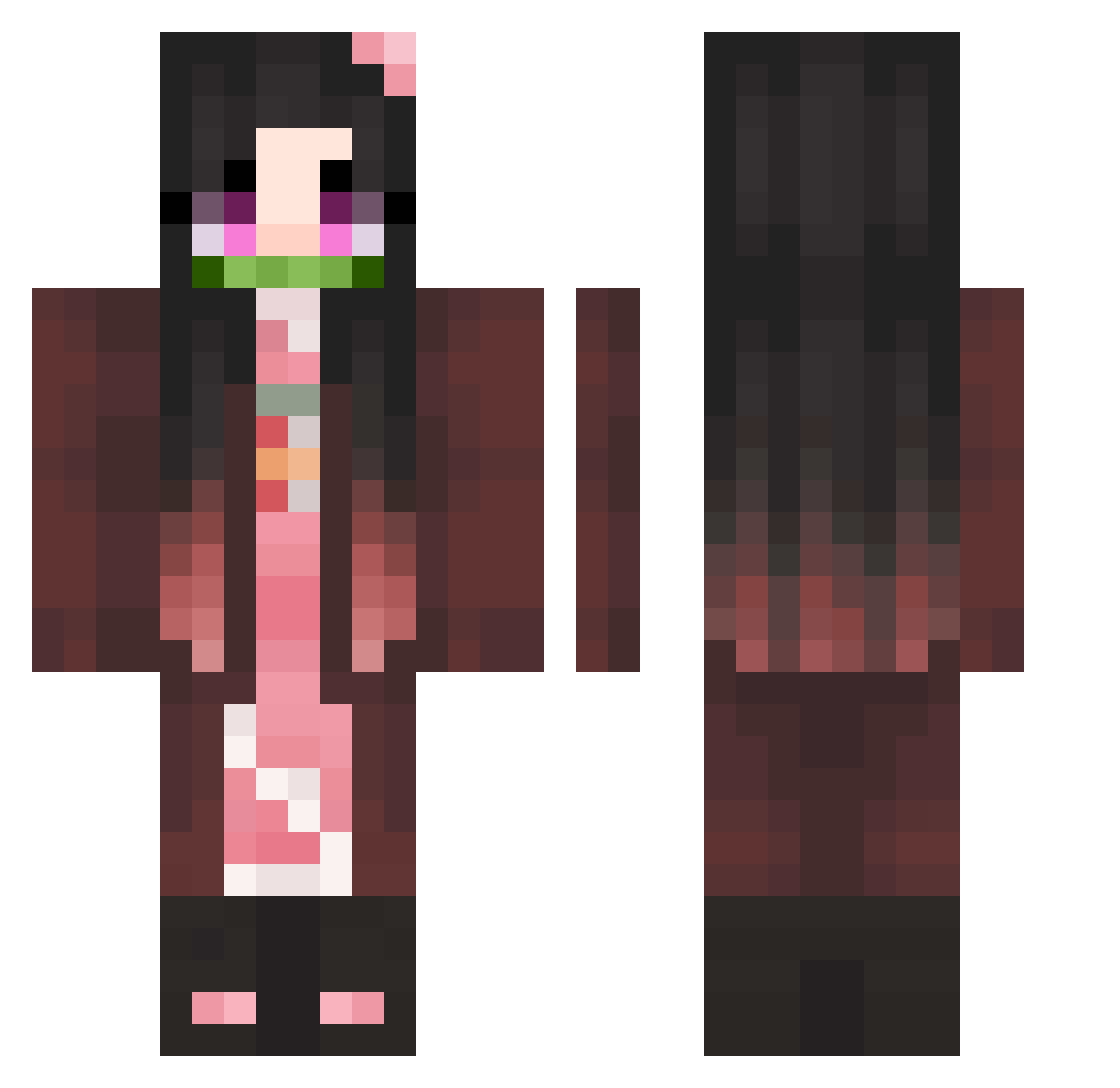
Current Minecraft skin of the player Devc123456, loaded from the official Mojang API. Rotate the 3D model with your mouse or finger, then download the skin as a PNG file and use it in Minecraft: Bedrock Edition or Java Edition for free. When Devc123456 changes their skin, this page updates automatically and the old skin stays in the history below.
Other players with this skin (363)
Devc123456 was the 59th player we have seen with this skin, first spotted on 09.08.2026. The same skin was seen on these players. Open a nickname to see their current skin and skin history.
 IImany_ AUTALIEN FlordePoronga goldfish_1119 CubeBot katsumane CristalTimeShow Skyfalls_ Ryann5 FakeKet stone__m Minori169 Adle_Jin Deadnedzuko Kaci130 trapon CrosstheSun_ _narcia UnleqitEisermann Uvlyne OutOftheSilentt Shonichi coco_xlsx Beiwieh Ayame_5 Akasuya Ngotastic Helistar wkas22 catrun3 UrsulaPM2 kimsm1025 odu001 Queen_Renata mongkkun hrzbb rainy073 Cabella_Luigi WhiteRaven09 buyao123 ZantherK DF46 Nanasn77 abdoss NuttMilk liren110 kerorobbang HazukiSakura RattyTalosXD Crazypengu12 rannie107 KawaiiKasumi Aya_2008 NoKneess Blasphem54 EvilTurtle0428 KIMDANI2016 Dllm_poor_guy moogssss Glowbby
More Nezuko Kamado Minecraft skins
See all 178 Nezuko Kamado skins
How to install the Devc123456 skin
- Press the Download button above to save the skin as a PNG file.
- Minecraft: Bedrock Edition (PE): open the Dressing Room from the main menu (or tap your character → Edit Character), go to Classic Skins → Owned, press the + (new skin) button, choose the downloaded PNG and pick the Classic (Steve) model. Works on PC and mobile; consoles cannot import custom skins.
- Minecraft: Java Edition: open the Minecraft Launcher, go to the Skins tab, click New Skin, load the PNG, pick the Classic (Steve) model and press Save & Use. You can also upload it at minecraft.net → Profile → Change Skin.
The skin does not show up after import - what should I do?
Restart Minecraft and open the Dressing Room again - imported skins sometimes appear only after a restart. Also make sure you selected the imported skin and picked the Classic (Steve) model.
Which model should I choose, Classic or Slim?
This skin is designed for the Classic (Steve) model. If you pick the wrong model, the arms of the skin will look stretched or squeezed.
Is the skin of Devc123456 free to download?
Yes. Press Download, save the PNG file and use it in Minecraft: Bedrock Edition or Java Edition - no payment or registration needed. The skin also works on multiplayer servers and Realms.
More skins
Looking for more? Go back to all Minecraft skins and check the top skins of the week, month and all time, or find any player's skin by nickname.