
Dee_Thor - Minecraft Skins & Skin History
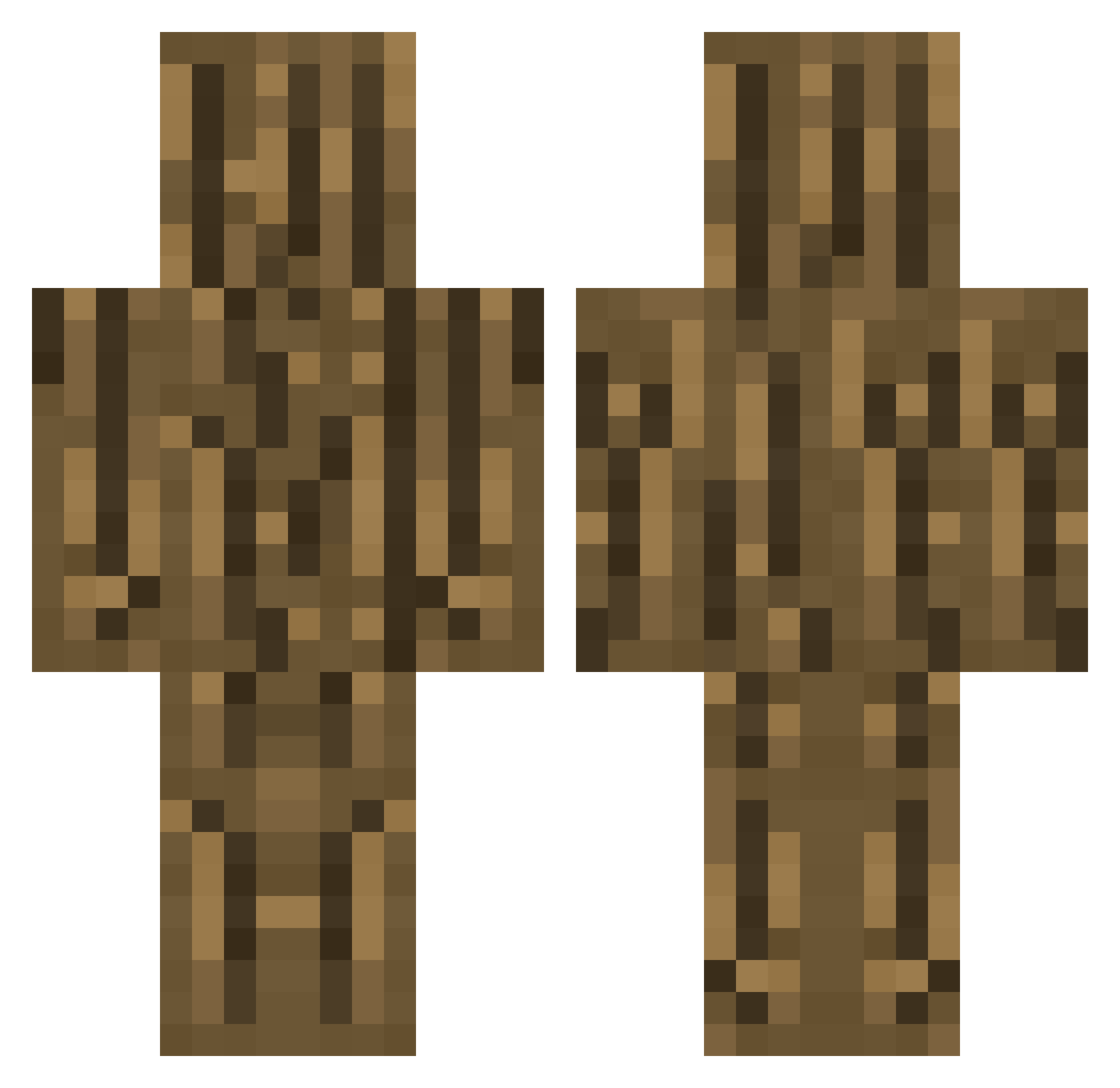
Current Minecraft skin of the player Dee_Thor, loaded from the official Mojang API. Rotate the 3D model with your mouse or finger, then download the skin as a PNG file and use it in Minecraft: Bedrock Edition or Java Edition for free. When Dee_Thor changes their skin, this page updates automatically and the old skin stays in the history below.
Other players with this skin (70)
Dee_Thor was the 23rd player we have seen with this skin, first spotted on 21.08.2026. The same skin was seen on these players. Open a nickname to see their current skin and skin history.
 taka0509 Edvinn ProjektKhaoz AKJOKER747 AbEcEzZ MustafaAkk Santa_____Claus TheBestGamerz akito223 Diamantpilen woodzinho XxSamx PetulkaKrej caruo SuprmeBoy _Skiterh_ zoras33 GustavPro BebeDestept CakoFTW Kunnny PrototypeAUT Mr_Pangkon MrSalamaSk Nate1887 TheRoro17 TomAhriman CuckLord_ MrManos88 bajanboys wizwap Kickhamster communisthobo ThiboGame termiet 8FUJI8 MoonMqn_ Rosstmemo Martin18_11 mjence9999 96mc96 blisters413 louis_16 Variante youkan2189 LevChik articuno31 MCDJSLIME2_0 ABR_Noah Risbell Krantenbericht FXStryker06 Rozetmen kamipique JOSE1414 summersafari03 BlakeUHC IIIjonas Canttouchmydonut crowley11
More Oak Log Minecraft skins
How to install the Dee_Thor skin
- Press the Download button above to save the skin as a PNG file.
- Minecraft: Bedrock Edition (PE): open the Dressing Room from the main menu (or tap your character → Edit Character), go to Classic Skins → Owned, press the + (new skin) button, choose the downloaded PNG and pick the Classic (Steve) model. Works on PC and mobile; consoles cannot import custom skins.
- Minecraft: Java Edition: open the Minecraft Launcher, go to the Skins tab, click New Skin, load the PNG, pick the Classic (Steve) model and press Save & Use. You can also upload it at minecraft.net → Profile → Change Skin.
The skin does not show up after import - what should I do?
Restart Minecraft and open the Dressing Room again - imported skins sometimes appear only after a restart. Also make sure you selected the imported skin and picked the Classic (Steve) model.
Which model should I choose, Classic or Slim?
This skin is designed for the Classic (Steve) model. If you pick the wrong model, the arms of the skin will look stretched or squeezed.
Is the skin of Dee_Thor free to download?
Yes. Press Download, save the PNG file and use it in Minecraft: Bedrock Edition or Java Edition - no payment or registration needed. The skin also works on multiplayer servers and Realms.
More skins
Looking for more? Go back to all Minecraft skins and check the top skins of the week, month and all time, or find any player's skin by nickname.