
DarthChap - Minecraft Skins & Skin History
Current Minecraft skin of the player DarthChap, loaded from the official Mojang API. Rotate the 3D model with your mouse or finger, then download the skin as a PNG file and use it in Minecraft: Bedrock Edition or Java Edition for free. When DarthChap changes their skin, this page updates automatically and the old skin stays in the history below.
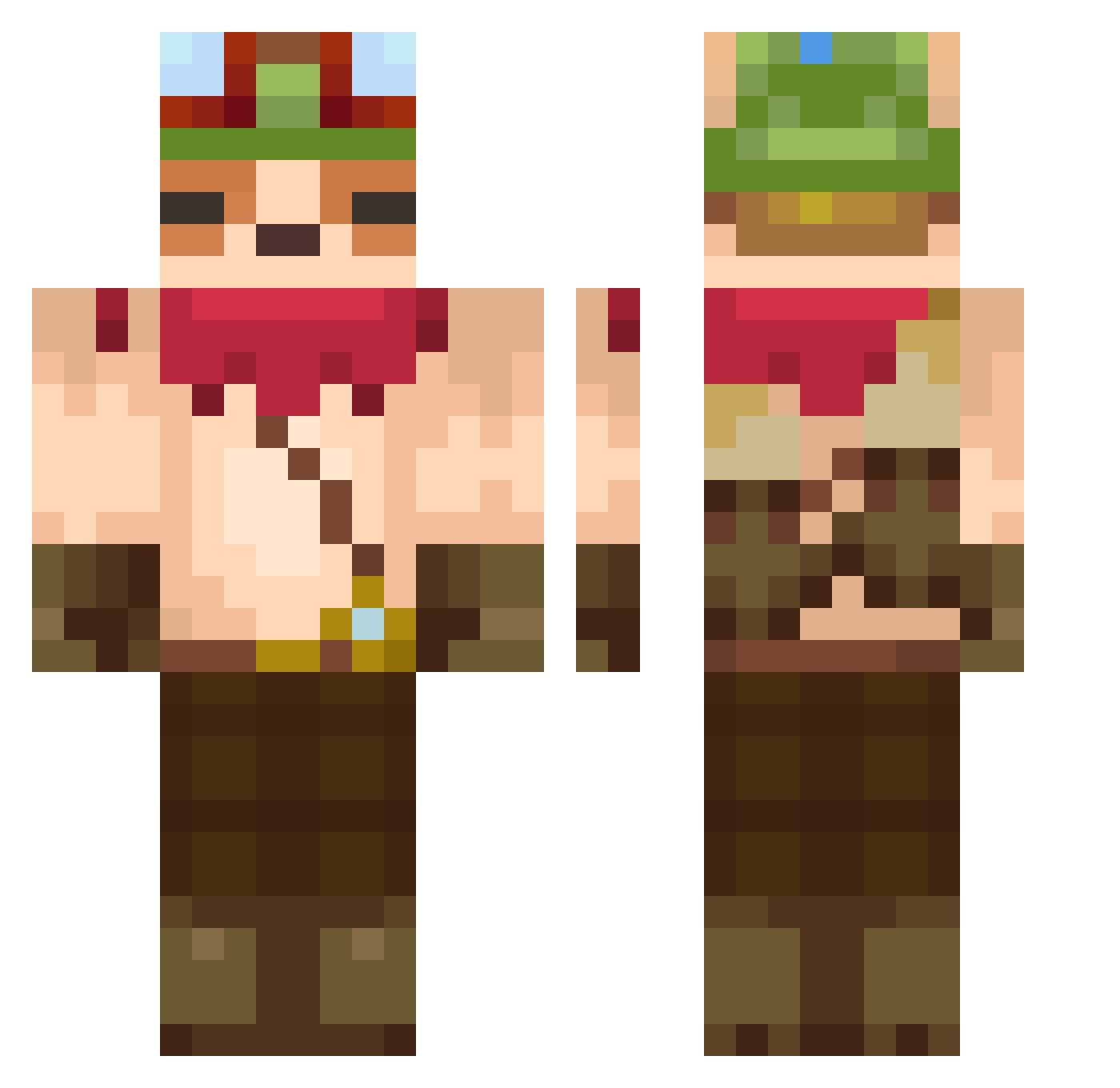
Other players with this skin (607)
DarthChap was the 339th player we have seen with this skin, first spotted on 24.09.2026. The same skin was seen on these players. Open a nickname to see their current skin and skin history.
 ferenci69 xiqo8 ZeroEnrg Ryzehn jinjinuouo ROBERCOCO popooooooooooo UnseenFate18 Printerset Isouki Nicolasito1 Ramos0606 FilipSMB DuckToADecoy MingusJupitor Bafomas fiqe BaianoDa18 arci589 Vanessa101020 twouix Mense_ Tonii_s1 PrimaIe PufferSob GenosseJannik_ 404GigaKoks TazzyWazzyX nico0tarifa Ballofmeat KingGunjo Elmalditosegu Svullo420 Plotosus nana11747 MonsterMouton qtnh ESC_JSC Shalexz Flapter887 Rayness20 moti260 lucho9 Gunduggi Snow_cap_ Siamcat_ PUNPUN4280 ikakirai893 HamaJiL Chambanator saiyansloth72618 qwert1822 XCrabmanX Passau Rampei xxLumie oimo99 byuzii Polarisuu nasikame
More Bandana Minecraft skins
How to install the DarthChap skin
- Press the Download button above to save the skin as a PNG file.
- Minecraft: Bedrock Edition (PE): open the Dressing Room from the main menu (or tap your character → Edit Character), go to Classic Skins → Owned, press the + (new skin) button, choose the downloaded PNG and pick the Classic (Steve) model. Works on PC and mobile; consoles cannot import custom skins.
- Minecraft: Java Edition: open the Minecraft Launcher, go to the Skins tab, click New Skin, load the PNG, pick the Classic (Steve) model and press Save & Use. You can also upload it at minecraft.net → Profile → Change Skin.
The skin does not show up after import - what should I do?
Restart Minecraft and open the Dressing Room again - imported skins sometimes appear only after a restart. Also make sure you selected the imported skin and picked the Classic (Steve) model.
Which model should I choose, Classic or Slim?
This skin is designed for the Classic (Steve) model. If you pick the wrong model, the arms of the skin will look stretched or squeezed.
Is the skin of DarthChap free to download?
Yes. Press Download, save the PNG file and use it in Minecraft: Bedrock Edition or Java Edition - no payment or registration needed. The skin also works on multiplayer servers and Realms.
More skins
Looking for more? Go back to all Minecraft skins and check the top skins of the week, month and all time, or find any player's skin by nickname.