
DarkBD12 - Minecraft Skins & Skin History
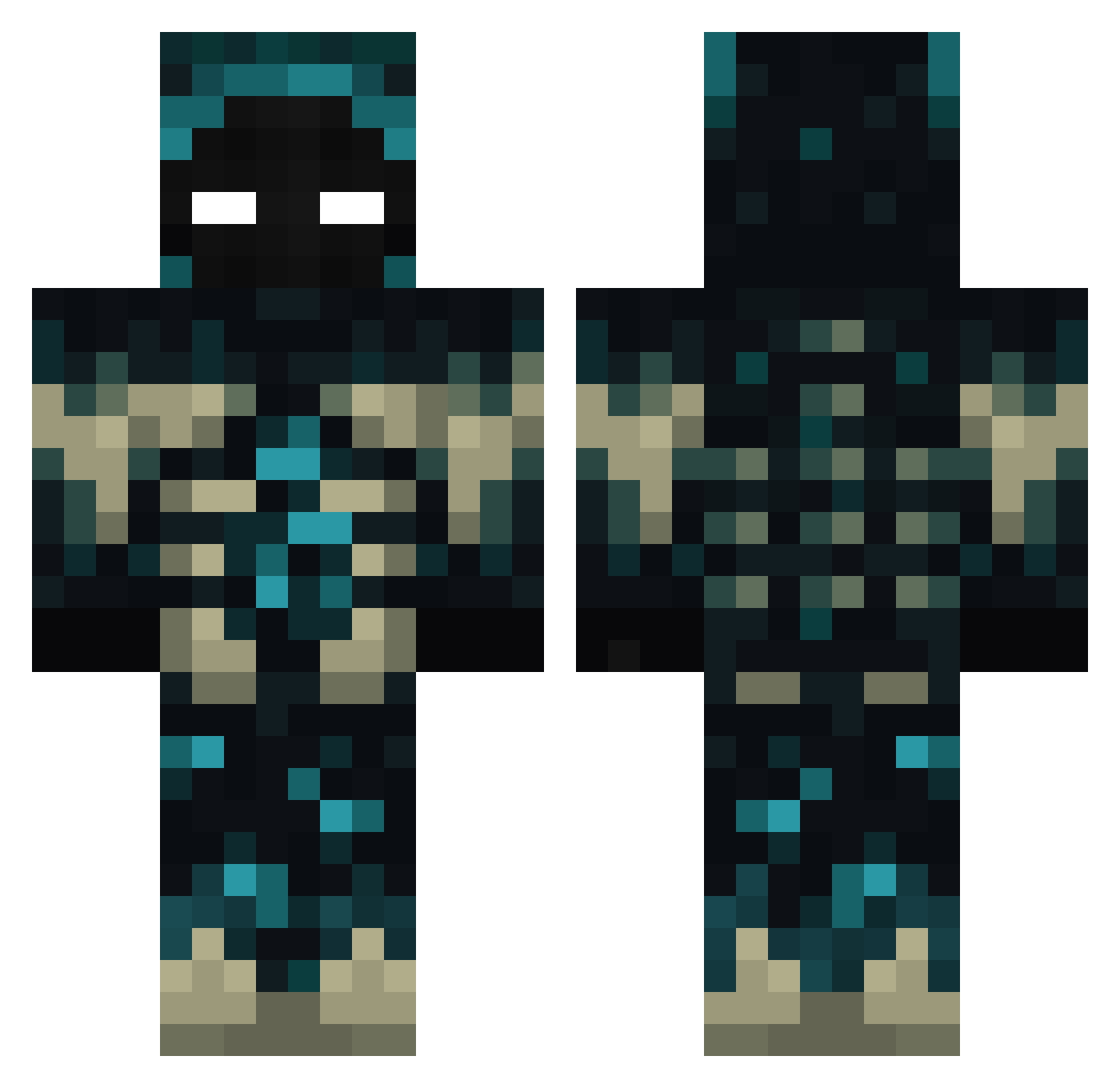
Current Minecraft skin of the player DarkBD12, loaded from the official Mojang API. Rotate the 3D model with your mouse or finger, then download the skin as a PNG file and use it in Minecraft: Bedrock Edition or Java Edition for free. When DarkBD12 changes their skin, this page updates automatically and the old skin stays in the history below.
Other players with this skin (472)
DarkBD12 was the 388th player we have seen with this skin, first spotted on 01.11.2026. The same skin was seen on these players. Open a nickname to see their current skin and skin history.
 sky_high01 CrazyFish127 MagicRainbow Aceman595 erkansengen XXpanda534XX TryHunter73 Mabo_2006 kenuccio Ferdoker Metaversus Magicrain012 6003DFST Rayfox_private RikkertBatsbak Zidal911 Guig42jk Bust3rgam3 anguschang2007 LLavaMann Cristianvi hail_DArth_Vader wooluey Uryon_ DeSoZz Davo26 MITCHISUU mrzerus kacejko crumble667 Nikikimora dziaslo Sxcrollx avocado_cream der_max1234 Salamandrul JLeandro OutlawFisch TheFinalDareal VoidOfUniverse Redcandy okYato RedKing963 anubisXD Atomistannn YoshiApollo ODRBOB0 TheBloody59 DiegoBDN01 Nizanss Cansty kidcrusher22 HyperFoxOne Orange20151210 SilentVox_ Romano15 RedLeopardMC braydude6292 MischievousBOSS Droks
More Sculk Minecraft skins
How to install the DarkBD12 skin
- Press the Download button above to save the skin as a PNG file.
- Minecraft: Bedrock Edition (PE): open the Dressing Room from the main menu (or tap your character → Edit Character), go to Classic Skins → Owned, press the + (new skin) button, choose the downloaded PNG and pick the Classic (Steve) model. Works on PC and mobile; consoles cannot import custom skins.
- Minecraft: Java Edition: open the Minecraft Launcher, go to the Skins tab, click New Skin, load the PNG, pick the Classic (Steve) model and press Save & Use. You can also upload it at minecraft.net → Profile → Change Skin.
The skin does not show up after import - what should I do?
Restart Minecraft and open the Dressing Room again - imported skins sometimes appear only after a restart. Also make sure you selected the imported skin and picked the Classic (Steve) model.
Which model should I choose, Classic or Slim?
This skin is designed for the Classic (Steve) model. If you pick the wrong model, the arms of the skin will look stretched or squeezed.
Is the skin of DarkBD12 free to download?
Yes. Press Download, save the PNG file and use it in Minecraft: Bedrock Edition or Java Edition - no payment or registration needed. The skin also works on multiplayer servers and Realms.
More skins
Looking for more? Go back to all Minecraft skins and check the top skins of the week, month and all time, or find any player's skin by nickname.