
DESTRUCTO1982 - Minecraft Skins & Skin History
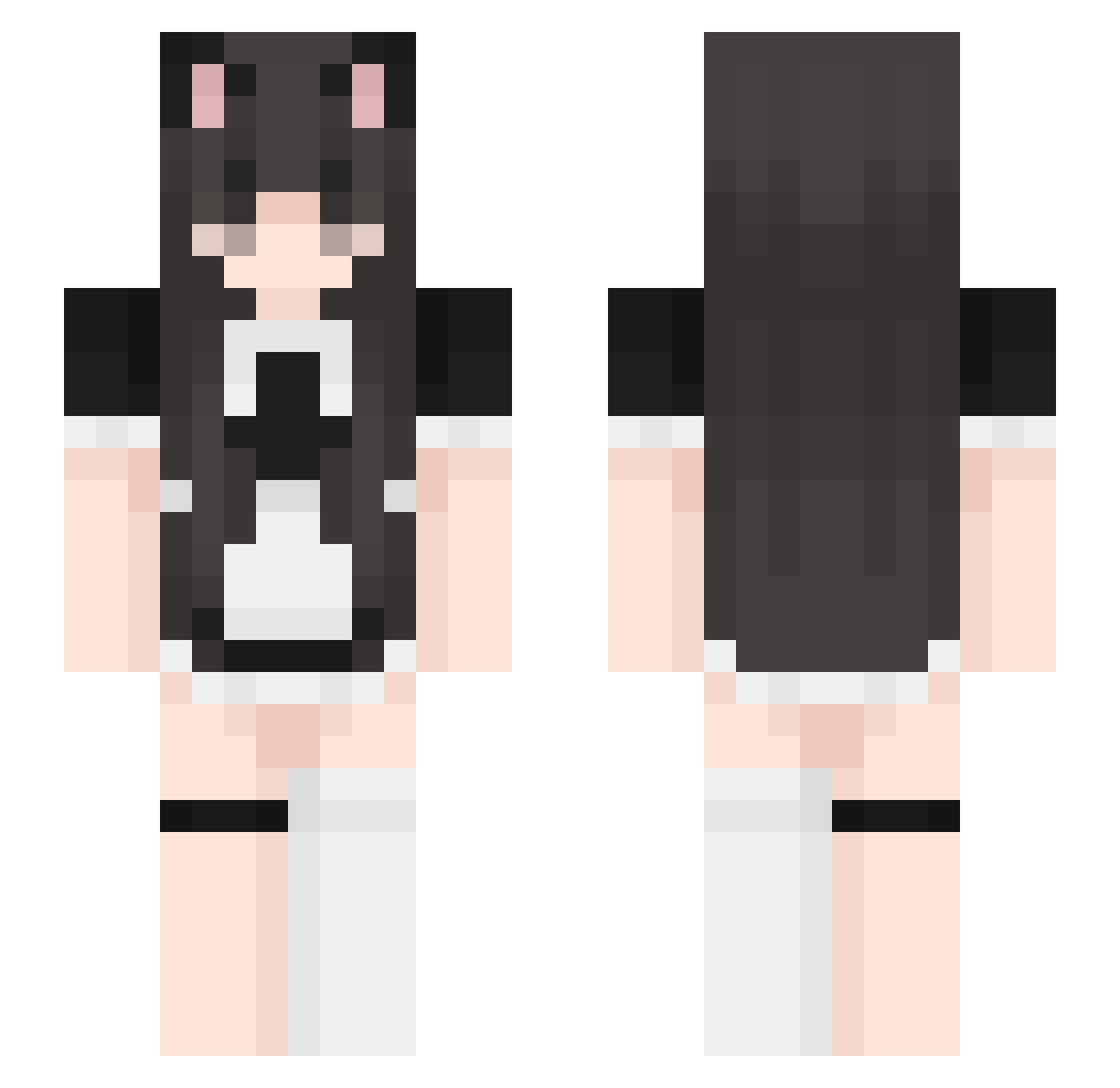
Current Minecraft skin of the player DESTRUCTO1982, loaded from the official Mojang API. Rotate the 3D model with your mouse or finger, then download the skin as a PNG file and use it in Minecraft: Bedrock Edition or Java Edition for free. When DESTRUCTO1982 changes their skin, this page updates automatically and the old skin stays in the history below.
Other players with this skin (442)
DESTRUCTO1982 was the 184th player we have seen with this skin, first spotted on 10.09.2026. The same skin was seen on these players. Open a nickname to see their current skin and skin history.
 Zaayvvy Pat3lniq JY817 Off_DG Super_Maci CSharpLibrary TZHUN ACHIII05 Ruskatopka DISHWASHERGIRL lllDaRkill michif02 stas1s_ Brianlulupart2 Mo_ran432 Squitlee LutuGHG foxbox10 Lollypop0 SamahYlm lilramyun Boncuk155981 sofieekeiei NadiniBienii Charlie_638 RealEthaNinJa NIL10X IC_Bob LastMidori1 JUUUUUUUUNE maggersdaggers ikk555 lne_01 lilijanax iluvnuri YoMeow0126 tombbbbb Darusia_ Cattie14 nqpz R_Happy tenziee Gabrysiag_ htree gatita31 Jade_Baetens
 dcspacito KZS5 TABASA1216 k4stli4 xxLeak MrsWoyno yuras1a llkarox3ll wintrbear Nenelike Romannaa CutiePieK EmmatheDork MushroomMei17
More Maid Minecraft skins
How to install the DESTRUCTO1982 skin
- Press the Download button above to save the skin as a PNG file.
- Minecraft: Bedrock Edition (PE): open the Dressing Room from the main menu (or tap your character → Edit Character), go to Classic Skins → Owned, press the + (new skin) button, choose the downloaded PNG and pick the Slim (Alex) model. Works on PC and mobile; consoles cannot import custom skins.
- Minecraft: Java Edition: open the Minecraft Launcher, go to the Skins tab, click New Skin, load the PNG, pick the Slim (Alex) model and press Save & Use. You can also upload it at minecraft.net → Profile → Change Skin.
The skin does not show up after import - what should I do?
Restart Minecraft and open the Dressing Room again - imported skins sometimes appear only after a restart. Also make sure you selected the imported skin and picked the Slim (Alex) model.
Which model should I choose, Classic or Slim?
This skin is designed for the Slim (Alex) model. If you pick the wrong model, the arms of the skin will look stretched or squeezed.
Is the skin of DESTRUCTO1982 free to download?
Yes. Press Download, save the PNG file and use it in Minecraft: Bedrock Edition or Java Edition - no payment or registration needed. The skin also works on multiplayer servers and Realms.
More skins
Looking for more? Go back to all Minecraft skins and check the top skins of the week, month and all time, or find any player's skin by nickname.